
Slicedlime Videos: Normal / Technical
Snapshot Datapack: Download
It’s Snapshot Tues- I mean Thursday, everyone! Today, we are kicking off a brand-new Snapshot series and with it comes the first set of features from our upcoming game drop, Mounts of Mayhem! Charge into the fray with the spear, a new weapon with a unique enchantment. Explore the oceans atop your nautilus or claim undead mounts – the zombie horse and zombie nautilus – as your new steeds. Galloping side to side with these new features is both a revamped video settings screen that includes nifty new graphical presets, as well as the new stopwatch command which keeps track of real time. Bug fixes and technical changes round off the meal, as is tradition.
Happy mining!
New Features #
- Added Nautilus and Zombie Nautilus
- Added Nautilus Armor
- Added Spear Weapon
- Updated advancements to include Nautilus, Zombie Nautilus, and the Zombie Horse
Nautilus #


- Nautilus is a new neutral aquatic mob
- Spawns in all ocean biomes
- Attacks using a Dash attack, if provoked
- Occasionally attacks Pufferfish within range using the Dash attack
- Has a Dash skill similar to Camels, used by pressing the Jump button
- Takes suffocation damage on land
- Adds the “Breath of the Nautilus” effect to mounted players
- Nautilus can be bred and tamed using Pufferfish or a Bucket of Pufferfish
- A Tamed Nautilus:
- Can be mounted using a Saddle
- With a Saddle has a roaming restriction of 16 blocks
- Without a Saddle has a roaming restriction of 32 blocks
- Nautilus have a 5% chance to drop Nautilus Shells, which is unaffected by the Looting enchantment
Zombie Nautilus #

- Zombie Nautilus is a new underwater mob that spawns with a Drowned rider wielding a Trident
- Zombie Nautilus is only hostile if ridden by a hostile mob
- Zombie Nautilus behaves similar to the Nautilus except that it cannot be bred
Nautilus Armor #
- Equippable on the Nautilus and Zombie Nautilus
- Comes in Copper, Golden, Iron, Diamond and Netherite versions
Item:


Model:


Spear Weapon #
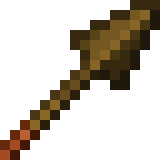





-
New weapon that can be crafted in Wood, Stone, Copper, Iron, Gold, Diamond and Netherite versions


-
Each material has different stats for timing, influencing how fast they are to use
-
Has a minimum reach for damage, being too close to a target will yield no damage
-
Has extended maximum reach compared to other tools and weapons
-
Has two attacks. Jab and Charge
-
Zombies, Husks, Zombified Piglins and Piglins can spawn with the Spear
Benötigt das Snapshot Datapack:
Gdrücken und dort “Mannequin Setup” auswählen falls du den Damage des Spears mit verschiedenen rüstungen testen willst oder so
Jab Attack #
- Quick-press primary action button to use
- Low damage attack with knockback
- Cooldown between attacks
- Wooden Spears have the fastest cooldown; Netherite the slowest
- Can hit multiple enemies
- Does not destroy blocks
Charge Attack #
- Press and hold the secondary action button to use
- Damage is based on Spear material, the player’s view angle, and the velocity of both the player and the target
- While holding down the button, the attack goes through three stages before returning to idle:
- Engaged: The Spear can deal damage, knockback, and dismount mounted enemies if the speed is above the required thresholds
- Tired: Indicated by the Spear rotating to a vertical position and shaking. The Spear can deal damage and knockback (but not dismount) if the speed is above the required thresholds
- Disengaged: Indicated by the Spear being lowered, pointing downwards. The Spear gives damage but not knockback or dismount if the speed is above the required threshold
- The Spear’s range when used by mobs is half of that when used by players, but they can deal damage, dismount and knockback at lower speeds than the players
- Zombies, Husks and Zombified Piglins know how to charge with a Spear
Lunge Enchantment #
- Spear exclusive enchantment
- Only works with the Jab attack
- When doing a Jab attack with Lunge, it propels the player horizontally in the view direction
- The view angle needs to be perfectly leveled horizontally to achieve maximum lunge distance
Does significant durability damage to the Spearlvl 1: 8 dmglvl 2: 32 dmglvl 3: 128 dmgUnbreaking reduces the dura dmg from the Enchant
-
/\ changed in 25w43a /\
-
Mobs können das Enchant auch benutzen:
/summon silverfish ~ ~ ~ {equipment:{mainhand:{id:"iron_spear",count:1,components:{"minecraft:unbreakable":{},"minecraft:enchantments":{"lunge":5}}}}} -
Falls du mit höheren Leveln des enchants rumspielen willst:
/give @s minecraft:wooden_spear[minecraft:enchantments={lunge:10}]/effect give @s minecraft:saturation infinite 255 true
Advancements #
- Updated the “How did we get here?” advancement to include the
Breath of the Nautiluseffect - Updated the “Best Friends Forever” advancement to include the Nautilus, Zombie Nautilus, and the Zombie Horse
- Updated the “The Parrots and the Bats” advancement to include the Nautilus
- Updated the “Two by Two” advancement to include the Nautilus
- Updated the “Monster Hunter” advancement to include the Zombie Nautilus
- Updated the “A Throwaway Joke”, “Take Aim” and “It Spreads” advancements to include the Nautilus and Zombie Nautilus
Changes #
-
Zombies, Husks, Piglins and Zombified Piglins can now hold Spears
-
Piglins now consider Golden Spears as one of the items they like
-
Items will no longer “bob” whenever their durability changes, such as when losing durability from an attack, or repaired by Mending
-
Some changes were made to debug renderers
-
Graphics modes “Fast”, “Fancy”, and “Fabulous!” have been replaced with graphics presets with the same names
-
Cloud movement is now the same for all players on a server
-
Netherite Armor points have been increased for the Body slot from 11 to 19 (
Bodyist der Slot für Horse, Nautilus und Wolf Armor etc) -
All blocks in the world now have mipmaps applied if enabled in video settings
- Blocks that did not have mipmaps before, such as different vines, rails, foliage (apart from leaves) and more should look better from higher distances
-
Client FPS is expected to be higher for most players
- Hermitcraft 10 Map / 32 Chunks:
1.21.10 25w41a
Zombie Horse #
- Zombie Horses now spawn naturally
- Zombie Horses spawn in darkness, and burn in sunlight like other undead mobs
- Zombie Horses count towards the hostile mob cap and spawn with other hostile mobs
- Zombie Horses do not display any hostile behavior towards players. Their hostility resides solely in their Zombie rider
- Untamed Zombie Horses despawn like other hostile mobs
- Tamed Zombie Horses are persistent and do not despawn
- Zombie Horses can be tamed in the same fashion as regular Horses, and can then be mounted and controlled by a player
- Zombie Horses can be healed and tempted using Red Mushrooms
- Tamed Zombie Horses can be equipped with a Saddle and Horse Armor
- Horse Armor protects Zombie Horses from sunlight damage
- Zombie Horses have 25 health points (12.5 hearts) of health
- Zombie Horses have variable movement speed and jump strength, determined when they spawn
- Zombie Horses drops 2-3 Rotten Flesh when killed, with extra 0-1 for each level of Looting
- Zombies riding Zombie Horses now have a chance of dropping a Red Mushroom on death
Mob Spawning #
- Zombie Horses now has a chance to spawn in plains and savanna biome types, with a zombie rider holding an iron spear
World Generation #
- Added various spears to various loot chests around the world
- Iron Spears can be found in Buried Treasure chests
- Copper and Iron Spears can be found in Weaponsmith chests in villages
- Stone Spears can be found in Ocean Ruin chests
- Diamond Spears can be found in Bastion Remnant and End City chests
- Copper, Iron, Golden, and Diamond Nautilus Armor now have a chance to be found in the Chests for the following Structures:
- Buried Treasure
- Ocean Ruins
- Shipwreck
Benötigt das Snapshot Datapack:
Gdrücken und “Loot Setup” auswählen falls du die spawn rate sehen möchtest
Status Effects #
- Added
Breath of the Nautiluseffect- Effect that affects mounted players
- Pauses player oxygen consumption (but does not replenish oxygen)
- Icon:

Sounds #
-
Anvil destroy, land, place and use sounds now play at a slightly lower volume
Accessibility #
- Keys used to access debug features can now be rebound
- It is part of a new
Debugcategory in the Key Binds screen
- It is part of a new
- The debug modifier key can be bound separately from the debug overlay key
- The key to toggle GUI can now be rebound
- The key to toggle spectator shader effects, such as when spectating an enderman, can now be rebound
Input #
Several uses of the cmd key on Mac have been rebound to ctrl:
- The input modifier to drop all items
- The input modifier to include all the data when picking a block
- The input modifier to change GUI scale in the Video Settings screen
- Stopping the recipe book from cycling through variations of items
Debug Renderer Changes #
-
Same as before, do not treat debug renderers as supported features, they are there only to aid with development
-
More debug renderers are now available through the Debug Settings screen
- Blocklight Overlay
-
Some existing renderers were improved
-
The performance of debug renderers has been significantly improved
Graphics Presets #
-
Settings on the Video Settings screen have been reordered and split into 3 sections: “Display”, “Quality & Performance”, and “Interface”

-
The following settings that were duplicating accessibility settings have been removed from the Video Settings screen:
- “View Bobbing”
- “Glint Speed”
- “Glint Strength”
- “FOV Effects”
- “Distortion Effects”
-
Tweaks that were previously hidden behind the “Graphics” setting have been split out to be configurable independently:
- “Show Vignette”
- “Weather Effect Radius” configures the distance in blocks within which rain and snow are visible
- “Improved Transparency” resolves some of the transparent geometry rendering issues at a significant GPU cost, previously was hidden behind “Fabulous!”


- “See-Through Leaves”


-
A new “Preset” slider was added to the top of the “Quality & Performance” section
- Presets, as you would expect based on gaming industry standard, control most of the “Quality & Performance” settings at once, not only the ones that were previously hidden behind the “Graphics” setting
- Available presets are “Fast”, “Fancy”, “Fabulous!” and “Custom”
- The default preset is “Fancy” for new players
- But for players who are upgrading to this version the preset will be set to “Custom” to preserve your current configuration
UI #
- Menu sliders will now “stick” to the closest available value when you release them after dragging with a mouse
- When using keyboard to change slider values, arrow keys will now move the slider to the next available value, not by one pixel as before
- The
inF3button in the Debug Option screen has been renamed toinOverlay
Technical Changes #
- The Data Pack version is now 89.0
- The Resource Pack version is now 70.0
- The Minecraft Server Management Protocol version is now 1.1.0
- Added ClientFps JFR event
- Experience packets that do not change the player’s experience progress or level are no longer sent by the server
Minecraft Server Management Protocol Version 1.1.0 #
- Added a new notification
server/activity- Indicates that a network connection to the server has been initiated
- Rate limited to 1 notification per 30 seconds
Data Pack Version 89.0 #
- Added
stopwatchcommand for keeping track of real time
Commands #
Added stopwatch
#
- New command that allows the creation of a Stopwatch that keeps track of real time
- Stopwatches do not depend on game ticks
- They only run when the server/world is running, even when paused
Syntax:
-
stopwatch <id> create- creates a Stopwatch with the given namespaced ID/stopwatch create cc -
stopwatch <id> query- shows the elapsed time in seconds of the given Stopwatch in chat/stopwatch query cc -
stopwatch <id> restart- restarts the given Stopwatch/stopwatch restart cc -
stopwatch <id> remove- removes the given Stopwatch/stopwatch remove cc
execute
#
-
Added new syntax
/execute if|unless stopwatch <id> <range> -
Allows to compare the elapsed time of a given Stopwatch with a floating point value range
- The Stopwatch value is measured in seconds and has an accuracy of at most a millisecond
- Example:
/execute if stopwatch foo:bar ..10 run say Stopwatch foo:bar has not reached 10 seconds yet
/stopwatch restart cc/execute if stopwatch cc ..6 run say Test
Item Components #
Added minecraft:use_effects
#
-
Controls how the player behaves when using an item (right mouse click)
-
Format: object with fields
can_sprint: boolean, whether the player can sprint while using this item- Default value:
false
- Default value:
speed_multiplier: float (0 to 1), the speed multiplier applied to the player while using this item- Default value:
0.2
- Default value:
- e.g.
use_effects={can_sprint:true,speed_multiplier:1.0}
Beispiele #
-
Consumable, das einem nicht erlaubt, sich zu bewegen, solange man es konsumiert:
/give @p weathered_copper_golem_statue[consumable={consume_seconds:1},food={nutrition:2,saturation:2,can_always_eat:true},use_effects={can_sprint:false,speed_multiplier:0},minecraft:max_stack_size=99] 99 -
Consumable, bei dem man sich ganz normal bewegen kann, während man es konsumiert:
/give @p weathered_copper_golem_statue[consumable={consume_seconds:1},food={nutrition:2,saturation:2,can_always_eat:true},use_effects={can_sprint:true,speed_multiplier:1.0},minecraft:max_stack_size=99] 99 -
Huge for Datapacks! Items mit dem Consumable Component werden benutzt, um rclick zu detecten, für Magic Wands oder so, aber das hat einen vorher immer verlangsamt, jetzt mit diesem neuen Component ist das kein Problem mehr! bsp:
Benötigt das Snapshot Datapack:
-
old:
/give @p stick[consumable={consume_seconds:999999999,animation:"none",has_consume_particles:false}] -
new:
/give @p stick[consumable={consume_seconds:999999999,animation:"none",has_consume_particles:false},use_effects={can_sprint:true,speed_multiplier:1.0}]
-
Added minecraft:minimum_attack_charge
#
- Sets the minimum attack charge on the attack indicator required to attack with this item
- Format: float (0.0 to 1.0)
- 0.0: no charge required
- 1.0: full charge required
Added minecraft:damage_type
#
-
Specifies the type of damage this item deals
-
Format: string, damage type identifier
- e.g.
damage_type='minecraft:spear'
-
/summon husk ~ ~ ~ {equipment:{mainhand:{id:"minecraft:netherite_sword",count:1,components:{"minecraft:damage_type":freeze}}}}↓
- Get Killed by the Husk -> Notice Death Message
- e.g.
Added minecraft:kinetic_weapon
#
(der spear fast komplett datadriven 🎉 Danke Mojang)
-
Enables a charge-type attack when using the item (primarily for Spears), where, while being used, the damage is dealt along a ray every tick based on the relative speed of the entities
-
Format: object with fields
min_reach: float, the minimum distance in blocks from the attacker to the target to be considered valid- Default value:
0.0
- Default value:
max_reach: float, the maximum distance in blocks from the attacker to the target to be considered valid- Default value:
3.0
- Default value:
hitbox_margin: float, the margin applied to the target bounding box when checking for valid hitbox collision- Default value:
0.3
- Default value:
delay_ticks: integer, the time in ticks required before weapon is effective- Default value:
0
- Default value:
dismount_conditions,knockback_conditions,damage_conditions: indicating the condition to apply dismount, knockback and damage effects respectively. Objects with fields:max_duration_ticks: integer, the ticks after which the condition is no longer checked. This starts afterdelayhas elapsedmin_speed: float, the minimum speed of the attacker, in blocks per second, along the direction that the attacker is looking- Optional, default value:
0.0
- Optional, default value:
min_relative_speed: float, the minimum relative speed between the attacker and target, in blocks per second, along the direction that the attacker is looking- Optional, default value:
0.0
- Optional, default value:
forward_movement: float, the distance the item moves out of hand during animation- Default value:
0.0
- Default value:
damage_multiplier: float, the multiplier for the final damage from the relative speed- Default value:
1.0
- Default value:
sound: Optional Sound Event to play when the weapon is engagedhit_sound: Optional Sound Event to play when the weapon hits an entity- e.g.
kinetic_weapon={max_reach:5.0,forward_movement:1.0,delay:20,damage_conditions:{max_duration:60},knockback_conditions:{max_duration:40},dismount_conditions:{max_duration:20}}
-
The damage dealt is calculated as
floor(relative_speed * velocity_multiplier)whererelative_speedis the difference of speed vectors of the attacker and the target as projected onto the axis of the attacker’s view vector- Any additional damage from enchantments or attribute modifiers is added after this calculation
Beispiele #
-
Killaura Rod:
/give @s minecraft:blaze_rod[minecraft:piercing_weapon={max_reach:10,hitbox_margin:10}] -
Propell Stick:
Benötigt das Snapshot Datapack:
/give @s stick[minecraft:piercing_weapon={},enchantments={"minecraft:propell":1}]
Added minecraft:piercing_weapon
#
-
Enables a quick attack that damages multiple entities along a ray (primarily for Spears)
-
Format: object with fields
min_reach,max_reach,hitbox_margin: as inkinetic_weapondeals_knockback: boolean, whether the attack deals knockback- Default value:
true
- Default value:
dismounts: boolean, whether the attack dismounts the target- Default value:
false
- Default value:
sound: Optional Sound Event to play when a player attacks with the weaponhit_sound: Optional Sound Event to play when the weapon hits an entity- e.g.
piercing_weapon={min_reach:0,max_reach:4,dismounts:true}
-
Eine Waffe, mit der man einen Mob nur hitten kann, wenn man genau 9-12 Blöcke davon entfernt ist!
/give @s arrow[piercing_weapon={min_reach:9,max_reach:12}] -
just for fun:
/give @s minecraft:music_disc_5[item_model="breeze_rod",enchantments={left_click:1},piercing_weapon={},custom_name="Copper Golem",!jukebox_playable]
Added minecraft:swing_animation
#
-
Specifies the swing animation to play when attacking or interacting using this item
-
Format: object with fields
type: string, the animation identifier (none,whack,stab)- Default value:
whack
- Default value:
duration: integer, the duration in ticks- Default value:
6
- Default value:
- e.g.
swing_animation={type:'stab',duration:20}
- Break Blocks and See:
/give @s minecraft:copper_pickaxe[swing_animation={type:'stab',duration:5}]
Changed minecraft:consumable
#
-
The
animationfield has been updated:- Renamed
speartotrident - Added new
spearanimation
-
/give @s wheat[minecraft:consumable={animation:spear,consume_seconds:9999999},use_effects={can_sprint:true,speed_multiplier:1.0}](2x F5)
- Renamed
Changed minecraft:intangible_projectile
#
- Items with this component now show information about it in their tooltip
Entity Data #
- The
AngryAtfield has been renamed toangry_at - The
AngerTimefield has been removed - An
anger_end_time(long) field has been added, containing the time anger ends in game ticks
Damage Types #
- Added a new
minecraft:speardamage type
Predicates #
Component Predicates #
- Component predicates (
predicatesfield in block, item and entity predicates) now include predicates for checking existence of every component type - Those predicates are written as
{<component_type>: {}} - Such predicate check passes as long as component is present, no matter the actual value
- Existing predicates for specific components remain unchanged
- Example:
{predicates:{written_book_content:{author:"foo"}}- existing format for matching books{predicates:{written_book_content:{}}- special case of above that accepted any value, as long as component existed{predicates:{instrument:{}}- checks if componentminecraft:instrumentexists (was not allowed before)
Entity Predicates #
The flags predicate now supports new values:
is_in_water: when an entity is touching water or a bubble columnis_fall_flying: when an entity is gliding with an elytra
Item Predicates #
- Item predicate in command form (
<item>[predicate~{...},component={...}]) has been extended to accept empty predicates for any component type - Similarily to component predicates in data, those empty entries only check for component existence
- Existing shorter syntax for checking component existence remains unchanged
- That means
*[instrument]and*[instrument~{}]are equivalent
- That means
Enchantments #
Enchantment Effect Components #
minecraft:post_piercing_attack: Effects applying after a piercing attack with an item
Enchantment Entity Effects #
minecraft:apply_impulse: applies an impulse to the targeted entitydirection- The first step of determining the impulse is applying this vector as local coordinates (the same used bytp @s ^ ^ ^) onto the entity look vectorcoordinate_scale- The second step is scaling the resulting vector by this vector on each axis in world space, X, Y and Zmagnitude- The third step is scaling the resulting vector by this Level-Based Value
minecraft:play_sound: can now support a list of sound event identifiers, one for each level of enchantment. If a level is higher than the number of sounds, the last sound in the list is used
Added EXPONENT
#
- Raises the base to the specified power level.
base- Level-Based Value indicating the base of the exponent.power- Level-Based Value indicating the power of the exponent.
Tags #
Block Tags #
- Added
#can_glide_through- climbable blocks that can be glided through without stopping
Item Tags #
- Added
#nautilus_taming_items- items that can be used to tame a Nautilus and a Zombie Nautilus - Added
#nautilus_bucket_food- bucketed fish items that can be used to feed a tamed Nautilus and Zombie Nautilus - Added
#nautilus_food- all items that can be used to feed a tamed Nautilus and Zombie Nautilus - Added
#spears- all Spear weapons - Added
#enchantable/lunge- all items that can be enchanted with thelungeenchantment - Added
#enchantable/melee_weapon- all primary melee weapons including Swords and Spears - Renamed
#enchantable/swordto#enchantable/sweeping
Entity Tags #
- Added
#can_wear_nautilus_armor- entities that can equip Nautilus Armor - Added
#nautilus_hostiles- entities that the Nautilus will be hostile towards when untamed - Changed
#not_scary_for_pufferfishto include Nautilus and Zombie Nautilus - Added
#burn_in_daylight- entities that burn in daylight
Enchantment Tags #
- Added
#lunge_exclusive- all enchantments incompatible with thelungeenchantment
Resource Pack Version 70.0 #
- Unifont has been updated to 17.0.01
Textures #
texturesection of*.mcmetafiles has a new boolean fielddarkened_cutout_mipmap- The default value is
false - It is set to true for the block textures that had mipmaps before this version: all Leave types and Mangrove Roots
- If the field is set to
trueand the texture is cutout the mipmaps will be darkened to emulate the darker interior of the block, this was the behavior for cutout mipmapped blocks before this version - Leaving the field unset or setting it to
falsewill generate mipmaps without darkening, and it fits well for other types of cutout blocks that do not have dark interior such as flowers, grasses, vines, rails, etc
- The default value is
- Only mipmaps of level 0 and 1 are now animated for block animated textures
- Glass and Glass Pane now support translucent textures
Item Sprites #
- Added new item sprites:
item/nautilus_spawn_eggitem/zombie_nautilus_spawn_eggitem/copper_nautilus_armoritem/iron_nautilus_armoritem/golden_nautilus_armoritem/diamond_nautilus_armoritem/netherite_nautilus_armor
- Added the following item sprites for the Spear weapon:
- When in inventory:
item/wooden_spear,item/stone_spear,item/copper_spear,item/iron_spear,item/golden_spear,item/diamond_spear,item/netherite_spear - When in hand:
item/wooden_spear_in_hand,item/stone_spear_in_hand,item/copper_spear_in_hand,item/iron_spear_in_hand,item/golden_spear_in_hand,item/diamond_spear_in_hand,item/netherite_spear_in_hand
- When in inventory:
UI Sprites #
- Added new UI sprite:
container/slot/nautilus_armorcontainer/slot/spear- Spear icon used in the Smithing Table screen
- Added new nine-sliced sprites:
container/inventory/effect_backgroundcontainer/inventory/effect_background_ambient
- Removed the following sprites:
container/inventory/effect_background_largecontainer/inventory/effect_background_small
Celestials Atlas #
-
A new
celestialsatlas has been introduced, including sprites for objects rendered in the sky such as the Sun and Moon -
Includes sprites from
<namespace>:textures/environment/celestial/<path>.png -
The following textures have been moved or split:
textures/environment/sun.png->suntextures/environment/end_flash.png->end_flashtextures/environment/moon_phases->moon/full_moon,moon/waning_gibbous,moon/third_quarter,moon/waning_crescent,moon/new_moon,moon/waxing_crescent,moon/first_quarter,moon/waxing_gibbous
-
Sonne und Mond können nun Animiert werden: Resourcepack Download
- Sonne: /time set 9400
- Mond: /time set 20000
- Sonne:
Mob Effect Sprites #
- Added new mob effect sprite:
breath_of_the_nautilus
Entity Textures #
- Added new entity textures:
entity/nautilus/nautilus.pngentity/nautilus/nautilus_baby.pngentity/nautilus/zombie_nautilus.pngentity/equipment/nautilus_body/copper.pngentity/equipment/nautilus_body/iron.pngentity/equipment/nautilus_body/gold.pngentity/equipment/nautilus_body/diamond.pngentity/equipment/nautilus_body/netherite.pngentity/equipment/nautilus_saddle/saddle.png
Sounds #
-
Added new sounds for Spears:
-
item.spear.hit -
item.spear.use -
item.spear.attack
-
-
Added special sounds for the Wooden Spear:
-
item.spear_wood.hit -
item.spear_wood.use -
item.spear_wood.attack
-
-
Added new sound events for the Lunge Enchantment:
item.spear.lunge_1item.spear.lunge_2item.spear.lunge_3
-
Added new sound events for the Nautilus:
-
entity.baby_nautilus.ambient -
entity.baby_nautilus.death -
entity.baby_nautilus.eat -
entity.baby_nautilus.hurt -
entity.baby_nautilus.swim -
entity.nautilus.ambient -
entity.nautilus.death -
entity.nautilus.dash -
entity.nautilus.dash_ready -
entity.nautilus.eat -
entity.nautilus.hurt -
entity.nautilus.swim -
entity.zombie_nautilus.ambient -
entity.zombie_nautilus.death -
entity.zombie_nautilus.dash -
entity.zombie_nautilus.dash_ready -
entity.zombie_nautilus.eat -
entity.zombie_nautilus.hurt -
entity.zombie_nautilus.swim -
item.nautilus_armor.equip -
item.nautilus_armor.unequip
-
-
Added new sound event for the Zombie Horse:
entity.zombie_horse.angry
Item Models #
- Added new option for all item models:
swap_animation_scale- Defaults to
1.0 - Indicates how fast the item moves up and down when swapping items in hotbar
- Large speeds can allow items that take more of the screen space to fully duck before swapped into the next item
- Defaults to
Added new item model:
spear_in_hand- model for the Spear when in hand.
Fixed bugs in 25w41a #
- MC-22882 - Ctrl + Q doesn’t work on Mac
- MC-54989 - Sliders can be moved to positions between available values
- MC-80476 - On macOS, the “drop item stack” shortcut conflicts with the “quit Minecraft” shortcut
- MC-114265 - Mipmaps are too dark around transparent edges in textures (e.g. side of grass)
- MC-146862 - Long effect names cause text to appear outside the effect box
- MC-147718 - F1, F3, F3+[char] combos cannot be rebound
- MC-159275 - Map player markers on maps of the nether don’t rotate when doDaylightCycle is disabled
- MC-162573 - A white outline is rendered on composters’ edges when viewed from far away
- MC-171688 - Invisibility status of LivingEntity is not updated when ActiveEffects are modified directly
- MC-195505 - Short grass is unaffected by mipmap levels
- MC-234358 - Moiré patterns / aliasing on certain objects when viewed from a distance
- MC-241862 - It sometimes requires multiple keyboard inputs to change values on sliders
- MC-248499 - Potion UIs displayed within the inventory don’t have cyan outlines if the effects are granted by beacons or conduits
- MC-264151 - Glass blocks do not use mipmapping, but glass panes do
- MC-267364 - Teleporting in the air is considered flying by server
- MC-271941 - Music discs can sometimes spawn inside jukeboxes when ejected from them
- MC-276445 - Highlighted text within the anvil and creative inventory interfaces renders blue making it difficult to read
- MC-278742 - Creakings cannot be ridden by any entities using commands
- MC-279076 - Certain mobs will always retarget the player upon reloading the chunks, regardless of distance or gamemode
- MC-295949 - Flying through vines with an elytra cancels the flight
- MC-296952 - F4 key to toggle shaders cannot be rebound
- MC-297328 - Unloading and reloading an area causes invisible entities to be visible until you get close enough.
- MC-297367 - Checkbox filled status isn’t narrated
- MC-298767 - Piercing arrows phase through mobs that are in the same block
- MC-298915 - Multishot crossbows loaded in survival or adventure mode show their secondary charged projectiles on a separate line in the tooltip
- MC-299196 - Waypoints fade out when an advancement is granted
- MC-300979 - The movement and duration messages in the demo introduction screen now have a text shadow
- MC-301595 - Music toasts briefly appear in the pause menu after a song has finished
- MC-301632 - Comparators measuring jukeboxes do not update when a music disc is taken out of a jukebox if the music disc has already finished its song
- MC-301754 - The hand animation plays when right-clicking shelves with nothing in your hand
- MC-301763 - The outline of the “Invited” element within the realms “Players” tab renders above other tabs when selected and when a scroll bar is present
- MC-301805 - Selected item outline on statistics screen renders outside of scissor area
- MC-302030 - Setting commandBlocksEnabled to false prevents command blocks from being edited
- MC-302254 - Cursor changes do not work for command suggestions
- MC-302288 - All shelves have the oak tan map color
- MC-302549 - Server main thread deadlock during respawn position resolution when the entire world spawn radius is filled with fluids
- MC-302601 - A white outline is rendered on anvils’ top texture when viewed from far away