
Today Mounts of Mayhem charges into Minecraft, bringing a new weapon to wield, mounts to tame, foes to face, and strategies to master! Challengers await beneath scorching suns, night skies, and deep in the ocean’s depths – and each clash will demand a fresh strategy. Fight back with the spear, a new tiered weapon which deals damage based on your precision and the speed of your trusted steed. So, riders of the Overworld – mount up and lead the charge in the Mounts of Mayhem drop!
New Features #
- Added Nautilus and Zombie Nautilus
- Added Nautilus Armor
- Added Spear Weapon
- Updated advancements to include the Nautilus, the Zombie Nautilus, the Zombie Horse, the Camel Husk, and the Parched
- Added new graphical options “Texture Filtering” and “Anisotropic Filtering”
- Added Netherite Horse Armor that can be obtained by upgrading Diamond Horse Armor with a Smithing Table
Nautilus #
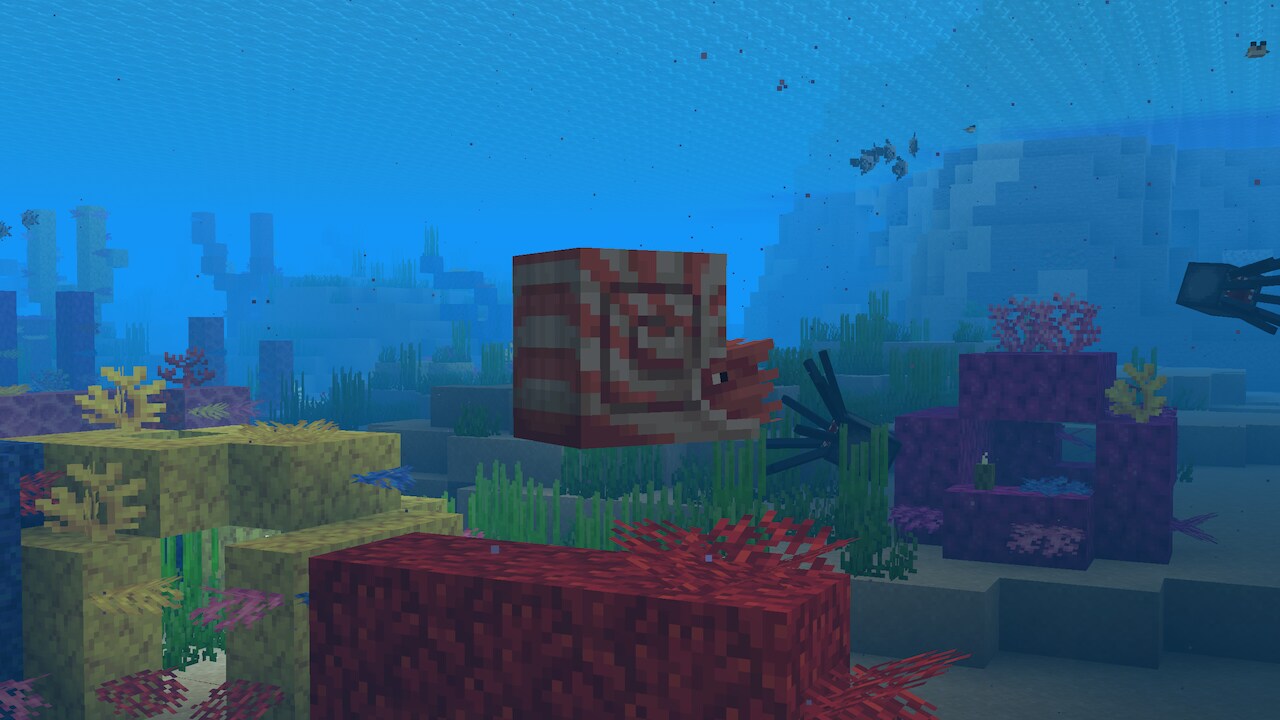
- Nautilus is a new neutral aquatic mob
- Spawns in all ocean biomes
- Attacks using a Dash attack, if provoked
- Occasionally attacks Pufferfish within range using the Dash attack
- Has a Dash skill similar to Camels, used by pressing the Jump button
- Takes suffocation damage on land
- Adds the “Breath of the Nautilus” effect to mounted players
- Nautilus can be bred and tamed using Pufferfish or a Bucket of Pufferfish
- Despawn naturally, however become persistent when interacted with by a player
- A Tamed Nautilus:
- Can be mounted using a Saddle
- With a Saddle has a roaming restriction of 16 blocks
- Without a Saddle has a roaming restriction of 32 blocks
Zombie Nautilus #
- Zombie Nautilus is a new underwater mob that spawns with a Drowned rider wielding a Trident
- Zombie Nautilus is only hostile if ridden by a hostile mob
- Zombie Nautilus behaves similar to the Nautilus except that it cannot be bred
Coral Zombie Nautilus #
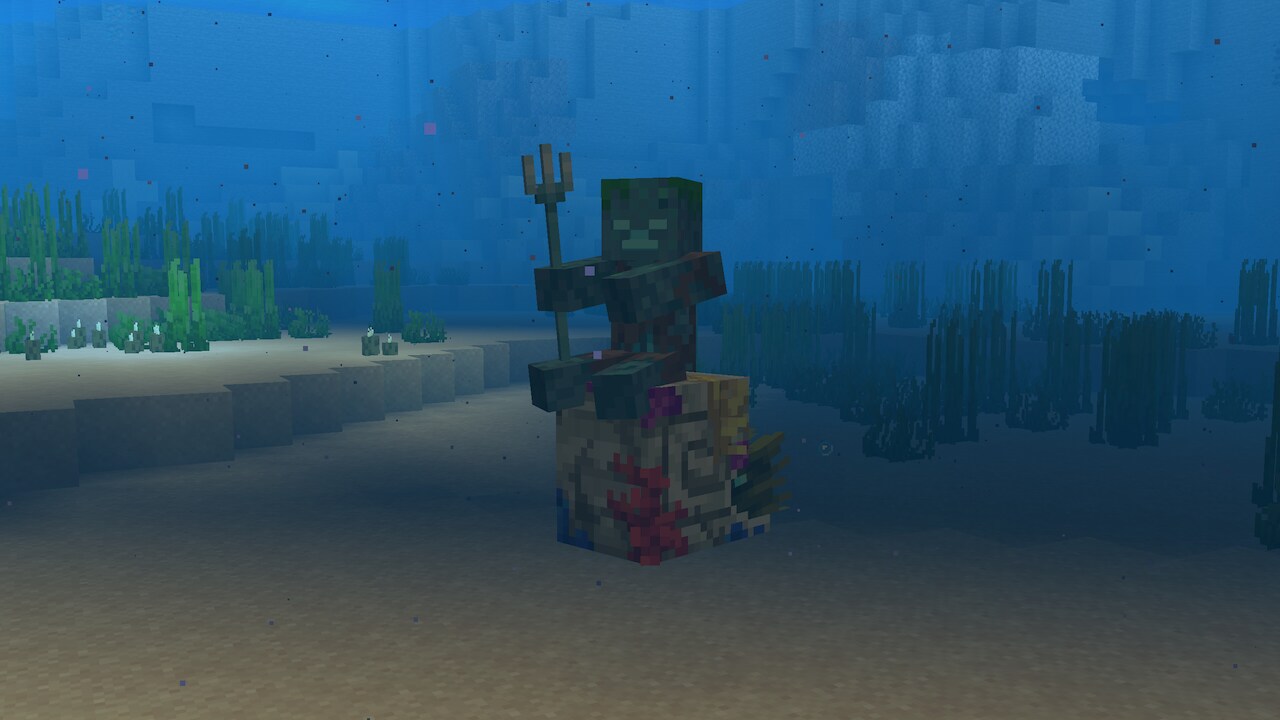
- The Zombie Nautilus has a Coral Zombie Nautilus variant that spawns in the Warm Ocean biome
Nautilus Armor #
- Equippable on the Nautilus and Zombie Nautilus
- Comes in Copper, Golden, Iron, Diamond and Netherite versions
Parched #
- New Skeleton variant
- Spawns at light level 0 in Deserts replacing some of the regular Skeletons
- Does not burn in sunlight
- Shoots Arrows of Weakness
- Is immune to Weakness effect
- Has a slower rate of fire compared to normal Skeletons, similar to Bogged
- Does not spawn in caves, following the Husk’s spawning rules
Camel Husk #
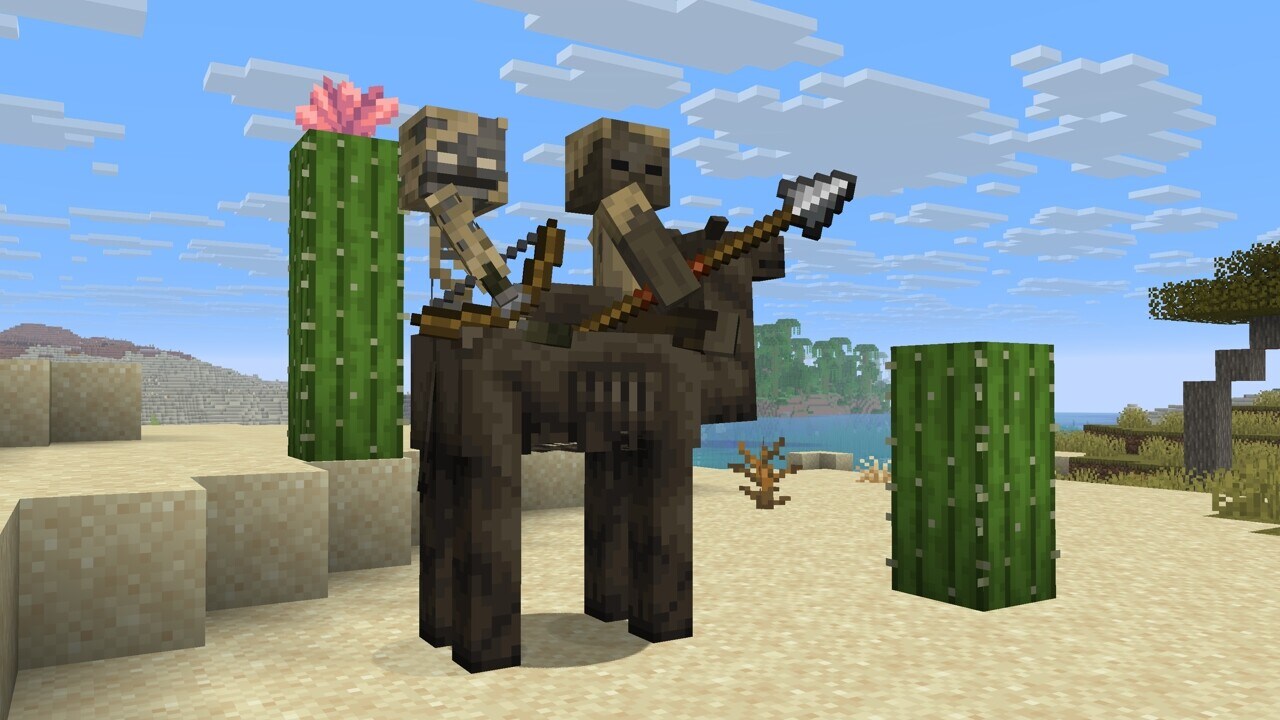
- New undead Camel variant
- Spawns a 0 light level in Deserts
- Does not burn in sunlight
- Spawns with two riders: A Husk wielding a Spear and a Parched
- Do not spawn in caves, following Husks spawning rules
- Is hostile if the rider is a hostile mob
- Passive without a rider
- Despawns with other hostile mobs, however becomes persistent when interacted with
- Favorite food is Rabbit Foot
- Cannot be bred
- As a mount they work similar to normal Camels
- Drops 2-3 Rotten Flesh when killed, with extra 0-1 for each level of Looting
Spear Weapon #
- New weapon that can be crafted in Wood, Stone, Copper, Iron, Gold, Diamond and Netherite versions
- Each material has different stats for timing, influencing how fast they are to use
- Has a minimum reach for damage, being too close to a target will yield no damage
- Has extended maximum reach compared to other tools and weapons
- Bounces back visually on hit
- Has two attacks. Jab and Charge
- Does not cause item interact vibrations
- Zombies, Husks, Zombified Piglins and Piglins can spawn with the Spear
- Golden Spear is considered a preferred weapon by Piglins
Jab Attack #
- Quick-press primary action button to use
- Low damage attack with knockback
- Cooldown between attacks
- Wooden Spears have the fastest cooldown; Netherite the slowest
- Can hit multiple enemies
- Does not destroy blocks
Charge Attack #
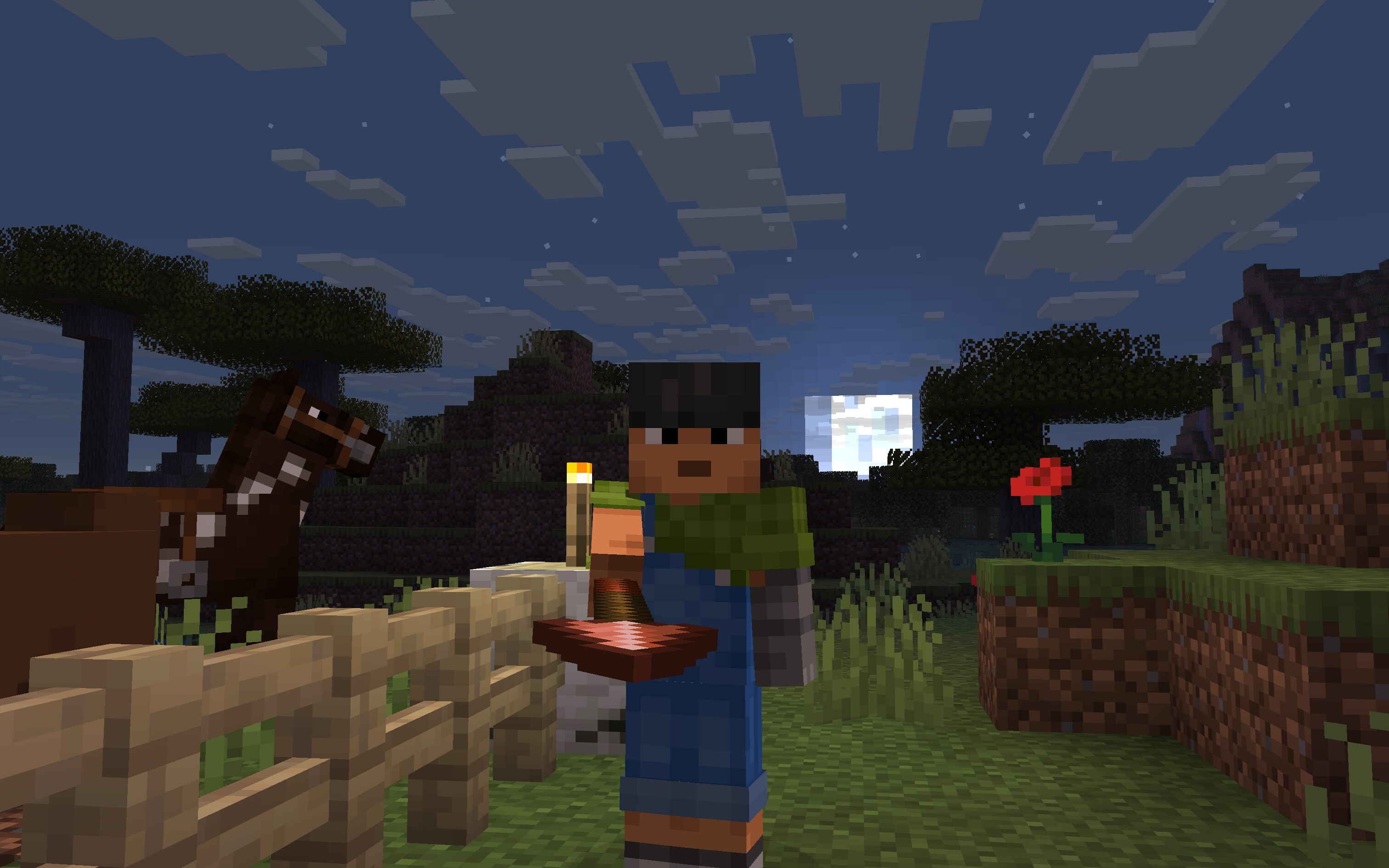
- Press and hold the secondary action button to use
- Damage is based on Spear material, the player’s view angle, and the velocity of both the player and the target
- While holding down the button, the attack goes through three stages before returning to idle:
- Engaged: The Spear can deal damage, knockback, and dismount mounted enemies if the speed is above the required thresholds
- Tired: Indicated by the Spear rotating to a vertical position and shaking. The Spear can deal damage and knockback (but not dismount) if the speed is above the required thresholds
- Disengaged: Indicated by the Spear being lowered, pointing downwards. The Spear gives damage but not knockback or dismount if the speed is above the required threshold
- The Spear’s range when used by mobs is half of that when used by players, but they can deal damage, dismount and knockback at lower speeds than the players
- Zombies, Husks, Zombified Piglins and Piglins know how to charge with a Spear
Lunge Enchantment #
- Spear exclusive enchantment
- Only works with the Jab attack
- When doing a Jab attack with Lunge, it propels the player horizontally in the view direction
- The view angle needs to be perfectly leveled horizontally to achieve maximum lunge distance
- Using Lunge has a durability cost of 1 for using Lunge across all Enchantment levels
- Using Lunge consumes hunger points by exhausting the player, similar to sprinting or jumping
- Level 1 Lunge consumes 1 hunger point, level 2 consumes 2 hunger points, and level 3 consumes 3 hunger points
- Lunge can only be used if the player has at least 6 hunger points in their hunger bar
- Does not work when the player is in water or flying with Elytra
Advancements #
- Added the “Mob Kabob” advancement for spearing 5 enemies with a Charge attack
- Updated the “How did we get here?” advancement to include the
Breath of the Nautiluseffect - Updated the “Best Friends Forever” advancement to include the Nautilus, Zombie Nautilus, and the Zombie Horse
- Updated the “The Parrots and the Bats” advancement to include the Nautilus
- Updated the “Two by Two” advancement to include the Nautilus
- Updated the “Monster Hunter” advancement to include the Zombie Nautilus, the Zombie Horse, the Camel Husk and the Parched
- Updated the “A Throwaway Joke”, “Take Aim” and “It Spreads” advancements to include the Nautilus, the Zombie Nautilus, the Zombie Horse, the Camel Husk and the Parched
- Updated the “Oh Shiny” advancement to include the Golden Spear and Golden Nautilus Armor
Texture Filtering #
- New option in Video Settings
- Controls the method used to sample textures when they are viewed at an angle or from a distance
- Available values are “None”, “RGSS”, and “Anisotropic”
- The default depends on your graphics preset and hardware
- “RGSS” (Rotated Grid Super Sampling) is a shader-based filtering method that improves texture clarity at a moderate performance cost
- This is available on all hardware
- “Anisotropic” is a hardware-based filtering method that provides the best texture clarity
- The maximum anisotropy may be “2x”, “4x”, and “8x”, controllable by a separate slider
- If your hardware does not support it, Anisotropic Filtering will do nothing
- This significantly impacts video memory usage (especially combined with a high mipmap count)
Changes #
- Zombies, Husks, Piglins and Zombified Piglins can now hold Spears
- Piglins now consider Golden Spears as one of the items they like
- Parrots can now mimic the sounds of Zombie Nautilus, Zombie Horse, Camel Husk and Parched
- Items will no longer “bob” whenever their durability changes, such as when losing durability from an attack, or repaired by Mending
- Some changes were made to debug renderers
- Graphics modes “Fast”, “Fancy”, and “Fabulous!” have been replaced with graphics presets with the same names
- Cloud movement is now the same for all players on a server
- Netherite Armor points have been increased for the Body slot from 11 to 19
- All blocks in the world now have mipmaps applied if enabled in video settings
- Blocks that did not have mipmaps before, such as different vines, rails, folliage (apart from leaves) and more should look better from higher distances
- Client FPS is expected to be higher for most players
- Underwater biome fog color and fog distance is now blended based on the player’s position between biomes, similarly to regular biome fog and sky colors
- Environmental Fog in the Nether is no longer dependent on the render distance setting, and will consistently be applied from 10 to 96 blocks
- Horses, Mules, Donkeys, and Camels no longer sink in water while ridden by a player
- Chunks now fade in instead of appearing out of nowhere, with the fade-in time adjustable through Video Settings
- Bats no longer spawn more frequently and in higher light levels between October 20 and November 3
- The color of the sky during sunrises and sunsets is now affected by rain and thunder
- Horses, Mules, Donkeys, Camels, Zombie Horses and Camel Husks will not panic if controlled by Mobs
- Spawn Eggs have been reorganized into groups in the Creative Inventory
- Mobs no longer spawn during chunk generation when the
minecraft:spawn_mobsgame rule is set tofalse - When the “See-Through Leaves” video setting is disabled, the gaps between leaves are now dark green instead of black
- Turning the “See-Through Leaves” video setting off now gives a bigger performance boost than before
- Added splash text “One does not simply walk to the Far Lands”
Developer’s Note: This statement was proven false on October 4, 2025.
- Tamed horses no longer run into cacti or sweet berry bushes
Zombie Horse #
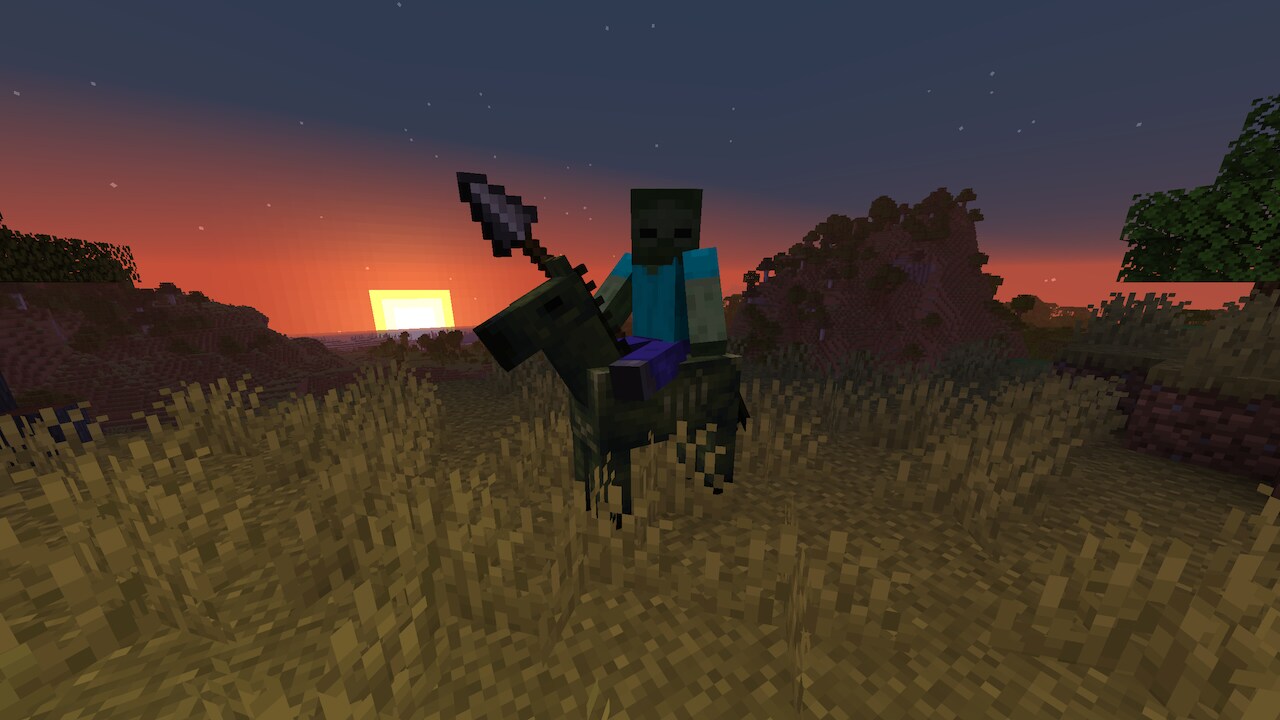
- Zombie Horses now spawn naturally
- Zombie Horses spawn in darkness, and burn in sunlight like other undead mobs
- Zombie Horses count towards the hostile mob cap and spawn with other hostile mobs
- Zombie Horses do not display any hostile behavior towards players. Their hostility resides solely in their Zombie rider
- Zombie Horses can be leashed when its mob jockey is removed
- Zombie Horses despawn like other hostile mobs
- However, they become persistent when interacted with by a player
- Zombie Horses can be tamed in the same fashion as regular Horses, and can then be mounted and controlled by a player
- Zombie Horses can be healed and tempted using Red Mushrooms
- Tamed Zombie Horses can be equipped with a Saddle and Horse Armor
- Horse Armor protects Zombie Horses from sunlight damage
- Zombie Horses have 25 health points (12.5 hearts) of health
- Zombie Horses have variable movement speed and jump strength, determined when they spawn
- Zombie Horses drops 2-3 Rotten Flesh when killed, with extra 0-1 for each level of Looting
- Zombies riding Zombie Horses now have a chance of dropping a Red Mushroom on death
Mob Spawning #
- Zombie Horses now has a chance to spawn in plains and savanna biome types, with a zombie rider holding an iron spear
World Generation #
- Added various spears to various loot chests around the world
- Iron Spears can be found in Buried Treasure chests
- Copper and Iron Spears can be found in Weaponsmith chests in villages
- Stone Spears can be found in Ocean Ruin chests
- Diamond Spears can be found in Bastion Remnant and End City chests
- Copper, Iron, Golden, and Diamond Nautilus Armor now have a chance to be found in the Chests for the following Structures:
- Buried Treasure
- Ocean Ruins
- Shipwreck
Status Effects #
- Added
Breath of the Nautiluseffect- Effect that affects mounted players
- Pauses player oxygen consumption (but does not replenish oxygen)
Minor Tweaks to Blocks, Items and Entities #
Items #
- Spawn Eggs are now sorted thematically in the Creative Inventory, according to the following categories:
- Overworld
- Farm Animals
- Mounts
- Pets
- Wild Animals
- Aquatic
- Miscellaneous
- Golems
- Villagers
- Undead
- Spiders
- Monsters
- Illagers
- Nether
- The End
- Overworld
Sounds #
- Anvil destroy, land, place and use sounds now play at a slightly lower volume
Accessibility #
- Keys used to access debug features can now be rebound
- It is part of a new
Debugcategory in the Key Binds screen - The
F3 + Qkeybind to display a debug help message in chat has been removed
- It is part of a new
- The debug modifier key can be bound separately from the debug overlay key
- The key to toggle GUI can now be rebound
- The key to toggle spectator shader effects, such as when spectating an enderman, can now be rebound
Input #
Several uses of the cmd key on Mac have been rebound to ctrl:
- The input modfier to drop all items
- The input modfier to include all the data when picking a block
- The input modfier to change GUI scale in the Video Settings screen
- Stopping the recipe book from cycling through variations of items
Performance Improvements #
Debug Renderer Changes #
- Same as before, do not treat debug renderers as supported features, they are there only to aid with development
- More debug renderers are now available through the Debug Settings screen
- Some existing renderers were improved
- The performance of debug renderers has been significantly improved
Graphics Presets #
- Settings on the Video Settings screen have been reordered and split into 3 sections: “Display”, “Quality & Performance”, and “Preferences”
- The following settings that were duplicating accessibility settings have been removed from the Video Settings screen:
- “View Bobbing”
- “Glint Speed”
- “Glint Strength”
- “FOV Effects”
- “Distortion Effects”
- Tweaks that were previously hidden behind the “Graphics” setting have been split out to be configurable independently:
- “See-Through Leaves”
- “Show Vignette”
- “Weather Effect Radius” configures the distance in blocks within which rain and snow are visible
- “Improved Transparency” resolves some of the transparent geometry rendering issues at a significant GPU cost, previously was hidden behind “Fabulous!”
- A new “Preset” slider was added to the top of the “Quality & Performance” section
- Presets, as you would expect based on gaming industry standard, control most of the “Quality & Performance” settings at once, not only the ones that were previously hidden behind the “Graphics” setting
- Available presets are “Fast”, “Fancy”, “Fabulous!” and “Custom”
- The default preset is “Fancy” for new players
- But for players who are upgrading to this version the preset will be set to “Custom” to preserve your current configuration
UI #
- Menu sliders will now “stick” to the closest available value when you release them after dragging with a mouse
- When using keyboard to change slider values, arrow keys will now move the slider to the next available value, not by one pixel as before
- The
inF3button in the Debug Option screen has been renamed toinOverlay - The Single Biome Customization screen now has a search box
- The language selection screen now has a search box to filter languages
- Renamed the “Show Music Toast” option to “Music Toast”
- Added a third state to the “Music Toast” option, allowing it to only be shown in the pause menu
Technical Changes #
- The Data Pack version is now 94.1
- The Resource Pack version is now 75.0
- The Minecraft Server Management Protocol version is now 2.0.0
- Added ClientFps JFR event
- Experience packets that do not change the player’s experience progress or level are no longer sent by the server
- Added support for KQueue on OSX to improve network connection performance
Network Protocol #
Minecraft Server Management Protocol Version 2.0.0 #
- Added a new notification
server/activity- Indicates that a network connection to the server has been initiated
- Rate limited to 1 notification per 30 seconds
- Enable authentication from web browsers
- Authenticate by passing the token in
Sec-WebSocket-Protocolheader when opening the WebSocket connection- Example:
Sec-WebSocket-Protocol: minecraft-v1, <token>
- Example:
- Requests authenticating this way are subject to Origin header checks. This requires configuration of allowed origins on the server side using
management-server-allowed-origins. The default value is empty, meaningSec-Websocket-Protocolauthentication is effectively disabled
- Authenticate by passing the token in
- In the
typed_game_ruleanduntyped_game_ruleschemas, the type of thevaluefield has been changed from string to take either a boolean or an integer- Also, it now uses the game rule resource location as the key
Data Pack Versions 89.0 through 94.1 #
- Added
stopwatchcommand for keeping track of real time - Certain visual and gameplay effects can now be controlled by Environment Attributes
- World Border interpolation is now dependent on game ticks instead of real time
- This means the World Border will no longer move when the game is paused
- It will also respect any changes made by the
/tickcommand
- Changed loot function
filteredto allow running modification when predicate fails - Added
discardloot function - Added new Coral Zombie Nautilus mob variant
- The Zombie Nautilus variants can be data-driven
- Item textures were split out of the
blocksatlas into a separate newitemsatlas- It means that the commands that were referencing the
blocksatlas for item textures now need to reference theitemsatlas instead
- It means that the commands that were referencing the
Zombie Nautilus Variants #
- Zombie Nautilus variants can be data-driven by adding entries to
data/<namespace>/zombie_nautilus_variant/<id>.json - This feature is experimental
- Fields in file:
model- one of:normal,warmasset_id- namespaced id for this variant asset, resolves toassets/<namespace>/textures/<path>.pngspawn_conditions- a uniform variant selection rule explained below
Spawn conditions #
minecraft:biome
#
- Checks if entity is spawning in specific biomes
- Fields:
biomes- single entry, list or a tag describing biomes
minecraft:moon_brightness
#
- Checks if current moon brightness is within certain range
- Fields:
range- floating point range (a single number or an object like{"min": 1, "max": 2})
minecraft:structures
#
- Checks if entity is spawning in specific structures
- Fields:
structures- single entry, list or a tag describing structures
Commands #
- Resource suggestions now show results in any namespace instead of just within
minecraft
Added stopwatch
#
- New command that allows the creation of a Stopwatch that keeps track of real time
- Stopwatches do not depend on game ticks
- They only run when the server/world is running, even when paused
Syntax:
stopwatch create <id>- creates a Stopwatch with the given namespaced IDstopwatch query <id> [<scale>]- shows the elapsed time of the given Stopwatch in seconds and returns it scaled by the given value and truncated.- Default scale:
1
- Default scale:
stopwatch restart <id>- restarts the given Stopwatchstopwatch remove <id>- removes the given Stopwatch
Developer’s Note : This command is added to replace the need of using world borders to keep track of real time. The intent is to change the world border to be dependent on game ticks in a future snapshot. If you’ve relied on this way of measuring the passage of real time before, please switch to using the new command and let us know if anything doesn’t work as intended. Thank you!
Changes to execute
#
- Added new syntax
/execute if|unless stopwatch <id> <range> - Allows to compare the elapsed time of a given Stopwatch with a floating point value range
- The Stopwatch value is measured in seconds and has an accuracy of at most a millisecond
- Example:
/execute if stopwatch foo:bar ..10 run say Stopwatch foo:bar has not reached 10 seconds yet
Changes to worldborder
#
- The
timearguments now specify ticks by default, but can also specify seconds or in-game days using ansordsuffix
Game Rules #
Game rules have been moved into a registry. With that, all game rules have been renamed from their previous camel case names to resource locations in snake case.
Additionally, the following game rules have been further renamed:
announceAdvancements->minecraft:show_advancement_messagescommandBlocksEnabled->minecraft:command_blocks_workcommand_modification_block_limit->minecraft:max_block_modificationsdisableElytraMovementCheck->minecraft:elytra_movement_check- The value is inverted accordingly in places that use the resource location
disablePlayerMovementCheck->minecraft:player_movement_check- The value is inverted accordingly in places that use the resource location
disableRaids->minecraft:raids- The value is inverted accordingly in places that use the resource location
doDaylightCycle->minecraft:advance_timedoEntityDrops->minecraft:entity_dropsdoImmediateRespawn->minecraft:immediate_respawndoInsomnia->minecraft:spawn_phantomsdoLimitedCrafting->minecraft:limited_craftingdoMobLoot->minecraft:mob_dropsdoMobSpawning->minecraft:spawn_mobsdoPatrolSpawning->minecraft:spawn_patrolsdoTileDrops->minecraft:block_dropsdoTraderSpawning->minecraft:spawn_wandering_tradersdoVinesSpread->minecraft:spread_vinesdoWardenSpawning->minecraft:spawn_wardensdoWeatherCycle->minecraft:advance_weathermaxCommandChainLength->minecraft:max_command_sequence_lengthmaxCommandForkCount->minecraft:max_command_forksnaturalRegeneration->minecraft:natural_health_regenerationsnowAccumulationHeight->minecraft:max_snow_accumulation_heightspawnRadius->minecraft:respawn_radiusspawnerBlocksEnabled->minecraft:spawner_blocks_work
Limits #
Some game rules that previously did not have a limited value range now do:
minecraft:max_block_modifications: Minimum1minecraft:max_command_forks: Minimum1minecraft:max_command_sequence_length: Minimum0minecraft:max_entity_cramming: Minimum0minecraft:max_snow_accumulation_height: Minimum0, maximum:8minecraft:players_nether_portal_creative_delay: Minimum0minecraft:players_nether_portal_default_delay: Minimum0minecraft:players_sleeping_percentage: Minimum0minecraft:random_tick_speed: Minimum0minecraft:respawn_radius: Minimum0
Added minecraft:fire_spread_radius_around_player
#
- Controls the maximum distance in blocks that fire can spread around a player
- This replaces the previous
doFireTickandallowFireTicksAwayFromPlayergame rules, which have now been removed - Setting it to
0will disable fire spreading - Setting it to
-1will allow fire spreading without players around - Limit: Minimum
-1
- This replaces the previous
Game Tests #
In the game_rules test environment the keys bool_rule and int_rule have
been replaced with a single key rules. It is a map from game rules resource
locations to the game rules value. The value type is either integer or boolean
depending on the game rule.
Attributes #
Timelines #
Timelines are a new concept defined in data packs under the timeline
registry (i.e. found under data/<namespace>/timeline/<id>.json).
Timelines specify game behavior based on the absolute day time (that which is
set by /time set). Timelines optionally can specify a period over which they
will be repeated.
Primarily, Timelines are able to modify game behavior or visuals by applying Environment Attribute modifiers.
Format: object with fields
period_ticks: optional integer, defines the duration in ticks over which the timeline will repeat- If not specified, the timeline will not repeat
tracks: optional map between Environment Attribute IDs and a corresponding Environment Attribute Track object- See the section on Environment Attributes below for details
Timelines by default have no effect unless they are included by a dimension - see the Dimension Types section below.
Environment Attributes #
Environment Attributes provide a data-driven way to control a variety of visual and gameplay systems.
Each Environment Attribute controls a specific visual or gameplay effect: for
example, minecraft:visual/sky_color controls the color of the sky, and
minecraft:gameplay/water_evaporates controls whether water can be placed at
a given location.
Developer’s Note: This system and many of the introduced attributes should be considered very experimental, and may still change significantly in coming snapshots and releases. In the meantime, we would as always love to hear any feedback or suggestions you may have!
Sources #
Environment Attribute values can be provided by the following Environment Attribute sources (in order of low to high priority):
- Dimensions
- Biomes
- Timelines
- Weather (not data-driven)
While Biomes act as a source to modify an attribute by position, Timelines can modify an attribute based on time.
The “effective” value of the Environment Attribute (i.e. what will actually show up in game) will be some combination of the values provided by each source according to their priority.
For example, in the following scenario:
- The
overworlddimension providessky_color = #00ff00(green) - The
plainsbiome providessky_color = #ff0000(red)
When the player is in the plains biome, they will see the red sky_color,
while anywhere else in the overworld they will see green.
When an Environment Attribute source provides an Environment Attribute, it can:
- Override the value, such as the
plainsbiome overriding theoverworld’ssky_colorin the above scenario - Apply a modifier to a previous value (see section on Modifiers below)
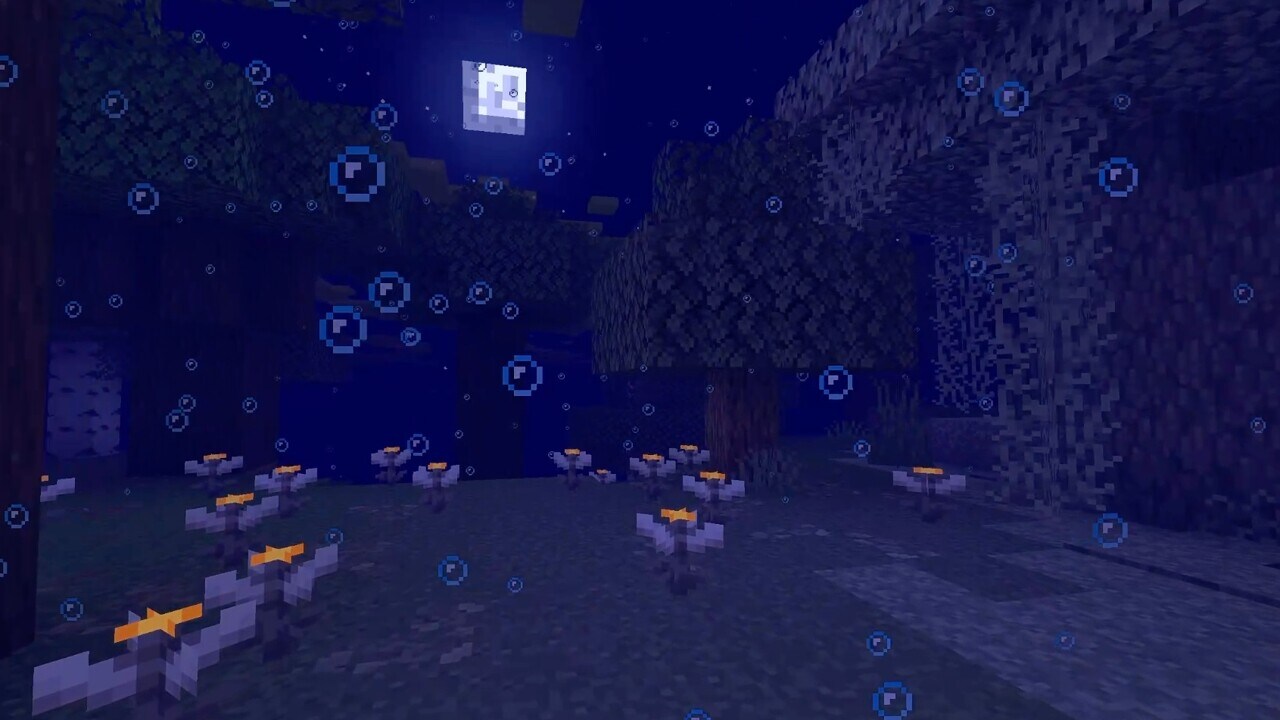
Modifiers #
As described in the above example, an Environment Attribute source may simply override the value of a particular attribute. However, it is sometimes also desirable to rather apply a modifier to a value provided by a source with lower priority.
For example, in the following scenario:
- The
overworlddimension provideswater_fog_end_distance = 96.0 - The
plainsbiome modifieswater_fog_end_distancewith amultiplymodifier of0.85
When in the plains biome, the water_fog_end_distance will be resolved to
96.0*0.85 = 81.6, while in any other Overworld biome, it will resolve to
96.0.
The kinds of modifiers available depends on the type of Environment Attribute.
The most basic modifier, supported by every Environment Attribute, is the
override modifier. This behaves purely as an override of the preceding
value. If not specified by an Environment Attribute source, the modifier will
always be assumed to be override.
Full descriptions of the available modifiers and their behaviors can be found in the Common Modifiers section below.
Interpolation #
While modifiers describe how a value provided by one source is applied on the value from a preceding source, interpolation describes the combination of values within a source. Only some Environment Attributes support interpolation. This allows for the smooth transition between two or more values, such as when moving between two biomes.
Between multiple Biomes, interpolation is performed on values from a source after modifiers have been applied. Within a Timeline, interpolation is performed on the modifier arguments before they get applied.
Biomes #
For example, in the following scenario:
- The
plainsbiome providessky_color = #ff0000(red) - The
desertbiome providessky_color = #ffff00(yellow)
sky_color is one such attribute that will transition smoothly based on
position: for example, in the above scenario, as a player moves from a
plains to a desert biome, the sky color will gradually shift from red to
yellow. Other attributes, such as water_evaporates, represent discrete
values and will not be smoothly transitioned - only the biome exactly at a
subject position will be considered.
Smooth transitions between biomes are based on the biomes within an 8 block radius of the camera. Biomes that occupy a larger portion of that radius and are closer to the camera will have a stronger influence on the final interpolated value.
Timelines #
Timelines can define Attribute Tracks - these specify how a modifier for a particular Environment Attribute changes over time by defining keyframes. Depending on the attribute, interpolation may be used between each keyframe. If interpolation is not used, the previous keyframe value will always be selected.
For example, a Timeline with a period of 24000 might be set up as following:
- At time =
0, the timeline providessky_color = #ff0000(red) - At time =
1000, the timeline providessky_color = #ff0000(red) - At time =
6000, the timeline providessky_color = #ff00ff(magenta)
Between time = 0 and time = 1000, the sky color will be red. Between
1000 and 6000, it will shift from red to magenta. Then, from 6000 all
the way until the timeline repeats and reaches time = 0 again, the color
will slowly shift back to red.
Note: unlike biomes, if a Timeline uses a modifier instead of an override, interpolation is applied to the modifier arguments rather than the final modified values.
Environment Attribute Map #
Dimension Type and Biome definitions contain a new attributes field,
enabling them to define Environment Attributes.
This map generally takes the form of an object mapping between Environment Attribute IDs and their corresponding values, for example:
"attributes": {
    "minecraft:visual/fog_color": "#ffaa00",
    "minecraft:gameplay/water_evaporates": true
}
Values defined as above will always be assumed to use the override modifier.
The value object can however be expanded in order to express different modifiers, in the format of an object with the following fields:
modifier: optional string modifier ID, dependent on the Attribute Type (see the Common Modifiers section below)- Default:
override
- Default:
argument: the modifier argument (format dependent on the chosen modifier)- How the argument is used also depends on the type of modifier
For example, the following definition describes multiplying
water_fog_end_distance by 85%:
"attributes": {
    "minecraft:visual/water_fog_end_distance": {
        "modifier": "multiply",
        "argument": 0.85
    }
}
Attribute Track #
An Attribute Track specified within a Timeline takes the format of an object with the following fields:
ease- optional Easing Type (see below), used to ease the interpolaton of the value between keyframes- Default:
linear - If the target attribute does not support interpolation, the easing mode will have no effect
- Default:
keyframes- list of keyframe objects, must be ordered by theticksfield:ticks- integer between0andperiod_ticks(if specified), defines the tick (within the period) at which this keyframe’s value will be activevalue- the modifier argument (format dependent on the chosen modifier)- If no
modifieris specified (oroverrideis used), the type of this field is the same as the Environment Attribute itself - How this value is used depends on the type of modifier
- If no
- Note: at most two keyframes can be placed on the same tick, creating an immediate transition
modifier- optional string modifier ID, dependent on the Attribute Type (see the Common Modifiers section below)- Default:
override
- Default:
For example, the following Timeline has a period of 24000, and has an
attribute track that modifies only
minecraft:gameplay/cat_waking_up_gift_chance. Because the easing is
constant, between tick 362 and 23667 the value is 0.0, while between
tick 23667 and 362 it is 0.7.
Like other Environment Attribute sources, the specified value is used as the
argument to the specified modifier. This is then applied on top of sources
with a lower priority. In this case the modifier is maximum, so this
timeline will only ever increase the value of cat_waking_up_gift_chance to
the value specified in the track.
{
    "period_ticks": 24000,
    "tracks": {
        "minecraft:gameplay/cat_waking_up_gift_chance": {
            "ease": "constant",
            "modifier": "maximum",
            "keyframes": [
                { "ticks": 362,   "value": 0.0 },
                { "ticks": 23667, "value": 0.7 }
            ]
        }
    }
}
Easing Types #
Easing Types control the interpolation between two keyframes by applying a curve. The following built-in Easing Types are provided:
constant- always selects the previous keyframelinearin_backin_bouncein_circin_cubicin_elasticin_expoin_quadin_quartin_quintin_sinein_out_backin_out_bouncein_out_circin_out_cubicin_out_elasticin_out_expoin_out_quadin_out_quartin_out_quintin_out_sineout_backout_bounceout_circout_cubicout_elasticout_expoout_quadout_quartout_quintout_sine
An Easing Type may also be specified with a Cubic Bézier in the format: { "cubic_bezier": [ x1, y1, x2, y2 ] }
x1: float between0and1, x-coordinate of the first control pointy1: float, y-coordinate of the first control pointx2: float between0and1, x-coordinate of the second control pointy2: float, y-coordinate of the second control point
Developer’s Note : To play around with and visualize easings,easings.net and cubic- bezier.com are great references!
Common Data Types #
The following data types are reused in various parts of the Environment Attributes system and will be referenced in sections below.
RGB Color #
Format can be one of the following:
- A hex color RGB string, in the form
#rrggbb - A float array with 3 components, between
0and1, in the form[r, g, b] - An integer in packed RGB form
ARGB Color #
Format can be one of the following:
- A hex color ARGB string, in the form
#aarrggbb - A float array with 4 components, between
0and1, in the form[a, r, g, b] - An integer in packed ARGB form
Particle Options #
A full definition of a particle, including any type-specific properties (as in
the /particle command).
For example:
{
  "type": "minecraft:block_crumble",
  "block_state": {
    "Name": "minecraft:dirt"
  }
}
Mob Activity #
A string ID from the minecraft:activity built-in registry. One of:
minecraft:coreminecraft:idleminecraft:workminecraft:playminecraft:restminecraft:meetminecraft:panicminecraft:raidminecraft:pre_raidminecraft:hideminecraft:fightminecraft:celebrateminecraft:admire_itemminecraft:avoidminecraft:rideminecraft:play_deadminecraft:long_jumpminecraft:ramminecraft:tongueminecraft:swimminecraft:lay_spawnminecraft:sniffminecraft:investigateminecraft:roarminecraft:emergeminecraft:dig
Common Modifiers #
Every Environment Attribute has a specific value type, which describes how values must be defined as well as what modifiers are available and how they are interpolated. Some are very specific, while others are reused across many attributes.
Although this is not an exhaustive list, the following Attribute Types are used commonly across many Environment Attributes:
Modifiers on Boolean Values #
Argument format: boolean
overrideandnandornorxorxnor
Modifiers on Float Values #
Argument format: float
overrideaddsubtractmultiplyminimummaximumalpha_blend- Modifies
subjectaccording to:result = lerp(alpha, subject, value) - Argument format: object with fields:
value: float to blend towardsalpha: float between0and1
- Modifies
Modifiers on RGB Color Values #
override- Argument format: RGB Color
add- component-wise additive color blending- Argument format: RGB Color
subtract- component-wise subtractive color blending- Argument format: RGB Color
multiply- component-wise multiplicative color blending- Argument format: RGB Color
- If specified, the alpha component is multiplied independently just like the other color channels
alpha_blend- traditional alpha blending that might be seen in image editing software- Argument format: ARGB Color
- When the argument alpha is
1, it will behave as an override with no blending
blend_to_gray- modifies a color by taking its grayscale form, applying a brightness modifier, and mixing with this using some factor- Where
gray = brightness * (0.3 * red + 0.59 * green + 0.11 * blue),result = lerp(factor, subject, [gray, gray, gray]) - Argument format: object with fields:
brightness: float between0and1, a multiplier to apply to the grayscale valuefactor: float between0and1, the factor to mix with
- Where
Modifiers on ARGB Color Values #
override- Argument format: ARGB Color
add- component-wise additive color blending- Argument format: RGB Color
subtract- component-wise subtractive color blending- Argument format: RGB Color
multiply- component-wise multiplicative color blending- Argument format: RGB or ARGB Color
- If specified, the alpha component is multiplied independently just like the other color channels
alpha_blend- traditional alpha blending that might be seen in image editing software- Argument format: ARGB Color
- When the argument alpha is
1, it will behave as an override with no blending
blend_to_gray- same as for RGB Color
New Environment Attributes #
minecraft:visual/fog_color
#
The color of fog (when the camera is not submerged in another substance).
- Value type: RGB color
- Default value:
#000000 - Modifiers: RGB Color Modifiers
- Interpolated: yes
- Resolved at the camera’s position
- Replaces Biome
effects.fog_colorfield
minecraft:visual/fog_start_distance
#
The distance in blocks from the camera at which fog starts to have an effect (when the camera is not submerged in another substance). If negative, the fog will start out with density as if it had started that many blocks behind the camera.
- Value type: float
- Default value:
0.0 - Modifiers: Float Modifiers
- Interpolated: yes
- Resolved at the camera’s position
minecraft:visual/fog_end_distance
#
The distance in blocks from the camera at which fog reaches its maximum density (when the camera is not submerged in another substance).
- Value type: non-negative float
- Default value:
1024.0 - Modifiers: Float Modifiers
- Interpolated: yes
- Resolved at the camera’s position
minecraft:visual/sky_fog_end_distance
#
The distance in blocks from the camera at which the fog that affects the sky
reaches its maximum density (when the camera is not submerged in another
substance). Only visible with the overworld skybox type.
Note: this value is restricted by the Render Distance option.
- Value type: non-negative float
- Default value:
512.0 - Modifiers: Float Modifiers
- Interpolated: yes
- Resolved at the camera’s position
minecraft:visual/cloud_fog_end_distance
#
The distance in blocks from the camera at which the fog that affects clouds reaches its maximum density (when the camera is not submerged in another substance).
Note: this value is restricted by the Cloud Distance option.
- Value type: non-negative float
- Default value:
2048.0 - Modifiers: Float Modifiers
- Interpolated: yes
- Resolved at the camera’s position
minecraft:visual/water_fog_color
#
The color of fog when submerged in water.
- Value type: RGB color
- Default value:
#050533 - Modifiers: RGB Color Modifiers
- Interpolated: yes
- Resolved at the camera’s position
- Replaces Biome
effects.water_fog_colorfield
minecraft:visual/water_fog_start_distance
#
The distance in blocks from the camera at which underwater fog starts to have an effect. If negative, the fog will start out with density as if it had started that many blocks behind the camera.
- Value type: float
- Default value:
-8.0 - Modifiers: Float Modifiers
- Interpolated: yes
- Resolved at the camera’s position
minecraft:visual/water_fog_end_distance
#
The distance in blocks from the camera at which underwater fog reaches its maximum density.
Note: the final value is also modified by how long the player has been underwater.
- Value type: non-negative float
- Default value:
96.0 - Modifiers: Float Modifiers
- Interpolated: yes
- Resolved at the camera’s position
- Replaces
#has_closer_water_fogBiome Tag
minecraft:visual/sky_color
#
The color of the sky. This color is only visible for the overworld sky. Only
visible with the overworld skybox type.
- Value type: RGB color
- Default value:
#000000 - Modifiers: RGB Color Modifiers
- Interpolated: yes
- Resolved at the camera’s position
- Replaces Biome
effects.sky_colorfield
minecraft:visual/cloud_color
#
The color of the clouds. If fully transparent, clouds are entirely disabled and Happy Ghasts will not regenerate health faster when at cloud height.
- Value type: ARGB color
- Default value:
#00000000 - Modifiers: ARGB Color Modifiers
- Interpolated: yes
- Resolved at the camera’s position for rendering, or at the position of a Happy Ghast for regeneration
minecraft:visual/cloud_height
#
The height at which all clouds appear.
- Value type: float
- Default value:
192.33 - Modifiers: Float Modifiers
- Interpolated: yes
- Resolved at the camera’s position for rendering, or at the position of a Happy Ghast for regeneration
- Replaces Dimension Type
cloud_heightfield
minecraft:visual/default_dripstone_particle
#
The default particle to be dripped from Dripstone blocks when no fluid is placed above.
- Value type: Particle Options
- Default value:
{type:"minecraft:dripping_dripstone_water"} - Modifiers:
override - Interpolated: no
- Resolved at the position of the Dripstone block
- Replaces Dimension Type
ultrawarmfield
minecraft:visual/ambient_particles
#
Controls ambient particles that randomly spawn around the camera.
- Value type: list of objects with fields
particle: Particle Options to spawnprobability: float between0and1, the probability to spawn the particle in an empty space when randomly ticked
- Default value:
[] - Modifiers:
override - Interpolated: no
- Resolved at the camera’s position
- Replaces Biome
effects.particlefield
minecraft:visual/sunrise_sunset_color
#
Controls the color and intensity of the sunrise and sunset effect. If fully
transparent, no sunrise or sunset will be rendered. Only visible with the
overworld skybox type.
- Value type: ARGB Color
- Default value:
"#00000000" - Modifiers: ARGB Color Modifiers
- Interpolated: yes
- Resolved at the camera’s position
minecraft:visual/sun_angle
#
The angle in degrees of the sun, clockwise from east to west, with 0 being
directly up.
Only visible with the overworld skybox type.
- Value type: float, angle in degrees
- Default value:
0.0 - Modifiers: Float Modifiers
- Interpolated: yes
- Resolved at the camera’s position
minecraft:visual/moon_angle
#
The angle in degrees of the moon, clockwise from east to west, with 0 being
directly up. Only visible with the overworld skybox type.
- Value type: float, angle in degrees
- Default value:
0.0 - Modifiers: Float Modifiers
- Interpolated: yes
- Resolved at the camera’s position
minecraft:visual/star_angle
#
The angle in degrees of the stars, clockwise from east to west, with 0 being
directly up. Only visible with the overworld skybox type.
- Value type: float, angle in degrees
- Default value:
0.0 - Modifiers: Float Modifiers
- Interpolated: yes
- Resolved at the camera’s position
minecraft:visual/moon_phase
#
The phase of the moon. Only visible with the overworld skybox type.
- Value type: string id, one of:
full_moonwaning_gibbousthird_quarterwaning_crescentnew_moonwaxing_crescentfirst_quarterwaxing_gibbous
- Default value:
"full_moon" - Modifiers:
override - Interpolated: no
- Resolved at the camera’s position
minecraft:visual/star_brightness
#
The brightness of the stars in the sky, where 0.5 is the normal brightness
during the night and 0 is fully hidden. Only visible with the overworld
skybox type.
- Value type: float between
0and1 - Default value:
0.0 - Modifiers: Float Modifiers
- Interpolated: yes
- Resolved at the camera’s position
minecraft:visual/sky_light_color
#
The visual color of sky light. For blocks with a sky light level of 0 (or
minecraft:visual/sky_light_factor is 0), this will have no effect. This is
the value passed to the lightmap.fsh shader as SkyLightColor.
- Value type: RGB Color
- Default value:
"#ffffff" - Modifiers: RGB Color Modifiers
- Interpolated: yes
- Resolved at the camera’s position
minecraft:visual/sky_light_factor
#
The visual brightness of sky light. minecraft:visual/sky_light_color is
multiplied by this value. This is the value passed to the lightmap.fsh
shader as SkyFactor.
The corresponding gameplay effect is controlled entirely by
minecraft:gameplay/sky_light_level.
- Value type: float
- Default value:
1.0 - Modifiers: Float Modifiers
- Interpolated: yes
- Resolved at the camera’s position
minecraft:audio/background_music
#
Controls how and which background music is played.
- Value type: object with fields
default: optional object with fields:sound: Sound Event to playmin_delay: int, minimum delay in ticks between tracksmax_delay: int, maximum delay in ticks between tracksreplace_current_music: optional boolean, whether this track can replace whatever is currently playing- Default:
false
- Default:
- If not defined and not overridden, no music will start playing while this attribute is active
underwater: optional object with fields in the same format asdefault- if present and the player is underwater, will overridedefaultcreative: optional object with fields in the same format asdefault- if present and the player is in Creative Mode, will overridedefault
- Default value:
{} - Modifiers:
override - Interpolated: no
- Resolved at the camera’s position
- Replaces Biome
effects.musicfield
minecraft:audio/music_volume
#
The volume at which music should play. Any music playing will fade over time to this value.
- Value type: float between
0and1 - Default value:
1.0 - Modifiers: Float Modifiers
- Interpolated: no
- Resolved at the camera’s position
- Replaces Biome
effects.music_volumefield
minecraft:audio/ambient_sounds
#
Controls which ambient sounds are played around the camera, and when.
- Value type: object with fields
loop: optional Sound Event, sound to be continually loopedmood: object with fields, sounds that will be randomly played based on surrounding darknesssound: Sound Event to playtick_delay: int, the number of ticks between mood sounds, assuming a light level of 0block_search_extent: int, the radius in which light levels are sampledoffset: double, an additional distance offset to apply to sounds produced
additions: list of objects with fields, sounds that will be randomly playedsound: Sound Event to playtick_chance: float between0and1, probability within a tick to play a given sound
- Default value:
{} - Modifiers:
override - Interpolated: no
- Resolved at the camera’s position
- Replaces Biome
effects.ambient_sound,effects.mood_sound, andeffects.additions_soundfields
minecraft:audio/firefly_bush_sounds
#
If true and not below an opaque block, Firefly Bushes will produce idle
sounds.
- Value type: boolean
- Default value:
false - Modifiers: Boolean Modifiers
- Interpolated: no
- Resolved at the position of a Firefly Bush
minecraft:gameplay/can_start_raid
#
If false, a Raid cannot be started by a player with Raid Omen.
- Value type: boolean
- Default value:
true - Modifiers: Boolean Modifiers
- Interpolated: no
- Resolved at the position that the Raid would be started
- Replaces Dimension Type
has_raidsfield
minecraft:gameplay/water_evaporates
#
If true, Water cannot be placed with a Bucket, melting Ice will not produce
water, Wet Sponge will dry out when placed, and Dripstone will not produce
water from Mud blocks.
- Value type: boolean
- Default value:
false - Modifiers: Boolean Modifiers
- Interpolated: no
- Resolved at the position of the interaction
- Replaces Dimension Type
ultrawarmfield
minecraft:gameplay/bed_rule
#
Controls whether a Bed can be used to sleep, and whether it can be used to set a respawn point.
- Value type: object with fields
can_sleep: one of:always- the Bed can always be used to sleep (assuming the Bed is not obstructed and there are no monsters nearby)when_dark- the Bed can only be used to be sleep when the global skylight level is less than or equal 11never- the Bed can never be used to sleep
can_set_spawn- same ascan_sleepexplodes- optional boolean, iftruethe Bed will explode when interacted with- Default:
false
- Default:
error_message: optional Text Component, the message to show if the player is unable to sleep or set their spawn
- Default value:
{can_sleep:"when_dark",can_set_spawn:"always",error_message:{translate:"block.minecraft.bed.no_sleep"}} - Modifiers:
override - Interpolated: no
- Resolved at the head position of the Bed block
- Replaces Dimension Type
bed_worksfield
minecraft:gameplay/respawn_anchor_works
#
Controls whether Respawn Anchors can be used to set spawn (or respawn). If
false, the Respawn Anchor will explode once charged.
- Value type: boolean
- Default value:
false - Modifiers: Boolean Modifiers
- Interpolated: no
- Resolved at the position of the Respawn Anchor block
- Replaces Dimension Type
respawn_anchor_worksfield
minecraft:gameplay/nether_portal_spawns_piglin
#
Controls whether Nether Portal blocks can spawn Piglins.
- Value type: boolean
- Default value:
false - Modifiers: Boolean Modifiers
- Interpolated: no
- Resolved at the position of a random Nether Portal block
- Replaces Dimension Type
naturalfield
minecraft:gameplay/fast_lava
#
Controls whether Lava should spread faster and further, as well as have a stronger pushing force on entities when flowing.
- Value type: boolean
- Default value:
false - Modifiers: Boolean Modifiers
- Interpolated: no
- Resolved for a whole dimension (cannot be specified on a Biome)
- Replaces Dimension Type
ultrawarmfield
minecraft:gameplay/increased_fire_burnout
#
Controls whether Fire blocks burn out more rapidly than normal.
- Value type: boolean
- Default value:
false - Modifiers: Boolean Modifiers
- Interpolated: no
- Resolved at the position of the burning Fire block
- Replaces
#increased_fire_burnoutBiome Tag
minecraft:gameplay/piglins_zombify
#
Controls whether Piglins and Hoglins should zombify.
- Value type: boolean
- Default value:
true - Modifiers: Boolean Modifiers
- Interpolated: no
- Resolved at the position of the zombifying entity
- Replaces Dimension Type
piglin_safefield
minecraft:gameplay/snow_golem_melts
#
Controls whether a Snow Golem should be damaged.
- Value type: boolean
- Default value:
false - Modifiers: Boolean Modifiers
- Interpolated: no
- Resolved at the position of the Snow Golem
- Replaces
#snow_golem_meltsBiome Tag
minecraft:gameplay/sky_light_level
#
The effective light level of the sky used by mechanics such as mob spawning or Daylight Detectors. For example, a block fully exposed to the sky will be considered to have a light level of exactly this value, while a block deep in a cave will not be affected at all.
The corresponding visual effect is controlled entirely by
minecraft:visual/sky_light_factor.
- Value type: float
- Default value:
15.0 - Modifiers: Float Modifiers
- Interpolated: yes
- Resolved for a whole dimension (cannot be specified on a Biome)
minecraft:gameplay/eyeblossom_open
#
If true, Closed Eyeblossoms will eventually open by random block ticks. If
false, Open Eyeblossoms will do the opposite. If "default", Open or Closed
Eyeblossoms will remain in their current state.
- Value type: one of:
truefalse"default"
- Default value:
"default" - Modifiers:
override - Interpolated: no
- Resolved at the Eyeblossom block’s position
minecraft:gameplay/turtle_egg_hatch_chance
#
The chance that a Turtle Egg block will switch to its next hatching state when randomly ticked.
- Value type: float between
0and1 - Default value:
0.0 - Modifiers: Float Modifiers
- Interpolated: yes
- Resolved at the Turtle Egg block’s position
minecraft:gameplay/creaking_active
#
While true, Creaking Heart blocks (and their corresponding Creaking) will
become active. On the other hand, when false, it will enter its dormant
state.
- Value type: boolean
- Default value:
false - Modifiers: Boolean Modifiers
- Interpolated: no
- Resolved at the Creaking Heart block’s position
minecraft:gameplay/surface_slime_spawn_chance
#
An additional chance rolled when a natural Slime spawn attempt occurs in a
biome with the #allows_surface_slime_spawns tag.
- Value type: float between
0and1 - Default value:
0.0 - Modifiers: Float Modifiers
- Interpolated: yes
- Resolved at the position of the Slime spawn attempt
minecraft:gameplay/cat_waking_up_gift_chance
#
The chance that a Cat lying on its owner’s Bed will drop a gift (from the
gameplay/cat_morning_gift loot table) when the player wakes up.
- Value type: float
- Default value:
0.0 - Modifiers: Float Modifiers
- Interpolated: yes
- Resolved at the Cat’s position
minecraft:gameplay/bees_stay_in_hive
#
When true, Bees will try to navigate to their Hives and will not exit unless
the Hive is broken or next to a Fire.
- Value type: boolean
- Default value:
false - Modifiers: Boolean Modifiers
- Interpolated: no
- Resolved at a Bee or Bee Hive block’s position
minecraft:gameplay/monsters_burn
#
When true, monsters will burn while exposed to the sky.
- Value type: boolean
- Default value:
false - Modifiers: Boolean Modifiers
- Interpolated: no
- Resolved at the monster’s position
minecraft:gameplay/can_pillager_patrol_spawn
#
When true, Pillager Patrols are able to spawn.
Note: the global skylight level must also be greater than 11.
- Value type: boolean
- Default value:
true - Modifiers: Boolean Modifiers
- Interpolated: no
- Resolved at the position of the patrol spawn attempt
- Replaces the
#without_patrol_spawnsbiome tag
minecraft:gameplay/villager_activity
#
Controls the default AI activity for adult Villagers.
Not all activities are supported by Villager AI - if an unsupported one is chosen, the Villager will do nothing. The following activities are supported:
corehideidlemeetpanicpre_raidraidrestwork- Value type: Mob Activity
- Default value:
"minecraft:idle" - Modifiers:
override - Interpolated: no
- Resolved at the Villager’s position
minecraft:gameplay/baby_villager_activity
#
Controls the default AI activity for baby Villagers.
Not all activities are supported by Villager AI - if an unsupported one is chosen, the Villager will do nothing. The following activities are supported:
corehideidlemeetpanicplaypre_raidraidrest- Value type: Mob Activity
- Default value:
"minecraft:idle" - Modifiers:
override - Interpolated: no
- Resolved at the Villager’s position
Data Components #
- New components:
zombie_nautilus/variant- namespaced id fromzombie_nautilus_variantregistry
Item Components #
Added food properties to the following fish bucket items:
minecraft:cod_bucketminecraft:salmon_bucketminecraft:pufferfish_bucketminecraft:tropical_fish_bucket
Added minecraft:use_effects
#
- Controls how the player behaves when using an item (right mouse click)
- Format: object with fields
can_sprint: boolean, whether the player can sprint while using this item- Default value:
false
- Default value:
interact_vibrations: boolean, whether using this item emitsminecraft:item_interact_startandminecraft:item_interact_finishgame events- Default value:
true speed_multiplier: float (0 to 1), the speed multiplier applied to the player while using this item- Default value:
0.2
- Default value:
- e.g.
use_effects={can_sprint:true,speed_multiplier:1.0}
- Default value:
Added minecraft:minimum_attack_charge
#
- Sets the minimum attack charge on the attack indicator required to attack with this item
- Format: float (0.0 to 1.0)
- 0.0: no charge required
- 1.0: full charge required
Added minecraft:damage_type
#
- Specifies the type of damage this item deals
- Format: string, damage type identifier
- e.g.
damage_type='minecraft:spear'
- e.g.
Added minecraft:attack_range
#
- Enables a custom attack range when using the item.
- Overrides the normal entity interaction range for Player.
- Regular melee attack range is computed for Mobs based on the distance of the target hitbox to their hitbox. This component modifies that distance check by adjusting minimum and maximum padding for the attack hitbox.
- Mobs using
minecraft:kinetic_weaponwill have their attack range applied in the same way it applies to players - Format: object with fields
min_reach: float, the minimum distance in blocks from the attacker to the target to be considered valid- Default value:
0.0, valid from0.0to64.0
- Default value:
max_reach: float, the maximum distance in blocks from the attacker to the target to be considered valid- Default value:
3.0, valid from0.0to64.0
- Default value:
min_creative_reach: float, the minimum distance in blocks from the Creative Mode attacker to the target to be considered valid- Default value:
0.0, valid from0.0to64.0
- Default value:
max_creative_reach: float, the maximum distance in blocks from the Creative Mode attacker to the target to be considered valid- Default value:
5.0, valid from0.0to64.0
- Default value:
hitbox_margin: float, the margin applied to the target bounding box when checking for valid hitbox collision- Default value:
0.3, valid from0.0to1.0
- Default value:
mob_factor: float, the multiplier applied to themin_rangeandmax_rangewhen checking for valid distance when item is used by a mob- Default value:
1.0, valid from0.0to2.0
- Default value:
Added minecraft:kinetic_weapon
#
- Enables a charge-type attack when using the item (primarily for Spears), where, while being used, the damage is dealt along a ray every time an entity comes in contact with it, with the damage based on the relative speed of the entities
- Format: object with fields
contact_cooldown_ticks: integer, the cooldown in ticks after hitting, and loosing contact with an entity before being able to hit it again- Default value:
10
- Default value:
delay_ticks: integer, the time in ticks required before weapon is effective- Default value:
0
- Default value:
dismount_conditions,knockback_conditions,damage_conditions: indicating the condition to apply dismount, knockback and damage effects respectively. Objects with fields:max_duration_ticks: integer, the ticks after which the condition is no longer checked. This starts afterdelayhas elapsedmin_speed: float, the minimum speed of the attacker, in blocks per second, along the direction that the attacker is looking- Optional, default value:
0.0
- Optional, default value:
min_relative_speed: float, the minimum relative speed between the attacker and target, in blocks per second, along the direction that the attacker is looking- Optional, default value:
0.0
- Optional, default value:
forward_movement: float, the distance the item moves out of hand during animation- Default value:
0.0
- Default value:
damage_multiplier: float, the multiplier for the final damage from the relative speed- Default value:
1.0
- Default value:
sound: Optional Sound Event to play when the weapon is engagedhit_sound: Optional Sound Event to play when the weapon hits an entity- e.g.
kinetic_weapon={forward_movement:1.0,delay:20,damage_conditions:{max_duration:60},knockback_conditions:{max_duration:40},dismount_conditions:{max_duration:20}}
- The damage dealt is calculated as
floor(relative_speed * velocity_multiplier)whererelative_speedis the difference of speed vectors of the attacker and the target as projected onto the axis of the attacker’s view vector- Any additional damage from enchantments or attribute modifiers is added after this calculation
Added minecraft:piercing_weapon
#
- Enables a quick attack that damages multiple entities along a ray (primarily for Spears)
- Format: object with fields
deals_knockback: boolean, whether the attack deals knockback- Default value:
true
- Default value:
dismounts: boolean, whether the attack dismounts the target- Default value:
false
- Default value:
sound: Optional Sound Event to play when a player attacks with the weaponhit_sound: Optional Sound Event to play when the weapon hits an entity- e.g.
piercing_weapon={dismounts:true}
Added minecraft:swing_animation
#
- Specifies the swing animation to play when attacking or interacting using this item
- Format: object with fields
type: string, the animation identifier (none,whack,stab)- Default value:
whack
- Default value:
duration: integer, the duration in ticks- Default value:
6
- Default value:
- e.g.
swing_animation={type:'stab',duration:20}
Changed minecraft:consumable
#
- The
animationfield has been updated:- Renamed
speartotrident - Added new
spearanimation
- Renamed
Changed minecraft:intangible_projectile
#
- Items with this component now show information about it in their tooltip
Entity Data #
- The
AngryAtfield has been renamed toangry_at - The
AngerTimefield has been removed - An
anger_end_time(long) field has been added, containing the time anger ends in game ticks
Block Entity Data #
Advancements #
- Added new
spear_mobstrigger with fields:player: optional entity predicate, the player using the kinetic weaponcount: optional integer, the number of mobs hit in a single use of the kinetic weapon
Damage Types #
- Added a new
minecraft:speardamage type
Slot Sources #
- Added slot sources to allow the location of any inventory slot to be specified within datapacks
- Format: object with fields
type: the slot source type<type-specific>: additional fields depending on the type
minecraft:empty Type
#
- Empty selection containing no slots
minecraft:group Type
#
- Merges several slot sources into one, with the resulting selection containing all slots from each slot source provided
- If a slot is included in more than one slot source, it will be repeated in the resulting slot source
- e.g.
[a, b] + [c, a]->[a, b, c, a]
- Format:
terms: list of slot sources to join
- Can alternatively be written inline as a list of slot sources
minecraft:slot_range Type
#
- Selects slots within a slot range from the inventory of an entity or block entity
- Mirrors the behavior of the
fromargument of the/itemcommand - Format:
source: an entity or block entity from which the slots will be sourced, from loot context- Can be
block_entity,this,attacking_entity,last_damage_player,direct_attacker,target_entity, orinteracting_entity
- Can be
slots: a slot range in the format of<slot_type>or<slot_type>.<slot_number>(e.g.armor.chestorcontainer.*)
minecraft:contents Type
#
- Selects all non-empty slots from the inventory component of one or more items
- If no item is stored inside that component, the resulting selection will be empty
- The location of the item(s) whose inventory component to use is specified by another slot source
- If the slot source includes more than one item with that component, the resulting selections will be merged identically as with the
minecraft:grouptype - e.g.
Bundle [a, b] + Shulker Box [c, d]->[a, b, c, d]
- If the slot source includes more than one item with that component, the resulting selections will be merged identically as with the
- Format:
component: the inventory component to target- Allowed values are
minecraft:bundle_contents,minecraft:charged_projectiles, andminecraft:container
- Allowed values are
slot_source: a slot source containing slots with item(s) to target
minecraft:filtered Type
#
- Applies a filter to the selected slots, excluding any non-matching slots from the resulting selection
- Format:
item_filter: an item predicate to match against the items in each slotslot_source: the slot source to filter
minecraft:limit_slots Type
#
- Limits the number of slots provided, with the resulting selection containing at most that number of slots
- Any slots bringing the number of slots above that limit will be excluded, in order of inclusion
- e.g.
[a, b, c, d]->[a, b, c]if the limit is set to3
- Format:
limit: integer, the maximum number of slots to include in the resulting selectionslot_source: the slot source to limit
Example slot source selecting every slot with more than 16 items from the hotbar and armor slots of an entity:
{
    "type": "minecraft:filtered",
    "item_filter": {
        "count": {
            "min": 16
        }
    },
    "slot_source": [
        {
            "type": "minecraft:slot_range",
            "source": "this",
            "slots": "hotbar.*"
        },
        {
            "type": "minecraft:slot_range",
            "source": "this",
            "slots": "armor.*"
        }
    ]
}
Loot Tables #
- Added new
minecraft:slotsloot pool entry- Provides the items contained within the selected slots to the loot table
- Format:
slot_source: a slot source describing where the items are located
- Supports all standard loot pool entry fields
Loot Functions #
minecraft:filtered
#
- Field
modifierhas been replaced with two fields:on_pass- function or a list of functions to run whenitem_filterpredicate passeson_fail- function or a list of functions to run whenitem_filterpredicate fails
minecraft:discard
#
- Replaces any item stack with empty one
- No fields
Predicates #
Component Predicates #
- Component predicates (
predicatesfield in block, item and entity predicates) now include predicates for checking existence of every component type - Those predicates are written as
{<component_type>: {}}</code><li>Such predicate check passes as long as component is present, no matter the actual value<li>Existing predicates for specific components remain unchanged<li>Example:<ul><li><code>{predicates:{written_book_content:{author:"foo"}}</code> - existing format for matching books<li><code>{predicates:{written_book_content:{}}</code> - special case of above that accepted any value, as long as component existed<li><code>{predicates:{instrument:{}}</code> - checks if component <code>minecraft:instrument</code> exists (was not allowed before)</ul></ul><h3>Entity Predicates</h3><p>The <code>flags</code> predicate now supports new values:<ul><li><code>is_in_water</code>: when an entity is touching water or a bubble column<li><code>is_fall_flying</code>: when an entity is gliding with an elytra</ul><h3>Block Predicates</h3><h3>Item Predicates</h3><ul><li>Item predicate in command form (<code><item>[predicate~{...},component={...}]</code>) has been extended to accept empty predicates for any component type<li>Similarily to component predicates in data, those empty entries only check for component existence<li>Existing shorter syntax for checking component existence remains unchanged<ul><li>That means <code>*[instrument]</code> and <code>*[instrument~{}]</code> are equivalent</ul></ul><h2>Recipes</h2><h2>Enchantments</h2><h3>Enchantment Effect Components</h3><ul><li><code>minecraft:post_piercing_attack</code>: Effects applying after a piercing attack with an item</ul><h3>Enchantment Entity Effects</h3><ul><li><code>minecraft:apply_impulse</code>: applies an impulse to the targeted entity<ul><li><code>direction</code> - The first step of determining the impules is applying this vector as local coordinates (the same used by <code>tp @s ^ ^ ^</code>) onto the entity look vector<li><code>coordinate_scale</code> - The second step is scaling the resulting vector by this vector on each axis in world space, X, Y and Z<li><code>magnitude</code> - The third step is scaling the resulting vector by this Level-Based Value</ul><li><code>minecraft:apply_exhaustion</code>: applies exhaustion to the targeted entity<ul><li><code>amount</code> - Level-Based Value indicating the amount of exhaustion to apply<li>effective only on players</ul><li><code>minecraft:play_sound</code>: can now support a list of sound event identifiers, one for each level of enchantment. If a level is higher than the number of sounds, the last sound in the list is used</ul><h3>Enchantment Level-Based Values</h3><h4>Added <code>exponent</code></h4><ul><li>Raises the base to the specified power level.<ul><li><code>base</code> - Level-Based Value indicating the base of the exponent.<li><code>power</code> - Level-Based Value indicating the power of the exponent.</ul></ul><h2>World Generation</h2><h3>Dimension Types</h3><ul><li>Added new <code>attributes</code> field for dimensions to specify Environment Attributes<ul><li>Refer to the Environment Attribute Map section for information about the format of this field</ul><li>Added a new optional <code>timelines</code> field that specifies which Timelines are active in this dimension<ul><li>Format: a Timeline ID, a list of Timeline IDs, or a Timeline Tag</ul><li>Many fields have been migrated to Environment Attributes:<ul><li>Note: the form of these attributes may not be identical to the original fields<li><code>ultrawarm</code> -> <code>minecraft:gameplay/water_evaporates</code>, <code>minecraft:gameplay/fast_lava</code>, <code>visual/default_dripstone_particle</code><li><code>bed_works</code> -> <code>minecraft:gameplay/bed_rule</code><li><code>respawn_anchor_works</code> -> <code>minecraft:gameplay/respawn_anchor_works</code><li><code>cloud_height</code> -> <code>minecraft:visual/cloud_height</code><li><code>piglin_safe</code> -> <code>minecraft:gameplay/piglins_zombify</code><li><code>has_raids</code> -> <code>minecraft:gameplay/can_start_raid</code><li><code>natural</code> -> <code>minecraft:gameplay/nether_portal_spawns_piglin</code>, <code>minecraft:gameplay/eyeblossom_open</code>, <code>minecraft:gameplay/creaking_active</code></ul><li>The <code>effects</code> field has been removed and replaced with the following new fields:<ul><li><code>skybox</code> - the skybox rendering type to use, one of:<ul><li><code>none</code> (was <code>minecraft:nether</code> effect ID)<li><code>overworld</code> (was <code>minecraft:overworld</code> effect ID)<ul><li>Following environment attribues are applied only when the <code>skybox</code> is <code>overworld</code>:<ul><li><code>minecraft:visual/sky_color</code>, <code>minecraft:visual/sun_angle</code>,<code>minecraft:visual/sunrise_sunset_color</code>, <code>minecraft:visual/moon_phase</code>, <code>minecraft:visual/moon_angle</code>, <code>minecraft:visual/star_angle</code>, <code>minecraft:visual/star_brightness</code></ul></ul><li><code>end</code> (was <code>minecraft:end</code> effect ID)<li>Default: <code>overworld</code></ul><li><code>cardinal_light</code> - the direction of cardinal lighting that affects blocks, one of:<ul><li><code>default</code> (was <code>minecraft:overworld</code> and <code>minecraft:end</code> effect ID)<li><code>nether</code> (was <code>minecraft:nether</code> effect ID)<li>Default: <code>default</code></ul></ul><li>The <code>fixed_time</code> field has been replaced by a <code>has_fixed_time</code> boolean (default: <code>false</code>)<ul><li>Time-based effects such as the angle of the sun are now specified instead by Environment Attributes<li>However, the remainder of behaviors formerly affected by <code>fixed_time</code> being present will now instead use the <code>has_fixed_time</code> boolean</ul></ul><h3>Biomes</h3><ul><li>Added new <code>attributes</code> field for biomes to specify Environment Attributes<ul><li>Refer to the Environment Attributes section for information about the format of this field<li>Note: certain attributes, such as <code>gameplay/fast_lava</code> are not evaluated positionally and thus cannot be set on a Biome</ul><li>Many subfields under <code>effects</code> have been migrated to Environment Attributes:<ul><li>Note: the form of these attributes may not be identical to the original fields<li><code>fog_color</code> -> <code>minecraft:visual/fog_color</code><li><code>water_fog_color</code> -> <code>minecraft:visual/water_fog_color</code><li><code>sky_color</code> -> <code>minecraft:visual/sky_color</code><li><code>particle</code> -> <code>minecraft:visual/ambient_particles</code><li><code>ambient_sound</code>, <code>mood_sound</code>, <code>additions_sound</code> -> <code>minecraft:audio/ambient_sounds</code><li><code>music</code> -> <code>minecraft:audio/background_music</code><li><code>music_volume</code> -> <code>minecraft:audio/music_volume</code></ul><li>The following color fields in the <code>effects</code> definition now support colors as a string in the form <code>"#rrggbb"</code>, or a float array in the form <code>[red, green, blue]</code><ul><li><code>water_color</code><li><code>foliage_color</code><li><code>dry_foliage_color</code><li><code>grass_color</code><li><code>grass_color_modifier</code></ul></ul><h2>Tags</h2><h3>Block Tags</h3><ul><li>Added <code>#can_glide_through</code> - climbable blocks that can be glided through without stopping</ul><h3>Item Tags</h3><ul><li>Added <code>#nautilus_taming_items</code> - items that can be used to tame a Nautilus and a Zombie Nautilus<li>Added <code>#nautilus_bucket_food</code> - bucketed fish items that can be used to feed a tamed Nautilus and Zombie Nautilus<li>Added <code>#nautilus_food</code> - all items that can be used to feed a tamed Nautilus and Zombie Nautilus<li>Added <code>#camel_husk_food</code> - all items that can be used to feed a Camel Husk<li>Added <code>#spears</code> - all Spear weapons<li>Added <code>#enchantable/lunge</code> - all items that can be enchanted with the <code>lunge</code> enchantment<li>Added <code>#enchantable/melee_weapon</code> - all primary melee weapons including Swords and Spears<li>Renamed <code>#enchantable/sword</code> to <code>#enchantable/sweeping</code><li>Updated <code>#piglin_loved</code> to include the Golden Nautilus Armor and the Golden Spear<li>Updated <code>#piglin_preferred_weapons</code> to include Golden Spears</ul><h3>Biome Tags</h3><ul><li>Removed <code>#snow_golem_melts</code> and <code>#increased_fire_burnout</code> - replaced by <code>gameplay/snow_golem_melts</code> and <code>gameplay/increased_fire_burnout</code> Environment Attributes<li>Removed <code>#plays_underwater_music</code> - replaced by <code>only_underwater</code> field in the <code>audio/background_music</code> Environment Attribute<li>Removed <code>#has_closer_water_fog</code> - replaced by <code>visual/water_fog_end_distance</code> Environment Attribute<li>Added <code>#spawns_coral_variant_zombie_nautilus</code> - biomes where the Coral Variant of the Zombie Nautilus can spawn<li>Removed <code>#without_patrol_spawns</code> - replaced by <code>gameplay/can_pillager_patrol_spawn</code> Environment Attribute</ul><h3>Entity Tags</h3><ul><li>Added <code>#can_wear_nautilus_armor</code> - entities that can equip Nautilus Armor<li>Added <code>#nautilus_hostiles</code> - entities that the Nautilus will be hostile towards when untamed<li>Changed <code>#not_scary_for_pufferfish</code> to include Nautilus and Zombie Nautilus<li>Added <code>#burn_in_daylight</code> - entities that burn in daylight<li>Added <code>#can_float_while_ridden</code> - entities that can float on water while being ridden<li>Changed <code>#skeletons</code> to include Parched<li>Changed <code>#zombies</code> to include Zombie Nautilus, Zombie Horse and Camel Husk<li>Changed <code>#can_equip_saddle</code> to include Nautilus, Zombie Nautilus, Zombie Horse and Camel Husk</ul><h3>Structure Tags</h3><h3>Enchantment Tags</h3><h3>Timeline Tags</h3><ul><li>Added <code>#universal</code> - Timelines that are active in every dimension<li>Added <code>#in_overworld</code> - Timelines that are active in the Overworld<li>Added <code>#in_nether</code> - Timelines that are active in the Nether<li>Added <code>#in_end</code> - Timelines that are active in the End</ul><h2>Particles</h2><h1>Resource Pack Versions 70.0 through 75.0</h1><ul><li>Unifont has been updated to 17.0.01<li><code>block.vsh/fsh</code> copies <code>terrain.vsh/fsh</code> and handles ad-hoc blocks (e.g. held by entities)<li>Added <code>ChunkSection</code> uniform, used by <code>terrain.vsh</code> (which replaces <code>DynamicTransforms</code>)<li>New shaders have been introduced to perform GPU based sprite animations<li><code>Globals</code> uniform now has camera coordinates<li>Item textures were split out of the <code>blocks</code> atlas into a separate new <code>items</code> atlas that does not have mipmaps<ul><li>All textures used in an item model have to come from the same (<code>items</code> or <code>blocks</code>) atlas<li>All textures used in a block model have to come from the <code>blocks</code> atlas<li>Textures used for still water and lava are now hardcoded to <code>minecraft:block/water_still</code> and <code>minecraft:block/lava_still</code></ul><li>To prepare for future work, the game will now print a warning if any defined sprites in any atlases share a name<li>Block model and state format has been expanded to allow more rotations<li>Textures for the Leather Horse Armor item and equipment asset have been split into a tinted base layer and an overlay layer</ul><h1>Textures</h1><ul><li><code>texture</code> section of <code>*.mcmeta</code> files has two new fields: <code>mipmap_strategy</code> and <code>alpha_cutoff_bias</code><ul><li><code>mipmap_strategy</code> has the following supported values:<ul><li><code>mean</code> averages both color and alpha between groups of four pixels for the current mipmap level to generate the next mipmap level pixel. This was and stays the default strategy for most solid or translucent full block textures<li><code>dark_cutout</code> is similar to <code>mean</code>, but blends colors in a way that makes the pixels bordering cutout pixels darker. This was and stays the strategy for leaves and Mangrove Roots. It simulates dark interior of the blocks<li><code>cutout</code> is a new strategy that always generates a mipmap based on the original texture instead of the previous mipmap. Used for most cutout blocks that became mipmapped in this version.<li><code>strict_cutout</code> is a modification of <code>cutout</code> that uses stricter alpha cutoff value leading to the textures using this value disappearing at higher mipmap levels. Is used for flowers and similar blocks to avoid artifacts.<li><code>auto</code> is the default value and will make the game to pick <code>mean</code> for textures that do not contain fully transparent pixels and <code>cutout</code> for those that do</ul><li><code>alpha_cutoff_bias</code> is a float field for controling the alpha bias for cutout textures<ul><li>Technically there is no limit for this value, it can be negative as well, but it does not make sense to set this higher than <code>1.0</code> or lower than <code>-1.0</code> since the texture will become either fully opaque or fully transparent<li>Default value for this field is <code>0.0</code>, and it can be increased for textures that can become too transparent/thin at distance, or decreased if it's too "opaque"<li>It's recommended to increment or decrease this value in fine granuality for finding the sweet spot. As an example, <code>0.1</code> is used for <code>kelp</code> textures in order to prevent them being fully trasparent at distance<li>Only used for lower mips of cutout textures, does not change the alpha of first mip level, and has no effect on other textures</ul></ul><li>Glass, Glass Pane and Redstone dust now support translucent textures<li>Added <code>gui/container/nautilus</code> used for the Nautilus inventory UI</ul><h2>Block Sprites</h2><h2>Item Sprites</h2><ul><li>Added new item sprites:<ul><li><code>item/nautilus_spawn_egg</code><li><code>item/zombie_nautilus_spawn_egg</code><li><code>item/camel_husk_spawn_egg</code><li><code>item/parched_spawn_egg</code><li><code>item/copper_nautilus_armor</code><li><code>item/iron_nautilus_armor</code><li><code>item/golden_nautilus_armor</code><li><code>item/diamond_nautilus_armor</code><li><code>item/netherite_nautilus_armor</code><li><code>item/netherite_horse_armor</code><li><code>item/leather_horse_armor_overlay</code></ul><li>Added the following item sprites for the Spear weapon:<ul><li>When in inventory: <code>item/wooden_spear</code>, <code>item/stone_spear</code>, <code>item/copper_spear</code>, <code>item/iron_spear</code>, <code>item/golden_spear</code>, <code>item/diamond_spear</code>, <code>item/netherite_spear</code><li>When in hand: <code>item/wooden_spear_in_hand</code>, <code>item/stone_spear_in_hand</code>, <code>item/copper_spear_in_hand</code>, <code>item/iron_spear_in_hand</code>, <code>item/golden_spear_in_hand</code>, <code>item/diamond_spear_in_hand</code>, <code>item/netherite_spear_in_hand</code></ul></ul><h2>Entity Sprites</h2><h2>UI Sprites</h2><ul><li>Added new UI sprite:<ul><li><code>container/slot/nautilus_armor</code><li><code>container/slot/spear</code> - Spear icon used in the Smithing Table screen<li><code>container/slot/nautilus_armor_inventory</code> - Nautilus icon used in Nautilus inventory UI</ul><li>Added new nine-sliced sprites:<ul><li><code>container/inventory/effect_background</code><li><code>container/inventory/effect_background_ambient</code></ul><li>Removed the following sprites:<ul><li><code>container/inventory/effect_background_large</code><li><code>container/inventory/effect_background_small</code></ul></ul><h2>Celestials Atlas</h2><ul><li>A new <code>celestials</code> atlas has been introduced, including sprites for objects rendered in the sky such as the Sun and Moon<li>Includes sprites from <code><namespace>:textures/environment/celestial/<path>.png</code><li>The following textures have been moved or split:<ul><li><code>textures/environment/sun.png</code> -> <code>sun</code><li><code>textures/environment/end_flash.png</code> -> <code>end_flash</code><li><code>textures/environment/moon_phases</code> -> <code>moon/full_moon</code>, <code>moon/waning_gibbous</code>, <code>moon/third_quarter</code>, <code>moon/waning_crescent</code>, <code>moon/new_moon</code>, <code>moon/waxing_crescent</code>, <code>moon/first_quarter</code>, <code>moon/waxing_gibbous</code></ul></ul><h2>Mob Effect Sprites</h2><ul><li>Added new mob effect sprite:<ul><li><code>breath_of_the_nautilus</code></ul></ul><h2>Entity Textures</h2><ul><li>Added new entity textures:<ul><li><code>entity/nautilus/nautilus.png</code><li><code>entity/nautilus/nautilus_baby.png</code><li><code>entity/nautilus/zombie_nautilus.png</code><li><code>entity/equipment/zombie_nautilus_coral.png</code><li><code>entity/equipment/nautilus_body/copper.png</code><li><code>entity/equipment/nautilus_body/iron.png</code><li><code>entity/equipment/nautilus_body/gold.png</code><li><code>entity/equipment/nautilus_body/diamond.png</code><li><code>entity/equipment/nautilus_body/netherite.png</code><li><code>entity/equipment/nautilus_saddle/saddle.png</code><li><code>entity/equipment/horse_body/leather_overlay.png</code><li><code>entity/camel/camel_husk.png</code><li><code>entity/equipment/camel_husk_saddle/saddle.png</code><li><code>entity/equipment/horse_body/netherite.png</code><li><code>entity/skeleton/parched.png</code><li><code>entity/skeleton/parched_overlay.png</code></ul></ul><h2>Sounds</h2><ul><li>Added new sounds for Spears:<ul><li><code>item.spear.hit</code><li><code>item.spear.use</code><li><code>item.spear.attack</code></ul><li>Added special sounds for the Wooden Spear:<ul><li><code>item.spear_wood.hit</code><li><code>item.spear_wood.use</code><li><code>item.spear_wood.attack</code></ul><li>Added new sound events for the Lunge Enchantment:<ul><li><code>item.spear.lunge_1</code><li><code>item.spear.lunge_2</code><li><code>item.spear.lunge_3</code></ul><li>Added new sound events for the Nautilus:<ul><li><code>entity.baby_nautilus.ambient</code><li><code>entity.baby_nautilus.death</code><li><code>entity.baby_nautilus.eat</code><li><code>entity.baby_nautilus.hurt</code><li><code>entity.baby_nautilus.swim</code><li><code>entity.nautilus.ambient</code><li><code>entity.nautilus.death</code><li><code>entity.nautilus.dash</code><li><code>entity.nautilus.dash_ready</code><li><code>entity.nautilus.eat</code><li><code>entity.nautilus.hurt</code><li><code>entity.nautilus.swim</code><li><code>entity.zombie_nautilus.ambient</code><li><code>entity.zombie_nautilus.death</code><li><code>entity.zombie_nautilus.dash</code><li><code>entity.zombie_nautilus.dash_ready</code><li><code>entity.zombie_nautilus.eat</code><li><code>entity.zombie_nautilus.hurt</code><li><code>entity.zombie_nautilus.swim</code><li><code>item.nautilus_armor.equip</code><li><code>item.nautilus_armor.unequip</code><li><code>entity.nautilus.riding</code><li><code>item.nautilus_saddle_equip</code><li><code>item.nautilus_saddle_underwater_equip</code><li><code>entity.baby_nautilus.ambient_land</code><li><code>entity.baby_nautilus.death_land</code><li><code>entity.baby_nautilus.hurt_land</code><li><code>entity.nautilus.ambient_land</code><li><code>entity.nautilus.dash_land</code><li><code>entity.nautilus.dash_ready_land</code><li><code>entity.nautilus.death_land</code><li><code>entity.nautilus.hurt_land</code><li><code>entity.zombie_nautilus.ambient_land</code><li><code>entity.zombie_nautilus.dash_land</code><li><code>entity.zombie_nautilus.dash_ready_land</code><li><code>entity.zombie_nautilus.death_land</code><li><code>entity.zombie_nautilus.hurt_land</code></ul><li>Added new sound event for the Zombie Horse:<ul><li><code>entity.zombie_horse.angry</code><li><code>entity.zombie_horse.eat</code></ul><li>Added new sound events for the Parched:<ul><li><code>entity.parched.ambient</code><li><code>entity.parched.death</code><li><code>entity.parched.hurt</code><li><code>entity.parched.step</code></ul><li>Added new sound events for the Camel Husk:<ul><li><code>entity.camel_husk.ambient</code><li><code>entity.camel_husk.dash</code><li><code>entity.camel_husk.dash_ready</code><li><code>entity.camel_husk.death</code><li><code>entity.camel_husk.eat</code><li><code>entity.camel_husk.hurt</code><li><code>entity.camel_husk.saddle</code><li><code>entity.camel_husk.sit</code><li><code>entity.camel_husk.stand</code><li><code>entity.camel_husk.step</code><li><code>entity.camel_husk.step_sand</code></ul><li>Added new sound events for the Parrot:<ul><li><code>entity.parrot.imitate.camel_husk</code><li><code>entity.parrot.imitate.parched</code><li><code>entity.parrot.imitate.zombie_horse</code><li><code>entity.parrot.imitate.zombie_nautilus</code></ul></ul><h2>Particles</h2><h2>Item Models</h2><ul><li>Added new option for all item models: <code>swap_animation_scale</code><ul><li>Defaults to <code>1.0</code><li>Indicates how fast the item moves up and down when swapping items in hotbar<li>Large speeds can allow items that take more of the screen space to fully duck before swapped into the next item</ul></ul><p>Added new item model:<ul><li><code>spear_in_hand</code> - model for the Spear when in hand.</ul><h2>Block Models</h2><ul><li>Block model elements can now be rotated around multiple axes<ul><li>Model is first rotated around X, then Y, then Z<li>New fields:<ul><li><code>x</code> - rotation around axis X in degrees, float, defaults to <code>0.0</code><li><code>y</code> - rotation around axis Y in degrees, float, defaults to <code>0.0</code><li><code>z</code> - rotation around axis Z in degrees, float, defaults to <code>0.0</code></ul><li>Existing fields <code>axis</code> and <code>angle</code> can still be used<ul><li>If both field sets are present, older notation takes presence</ul></ul><li>Existing restriction for angle value limiting them to <code>[-45, 45]</code> has been removed<ul><li>Note: Names of faces are not influenced by rotation. Features that depend on them, like culling, will always use original directions</ul></ul><h2>Block State Model Dispatch</h2><ul><li>Variants in block state dispatch files (defined in <code>assets/.../blockstates/</code> can now be also rotated around Z axis<ul><li>New optional field <code>z</code> has the same format as existing <code>x</code> and <code>y</code> fields: an integer with allowed values of <code>0</code> (default), <code>90</code>, <code>180</code> and <code>270</code><li>Rotation around Z axis is applied after X and Y</ul></ul><h2>Shaders & Post-process Effects</h2><ul><li>Added <code>animate_sprite*</code> core shaders, which use a new <code>SpriteAnimationInfo</code> uniform</ul><h3>Sprite Animations</h3><ul><li>Sprites (textures as part of a larger atlas) are now animated on the GPU rather than per-tick on the CPU<li>For regular frame-based animations, <code>animate_sprite.vsh</code> and <code>animate_sprite_blit.fsh</code> are used to perform the draw<li>For interpolated animations, <code>animate_sprite.vsh</code> and <code>animate_sprite_interpolate.fsh</code> are used to perform the draw<li>The UBO <code>SpriteAnimationInfo</code> contains information on where the sprite should be drawn to, within the greater texture atlas</ul><h1>Fixed bugs in 1.21.11</h1><ul><li><a href=https://mojira.dev/MC-2791 rel="noopener noreferrer"target=_blank>MC-2791</a> The player model in the inventory screen renders in the wrong orientation when it's not standing up straight<li><a href=https://mojira.dev/MC-22882 rel="noopener noreferrer"target=_blank>MC-22882</a> Ctrl + Q doesn't work on Mac<li><a href=https://mojira.dev/MC-53491 rel="noopener noreferrer"target=_blank>MC-53491</a> The world border can change in size when the game is paused<li><a href=https://mojira.dev/MC-54988 rel="noopener noreferrer"target=_blank>MC-54988</a> World border "warning" effect is not shown when graphics setting is set to "Fast"<li><a href=https://mojira.dev/MC-54989 rel="noopener noreferrer"target=_blank>MC-54989</a> Sliders can be moved to positions between available values<li><a href=https://mojira.dev/MC-73186 rel="noopener noreferrer"target=_blank>MC-73186</a> Gaps between the faces of item models and complex block models<li><a href=https://mojira.dev/MC-80476 rel="noopener noreferrer"target=_blank>MC-80476</a> On macOS, the "drop item stack" shortcut conflicts with the "quit Minecraft" shortcut<li><a href=https://mojira.dev/MC-114265 rel="noopener noreferrer"target=_blank>MC-114265</a> Mipmaps are too dark around transparent edges in textures (e.g. side of grass)<li><a href=https://mojira.dev/MC-146862 rel="noopener noreferrer"target=_blank>MC-146862</a> Long effect names cause text to appear outside the effect box<li><a href=https://mojira.dev/MC-147718 rel="noopener noreferrer"target=_blank>MC-147718</a> F1, F3, F3+[char] combos cannot be rebound<li><a href=https://mojira.dev/MC-149630 rel="noopener noreferrer"target=_blank>MC-149630</a> Some particles have very thin, vertical lines that flash in and out around the particles<li><a href=https://mojira.dev/MC-154651 rel="noopener noreferrer"target=_blank>MC-154651</a> Boats and rafts can break off paintings and item frames<li><a href=https://mojira.dev/MC-159275 rel="noopener noreferrer"target=_blank>MC-159275</a> Map player markers on maps of the nether don't rotate when doDaylightCycle is disabled<li><a href=https://mojira.dev/MC-162573 rel="noopener noreferrer"target=_blank>MC-162573</a> A white outline is rendered on composters' edges when viewed from far away<li><a href=https://mojira.dev/MC-171688 rel="noopener noreferrer"target=_blank>MC-171688</a> Invisibility status of LivingEntity is not updated when ActiveEffects are modified directly<li><a href=https://mojira.dev/MC-179383 rel="noopener noreferrer"target=_blank>MC-179383</a> Leaves not culled with graphics set to Fast<li><a href=https://mojira.dev/MC-188602 rel="noopener noreferrer"target=_blank>MC-188602</a> In non-natural custom dimensions, if "bed_works" is set to true, beds cannot be used to skip the night or set the spawn point<li><a href=https://mojira.dev/MC-189837 rel="noopener noreferrer"target=_blank>MC-189837</a> Nether fog is dark after rejoining a world that is thunder storming in the Overworld<li><a href=https://mojira.dev/MC-195505 rel="noopener noreferrer"target=_blank>MC-195505</a> Short grass is unaffected by mipmap levels<li><a href=https://mojira.dev/MC-199467 rel="noopener noreferrer"target=_blank>MC-199467</a> Certain entity animations stop after they've existed in world for too long<li><a href=https://mojira.dev/MC-234358 rel="noopener noreferrer"target=_blank>MC-234358</a> Moiré patterns / aliasing on certain objects when viewed from a distance<li><a href=https://mojira.dev/MC-237158 rel="noopener noreferrer"target=_blank>MC-237158</a> Magma blocks can generate on the ceilings of caves below aquifers<li><a href=https://mojira.dev/MC-238715 rel="noopener noreferrer"target=_blank>MC-238715</a> The "minecraft:block.chest.locked" sound cannot be heard by other players when attempting to open locked blocks<li><a href=https://mojira.dev/MC-241321 rel="noopener noreferrer"target=_blank>MC-241321</a> Darkness vignette effect is not shown when graphics setting is set to "Fast"<li><a href=https://mojira.dev/MC-245854 rel="noopener noreferrer"target=_blank>MC-245854</a> Fast graphics description is slightly misleading<li><a href=https://mojira.dev/MC-245895 rel="noopener noreferrer"target=_blank>MC-245895</a> View Bobbing stops working after long elytra flight<li><a href=https://mojira.dev/MC-248499 rel="noopener noreferrer"target=_blank>MC-248499</a> Potion UIs displayed within the inventory don't have cyan outlines if the effects are granted by beacons or conduits<li><a href=https://mojira.dev/MC-259368 rel="noopener noreferrer"target=_blank>MC-259368</a> Z-fighting occurs on trimmed armor items<li><a href=https://mojira.dev/MC-263562 rel="noopener noreferrer"target=_blank>MC-263562</a> World types in Realms backup info screen are untranslatable<li><a href=https://mojira.dev/MC-264151 rel="noopener noreferrer"target=_blank>MC-264151</a> Glass blocks do not use mipmapping, but glass panes do<li><a href=https://mojira.dev/MC-266425 rel="noopener noreferrer"target=_blank>MC-266425</a> Recipes for new waxed copper blocks are not grouped<li><a href=https://mojira.dev/MC-267364 rel="noopener noreferrer"target=_blank>MC-267364</a> Teleporting in the air is considered flying by server<li><a href=https://mojira.dev/MC-269295 rel="noopener noreferrer"target=_blank>MC-269295</a> Jump bar progress renders unused pixels from dynamic texture atlas<li><a href=https://mojira.dev/MC-271729 rel="noopener noreferrer"target=_blank>MC-271729</a> Armadillo scute drops are not affected by the mob_drops game rule<li><a href=https://mojira.dev/MC-271938 rel="noopener noreferrer"target=_blank>MC-271938</a> Mace smash attack can push players in creative mode that are flying<li><a href=https://mojira.dev/MC-271941 rel="noopener noreferrer"target=_blank>MC-271941</a> Music discs can sometimes spawn inside jukeboxes when ejected from them<li><a href=https://mojira.dev/MC-274828 rel="noopener noreferrer"target=_blank>MC-274828</a> Horse armor item and entity model tint affects the entirety of the textures<li><a href=https://mojira.dev/MC-276382 rel="noopener noreferrer"target=_blank>MC-276382</a> Leather horse armor leggings & helmet parts are untextured<li><a href=https://mojira.dev/MC-276445 rel="noopener noreferrer"target=_blank>MC-276445</a> Highlighted text within the anvil and creative inventory interfaces renders blue making it difficult to read<li><a href=https://mojira.dev/MC-277768 rel="noopener noreferrer"target=_blank>MC-277768</a> Mipmapping no longer affects items<li><a href=https://mojira.dev/MC-278742 rel="noopener noreferrer"target=_blank>MC-278742</a> Creakings cannot be ridden by any entities using commands<li><a href=https://mojira.dev/MC-279076 rel="noopener noreferrer"target=_blank>MC-279076</a> Certain mobs will always retarget the player upon reloading the chunks, regardless of distance or gamemode<li><a href=https://mojira.dev/MC-295949 rel="noopener noreferrer"target=_blank>MC-295949</a> Flying through vines with an elytra cancels the flight<li><a href=https://mojira.dev/MC-296952 rel="noopener noreferrer"target=_blank>MC-296952</a> F4 key to toggle shaders cannot be rebound<li><a href=https://mojira.dev/MC-297328 rel="noopener noreferrer"target=_blank>MC-297328</a> Unloading and reloading an area causes invisible entities to be visible until you get close enough.<li><a href=https://mojira.dev/MC-297367 rel="noopener noreferrer"target=_blank>MC-297367</a> Checkbox filled status isn't narrated<li><a href=https://mojira.dev/MC-298405 rel="noopener noreferrer"target=_blank>MC-298405</a> Text components in the "label" of input controls in dialogs don't support "hover_event"<li><a href=https://mojira.dev/MC-298767 rel="noopener noreferrer"target=_blank>MC-298767</a> Piercing arrows phase through mobs that are in the same block<li><a href=https://mojira.dev/MC-298915 rel="noopener noreferrer"target=_blank>MC-298915</a> Multishot crossbows loaded in survival or adventure mode show their secondary charged projectiles on a separate line in the tooltip<li><a href=https://mojira.dev/MC-298942 rel="noopener noreferrer"target=_blank>MC-298942</a> Character body moves instead of the head when riding a happy ghast<li><a href=https://mojira.dev/MC-299136 rel="noopener noreferrer"target=_blank>MC-299136</a> Hyper Potions (Ian Tsuchiura) is not mentioned in the credits and splash texts<li><a href=https://mojira.dev/MC-299196 rel="noopener noreferrer"target=_blank>MC-299196</a> Waypoints fade out when an advancement is granted<li><a href=https://mojira.dev/MC-299876 rel="noopener noreferrer"target=_blank>MC-299876</a> Labels for booleans within dialogs are rendered in a slightly different shade of white than normal<li><a href=https://mojira.dev/MC-300588 rel="noopener noreferrer"target=_blank>MC-300588</a> Waypoint modifications reset upon death<li><a href=https://mojira.dev/MC-300642 rel="noopener noreferrer"target=_blank>MC-300642</a> When texture atlases are large, gaps are rendered between blocks that have a low resolution<li><a href=https://mojira.dev/MC-300979 rel="noopener noreferrer"target=_blank>MC-300979</a> The movement and duration messages in the demo introduction screen now have a text shadow<li><a href=https://mojira.dev/MC-301127 rel="noopener noreferrer"target=_blank>MC-301127</a> Music stops and restarts when trying to connect to a server when the music frequency is set to constant<li><a href=https://mojira.dev/MC-301271 rel="noopener noreferrer"target=_blank>MC-301271</a> Object text components do not render in some places unless there are text glyphs on the same line<li><a href=https://mojira.dev/MC-301311 rel="noopener noreferrer"target=_blank>MC-301311</a> The “Transfer Now” button no longer renders highlighted when the java realms information box is selected<li><a href=https://mojira.dev/MC-301424 rel="noopener noreferrer"target=_blank>MC-301424</a> entity_data item component detection is broken in resource packs<li><a href=https://mojira.dev/MC-301516 rel="noopener noreferrer"target=_blank>MC-301516</a> The mouse cursor doesn’t change to the hand shape when hovering over tabs in the “Create New World” menu and similar screens<li><a href=https://mojira.dev/MC-301517 rel="noopener noreferrer"target=_blank>MC-301517</a> The mouse cursor doesn’t change to the hand shape when hovering over arrows in the singleplayer, multiplayer, resource packs, and data packs menus<li><a href=https://mojira.dev/MC-301518 rel="noopener noreferrer"target=_blank>MC-301518</a> The mouse cursor doesn’t change to the hand shape when hovering over checkboxes<li><a href=https://mojira.dev/MC-301520 rel="noopener noreferrer"target=_blank>MC-301520</a> The mouse cursor doesn’t change to the hand shape when hovering over the difficulty lock button<li><a href=https://mojira.dev/MC-301527 rel="noopener noreferrer"target=_blank>MC-301527</a> The mouse cursor doesn’t change to the resize shape when scrolling in the advancements menu<li><a href=https://mojira.dev/MC-301557 rel="noopener noreferrer"target=_blank>MC-301557</a> The shading direction of the bolts on single and large copper chests does not match<li><a href=https://mojira.dev/MC-301595 rel="noopener noreferrer"target=_blank>MC-301595</a> Music toasts briefly appear in the pause menu after a song has finished<li><a href=https://mojira.dev/MC-301632 rel="noopener noreferrer"target=_blank>MC-301632</a> Comparators measuring jukeboxes do not update when a music disc is taken out of a jukebox if the music disc has already finished its song<li><a href=https://mojira.dev/MC-301754 rel="noopener noreferrer"target=_blank>MC-301754</a> The hand animation plays when right-clicking shelves with nothing in your hand<li><a href=https://mojira.dev/MC-301756 rel="noopener noreferrer"target=_blank>MC-301756</a> The “This is a Snapshot Realm…” box outline is rendered above the delete realm interface<li><a href=https://mojira.dev/MC-301763 rel="noopener noreferrer"target=_blank>MC-301763</a> The outline of the “Invited” element within the realms “Players” tab renders above other tabs when selected and when a scroll bar is present<li><a href=https://mojira.dev/MC-301805 rel="noopener noreferrer"target=_blank>MC-301805</a> Selected item outline on statistics screen renders outside of scissor area<li><a href=https://mojira.dev/MC-301879 rel="noopener noreferrer"target=_blank>MC-301879</a> Double weathered and waxed weathered copper chests' bottom texture looks off compared to the other variants<li><a href=https://mojira.dev/MC-301988 rel="noopener noreferrer"target=_blank>MC-301988</a> Buttons in the telemetry screen are not aligned properly in some languages<li><a href=https://mojira.dev/MC-302030 rel="noopener noreferrer"target=_blank>MC-302030</a> Setting commandBlocksEnabled to false prevents command blocks from being edited<li><a href=https://mojira.dev/MC-302071 rel="noopener noreferrer"target=_blank>MC-302071</a> Single and double copper chests have inconsistent side textures<li><a href=https://mojira.dev/MC-302111 rel="noopener noreferrer"target=_blank>MC-302111</a> Elements within the resource pack and data pack menus are not selected in order when using the TAB key<li><a href=https://mojira.dev/MC-302184 rel="noopener noreferrer"target=_blank>MC-302184</a> Copper golems in cave/void air never turn into statues<li><a href=https://mojira.dev/MC-302209 rel="noopener noreferrer"target=_blank>MC-302209</a> Debug renderers stop working when changing dimensions<li><a href=https://mojira.dev/MC-302246 rel="noopener noreferrer"target=_blank>MC-302246</a> Sprite object component does not render in server list depending on component tree<li><a href=https://mojira.dev/MC-302254 rel="noopener noreferrer"target=_blank>MC-302254</a> Cursor changes do not work for command suggestions<li><a href=https://mojira.dev/MC-302288 rel="noopener noreferrer"target=_blank>MC-302288</a> All shelves have the oak tan map color<li><a href=https://mojira.dev/MC-302325 rel="noopener noreferrer"target=_blank>MC-302325</a> When the player toggles a debug renderer using its hotkey (F3+B, F3+G) while in the debug options screen, the corresponding entry is not updated<li><a href=https://mojira.dev/MC-302338 rel="noopener noreferrer"target=_blank>MC-302338</a> The narrator button in the Accessibility Settings menu doesn't update upon pressing Ctrl+B<li><a href=https://mojira.dev/MC-302362 rel="noopener noreferrer"target=_blank>MC-302362</a> Clicking on "Singleplayer" or "Multiplayer" in the main menu then immediately clicking on a world or server joins it even when not clicking the play button<li><a href=https://mojira.dev/MC-302409 rel="noopener noreferrer"target=_blank>MC-302409</a> Lightning that strikes waxed lightning rods do not deoxidize nearby unwaxed copper blocks<li><a href=https://mojira.dev/MC-302469 rel="noopener noreferrer"target=_blank>MC-302469</a> Creepers at the player's exact position with an explosion radius of 0 set the player's velocity to NaN<li><a href=https://mojira.dev/MC-302477 rel="noopener noreferrer"target=_blank>MC-302477</a> Loot tables stopped supporting SNBT as entity data<li><a href=https://mojira.dev/MC-302482 rel="noopener noreferrer"target=_blank>MC-302482</a> Resource and data pack names can overlap selection boxes when the scroll bar is present<li><a href=https://mojira.dev/MC-302493 rel="noopener noreferrer"target=_blank>MC-302493</a> The mouse cursor doesn't change to the hand shape when hovering over the close button in the "Add Realm" screen<li><a href=https://mojira.dev/MC-302516 rel="noopener noreferrer"target=_blank>MC-302516</a> Zombie villagers spawn as the variant matching the biome at 0, 0, 0<li><a href=https://mojira.dev/MC-302549 rel="noopener noreferrer"target=_blank>MC-302549</a> Server main thread deadlock during respawn position resolution when the entire world spawn radius is filled with fluids<li><a href=https://mojira.dev/MC-302601 rel="noopener noreferrer"target=_blank>MC-302601</a> A white outline is rendered on anvils' top texture when viewed from far away</ul>
Today Mounts of Mayhem charges into Minecraft, bringing a new weapon to wield, mounts to tame, foes to face, and strategies to master! Challengers await beneath scorching suns, night skies, and deep in the ocean’s depths – and each clash will demand a fresh strategy. Fight back with the spear, a new tiered weapon which deals damage based on your precision and the speed of your trusted steed. So, riders of the Overworld – mount up and lead the charge in the Mounts of Mayhem drop!
New Features #
- Added Nautilus and Zombie Nautilus
- Added Nautilus Armor
- Added Spear Weapon
- Updated advancements to include the Nautilus, the Zombie Nautilus, the Zombie Horse, the Camel Husk, and the Parched
- Added new graphical options “Texture Filtering” and “Anisotropic Filtering”
- Added Netherite Horse Armor that can be obtained by upgrading Diamond Horse Armor with a Smithing Table
Nautilus #
- Nautilus is a new neutral aquatic mob
- Spawns in all ocean biomes
- Attacks using a Dash attack, if provoked
- Occasionally attacks Pufferfish within range using the Dash attack
- Has a Dash skill similar to Camels, used by pressing the Jump button
- Takes suffocation damage on land
- Adds the “Breath of the Nautilus” effect to mounted players
- Nautilus can be bred and tamed using Pufferfish or a Bucket of Pufferfish
- Despawn naturally, however become persistent when interacted with by a player
- A Tamed Nautilus:
- Can be mounted using a Saddle
- With a Saddle has a roaming restriction of 16 blocks
- Without a Saddle has a roaming restriction of 32 blocks
Zombie Nautilus #
- Zombie Nautilus is a new underwater mob that spawns with a Drowned rider wielding a Trident
- Zombie Nautilus is only hostile if ridden by a hostile mob
- Zombie Nautilus behaves similar to the Nautilus except that it cannot be bred
Coral Zombie Nautilus #
- The Zombie Nautilus has a Coral Zombie Nautilus variant that spawns in the Warm Ocean biome
Nautilus Armor #
- Equippable on the Nautilus and Zombie Nautilus
- Comes in Copper, Golden, Iron, Diamond and Netherite versions
Parched #
- New Skeleton variant
- Spawns at light level 0 in Deserts replacing some of the regular Skeletons
- Does not burn in sunlight
- Shoots Arrows of Weakness
- Is immune to Weakness effect
- Has a slower rate of fire compared to normal Skeletons, similar to Bogged
- Does not spawn in caves, following the Husk’s spawning rules
Camel Husk #
- New undead Camel variant
- Spawns a 0 light level in Deserts
- Does not burn in sunlight
- Spawns with two riders: A Husk wielding a Spear and a Parched
- Do not spawn in caves, following Husks spawning rules
- Is hostile if the rider is a hostile mob
- Passive without a rider
- Despawns with other hostile mobs, however becomes persistent when interacted with
- Favorite food is Rabbit Foot
- Cannot be bred
- As a mount they work similar to normal Camels
- Drops 2-3 Rotten Flesh when killed, with extra 0-1 for each level of Looting
Spear Weapon #
- New weapon that can be crafted in Wood, Stone, Copper, Iron, Gold, Diamond and Netherite versions
- Each material has different stats for timing, influencing how fast they are to use
- Has a minimum reach for damage, being too close to a target will yield no damage
- Has extended maximum reach compared to other tools and weapons
- Bounces back visually on hit
- Has two attacks. Jab and Charge
- Does not cause item interact vibrations
- Zombies, Husks, Zombified Piglins and Piglins can spawn with the Spear
- Golden Spear is considered a preferred weapon by Piglins
Jab Attack #
- Quick-press primary action button to use
- Low damage attack with knockback
- Cooldown between attacks
- Wooden Spears have the fastest cooldown; Netherite the slowest
- Can hit multiple enemies
- Does not destroy blocks
Charge Attack #
- Press and hold the secondary action button to use
- Damage is based on Spear material, the player’s view angle, and the velocity of both the player and the target
- While holding down the button, the attack goes through three stages before returning to idle:
- Engaged: The Spear can deal damage, knockback, and dismount mounted enemies if the speed is above the required thresholds
- Tired: Indicated by the Spear rotating to a vertical position and shaking. The Spear can deal damage and knockback (but not dismount) if the speed is above the required thresholds
- Disengaged: Indicated by the Spear being lowered, pointing downwards. The Spear gives damage but not knockback or dismount if the speed is above the required threshold
- The Spear’s range when used by mobs is half of that when used by players, but they can deal damage, dismount and knockback at lower speeds than the players
- Zombies, Husks, Zombified Piglins and Piglins know how to charge with a Spear
Lunge Enchantment #
- Spear exclusive enchantment
- Only works with the Jab attack
- When doing a Jab attack with Lunge, it propels the player horizontally in the view direction
- The view angle needs to be perfectly leveled horizontally to achieve maximum lunge distance
- Using Lunge has a durability cost of 1 for using Lunge across all Enchantment levels
- Using Lunge consumes hunger points by exhausting the player, similar to sprinting or jumping
- Level 1 Lunge consumes 1 hunger point, level 2 consumes 2 hunger points, and level 3 consumes 3 hunger points
- Lunge can only be used if the player has at least 6 hunger points in their hunger bar
- Does not work when the player is in water or flying with Elytra
Advancements #
- Added the “Mob Kabob” advancement for spearing 5 enemies with a Charge attack
- Updated the “How did we get here?” advancement to include the
Breath of the Nautiluseffect - Updated the “Best Friends Forever” advancement to include the Nautilus, Zombie Nautilus, and the Zombie Horse
- Updated the “The Parrots and the Bats” advancement to include the Nautilus
- Updated the “Two by Two” advancement to include the Nautilus
- Updated the “Monster Hunter” advancement to include the Zombie Nautilus, the Zombie Horse, the Camel Husk and the Parched
- Updated the “A Throwaway Joke”, “Take Aim” and “It Spreads” advancements to include the Nautilus, the Zombie Nautilus, the Zombie Horse, the Camel Husk and the Parched
- Updated the “Oh Shiny” advancement to include the Golden Spear and Golden Nautilus Armor
Texture Filtering #
- New option in Video Settings
- Controls the method used to sample textures when they are viewed at an angle or from a distance
- Available values are “None”, “RGSS”, and “Anisotropic”
- The default depends on your graphics preset and hardware
- “RGSS” (Rotated Grid Super Sampling) is a shader-based filtering method that improves texture clarity at a moderate performance cost
- This is available on all hardware
- “Anisotropic” is a hardware-based filtering method that provides the best texture clarity
- The maximum anisotropy may be “2x”, “4x”, and “8x”, controllable by a separate slider
- If your hardware does not support it, Anisotropic Filtering will do nothing
- This significantly impacts video memory usage (especially combined with a high mipmap count)
Changes #
- Zombies, Husks, Piglins and Zombified Piglins can now hold Spears
- Piglins now consider Golden Spears as one of the items they like
- Parrots can now mimic the sounds of Zombie Nautilus, Zombie Horse, Camel Husk and Parched
- Items will no longer “bob” whenever their durability changes, such as when losing durability from an attack, or repaired by Mending
- Some changes were made to debug renderers
- Graphics modes “Fast”, “Fancy”, and “Fabulous!” have been replaced with graphics presets with the same names
- Cloud movement is now the same for all players on a server
- Netherite Armor points have been increased for the Body slot from 11 to 19
- All blocks in the world now have mipmaps applied if enabled in video settings
- Blocks that did not have mipmaps before, such as different vines, rails, folliage (apart from leaves) and more should look better from higher distances
- Client FPS is expected to be higher for most players
- Underwater biome fog color and fog distance is now blended based on the player’s position between biomes, similarly to regular biome fog and sky colors
- Environmental Fog in the Nether is no longer dependent on the render distance setting, and will consistently be applied from 10 to 96 blocks
- Horses, Mules, Donkeys, and Camels no longer sink in water while ridden by a player
- Chunks now fade in instead of appearing out of nowhere, with the fade-in time adjustable through Video Settings
- Bats no longer spawn more frequently and in higher light levels between October 20 and November 3
- The color of the sky during sunrises and sunsets is now affected by rain and thunder
- Horses, Mules, Donkeys, Camels, Zombie Horses and Camel Husks will not panic if controlled by Mobs
- Spawn Eggs have been reorganized into groups in the Creative Inventory
- Mobs no longer spawn during chunk generation when the
minecraft:spawn_mobsgame rule is set tofalse - When the “See-Through Leaves” video setting is disabled, the gaps between leaves are now dark green instead of black
- Turning the “See-Through Leaves” video setting off now gives a bigger performance boost than before
- Added splash text “One does not simply walk to the Far Lands”
Developer’s Note: This statement was proven false on October 4, 2025.
- Tamed horses no longer run into cacti or sweet berry bushes
Zombie Horse #
- Zombie Horses now spawn naturally
- Zombie Horses spawn in darkness, and burn in sunlight like other undead mobs
- Zombie Horses count towards the hostile mob cap and spawn with other hostile mobs
- Zombie Horses do not display any hostile behavior towards players. Their hostility resides solely in their Zombie rider
- Zombie Horses can be leashed when its mob jockey is removed
- Zombie Horses despawn like other hostile mobs
- However, they become persistent when interacted with by a player
- Zombie Horses can be tamed in the same fashion as regular Horses, and can then be mounted and controlled by a player
- Zombie Horses can be healed and tempted using Red Mushrooms
- Tamed Zombie Horses can be equipped with a Saddle and Horse Armor
- Horse Armor protects Zombie Horses from sunlight damage
- Zombie Horses have 25 health points (12.5 hearts) of health
- Zombie Horses have variable movement speed and jump strength, determined when they spawn
- Zombie Horses drops 2-3 Rotten Flesh when killed, with extra 0-1 for each level of Looting
- Zombies riding Zombie Horses now have a chance of dropping a Red Mushroom on death
Mob Spawning #
- Zombie Horses now has a chance to spawn in plains and savanna biome types, with a zombie rider holding an iron spear
World Generation #
- Added various spears to various loot chests around the world
- Iron Spears can be found in Buried Treasure chests
- Copper and Iron Spears can be found in Weaponsmith chests in villages
- Stone Spears can be found in Ocean Ruin chests
- Diamond Spears can be found in Bastion Remnant and End City chests
- Copper, Iron, Golden, and Diamond Nautilus Armor now have a chance to be found in the Chests for the following Structures:
- Buried Treasure
- Ocean Ruins
- Shipwreck
Status Effects #
- Added
Breath of the Nautiluseffect- Effect that affects mounted players
- Pauses player oxygen consumption (but does not replenish oxygen)
Minor Tweaks to Blocks, Items and Entities #
Items #
- Spawn Eggs are now sorted thematically in the Creative Inventory, according to the following categories:
- Overworld
- Farm Animals
- Mounts
- Pets
- Wild Animals
- Aquatic
- Miscellaneous
- Golems
- Villagers
- Undead
- Spiders
- Monsters
- Illagers
- Nether
- The End
- Overworld
Sounds #
- Anvil destroy, land, place and use sounds now play at a slightly lower volume
Accessibility #
- Keys used to access debug features can now be rebound
- It is part of a new
Debugcategory in the Key Binds screen - The
F3 + Qkeybind to display a debug help message in chat has been removed
- It is part of a new
- The debug modifier key can be bound separately from the debug overlay key
- The key to toggle GUI can now be rebound
- The key to toggle spectator shader effects, such as when spectating an enderman, can now be rebound
Input #
Several uses of the cmd key on Mac have been rebound to ctrl:
- The input modfier to drop all items
- The input modfier to include all the data when picking a block
- The input modfier to change GUI scale in the Video Settings screen
- Stopping the recipe book from cycling through variations of items
Performance Improvements #
Debug Renderer Changes #
- Same as before, do not treat debug renderers as supported features, they are there only to aid with development
- More debug renderers are now available through the Debug Settings screen
- Some existing renderers were improved
- The performance of debug renderers has been significantly improved
Graphics Presets #
- Settings on the Video Settings screen have been reordered and split into 3 sections: “Display”, “Quality & Performance”, and “Preferences”
- The following settings that were duplicating accessibility settings have been removed from the Video Settings screen:
- “View Bobbing”
- “Glint Speed”
- “Glint Strength”
- “FOV Effects”
- “Distortion Effects”
- Tweaks that were previously hidden behind the “Graphics” setting have been split out to be configurable independently:
- “See-Through Leaves”
- “Show Vignette”
- “Weather Effect Radius” configures the distance in blocks within which rain and snow are visible
- “Improved Transparency” resolves some of the transparent geometry rendering issues at a significant GPU cost, previously was hidden behind “Fabulous!”
- A new “Preset” slider was added to the top of the “Quality & Performance” section
- Presets, as you would expect based on gaming industry standard, control most of the “Quality & Performance” settings at once, not only the ones that were previously hidden behind the “Graphics” setting
- Available presets are “Fast”, “Fancy”, “Fabulous!” and “Custom”
- The default preset is “Fancy” for new players
- But for players who are upgrading to this version the preset will be set to “Custom” to preserve your current configuration
UI #
- Menu sliders will now “stick” to the closest available value when you release them after dragging with a mouse
- When using keyboard to change slider values, arrow keys will now move the slider to the next available value, not by one pixel as before
- The
inF3button in the Debug Option screen has been renamed toinOverlay - The Single Biome Customization screen now has a search box
- The language selection screen now has a search box to filter languages
- Renamed the “Show Music Toast” option to “Music Toast”
- Added a third state to the “Music Toast” option, allowing it to only be shown in the pause menu
Technical Changes #
- The Data Pack version is now 94.1
- The Resource Pack version is now 75.0
- The Minecraft Server Management Protocol version is now 2.0.0
- Added ClientFps JFR event
- Experience packets that do not change the player’s experience progress or level are no longer sent by the server
- Added support for KQueue on OSX to improve network connection performance
Network Protocol #
Minecraft Server Management Protocol Version 2.0.0 #
- Added a new notification
server/activity- Indicates that a network connection to the server has been initiated
- Rate limited to 1 notification per 30 seconds
- Enable authentication from web browsers
- Authenticate by passing the token in
Sec-WebSocket-Protocolheader when opening the WebSocket connection- Example:
Sec-WebSocket-Protocol: minecraft-v1, <token>
- Example:
- Requests authenticating this way are subject to Origin header checks. This requires configuration of allowed origins on the server side using
management-server-allowed-origins. The default value is empty, meaningSec-Websocket-Protocolauthentication is effectively disabled
- Authenticate by passing the token in
- In the
typed_game_ruleanduntyped_game_ruleschemas, the type of thevaluefield has been changed from string to take either a boolean or an integer- Also, it now uses the game rule resource location as the key
Data Pack Versions 89.0 through 94.1 #
- Added
stopwatchcommand for keeping track of real time - Certain visual and gameplay effects can now be controlled by Environment Attributes
- World Border interpolation is now dependent on game ticks instead of real time
- This means the World Border will no longer move when the game is paused
- It will also respect any changes made by the
/tickcommand
- Changed loot function
filteredto allow running modification when predicate fails - Added
discardloot function - Added new Coral Zombie Nautilus mob variant
- The Zombie Nautilus variants can be data-driven
- Item textures were split out of the
blocksatlas into a separate newitemsatlas- It means that the commands that were referencing the
blocksatlas for item textures now need to reference theitemsatlas instead
- It means that the commands that were referencing the
Zombie Nautilus Variants #
- Zombie Nautilus variants can be data-driven by adding entries to
data/<namespace>/zombie_nautilus_variant/<id>.json - This feature is experimental
- Fields in file:
model- one of:normal,warmasset_id- namespaced id for this variant asset, resolves toassets/<namespace>/textures/<path>.pngspawn_conditions- a uniform variant selection rule explained below
Spawn conditions #
minecraft:biome
#
- Checks if entity is spawning in specific biomes
- Fields:
biomes- single entry, list or a tag describing biomes
minecraft:moon_brightness
#
- Checks if current moon brightness is within certain range
- Fields:
range- floating point range (a single number or an object like{"min": 1, "max": 2})
minecraft:structures
#
- Checks if entity is spawning in specific structures
- Fields:
structures- single entry, list or a tag describing structures
Commands #
- Resource suggestions now show results in any namespace instead of just within
minecraft
Added stopwatch
#
- New command that allows the creation of a Stopwatch that keeps track of real time
- Stopwatches do not depend on game ticks
- They only run when the server/world is running, even when paused
Syntax:
stopwatch create <id>- creates a Stopwatch with the given namespaced IDstopwatch query <id> [<scale>]- shows the elapsed time of the given Stopwatch in seconds and returns it scaled by the given value and truncated.- Default scale:
1
- Default scale:
stopwatch restart <id>- restarts the given Stopwatchstopwatch remove <id>- removes the given Stopwatch
Developer’s Note : This command is added to replace the need of using world borders to keep track of real time. The intent is to change the world border to be dependent on game ticks in a future snapshot. If you’ve relied on this way of measuring the passage of real time before, please switch to using the new command and let us know if anything doesn’t work as intended. Thank you!
Changes to execute
#
- Added new syntax
/execute if|unless stopwatch <id> <range> - Allows to compare the elapsed time of a given Stopwatch with a floating point value range
- The Stopwatch value is measured in seconds and has an accuracy of at most a millisecond
- Example:
/execute if stopwatch foo:bar ..10 run say Stopwatch foo:bar has not reached 10 seconds yet
Changes to worldborder
#
- The
timearguments now specify ticks by default, but can also specify seconds or in-game days using ansordsuffix
Game Rules #
Game rules have been moved into a registry. With that, all game rules have been renamed from their previous camel case names to resource locations in snake case.
Additionally, the following game rules have been further renamed:
announceAdvancements->minecraft:show_advancement_messagescommandBlocksEnabled->minecraft:command_blocks_workcommand_modification_block_limit->minecraft:max_block_modificationsdisableElytraMovementCheck->minecraft:elytra_movement_check- The value is inverted accordingly in places that use the resource location
disablePlayerMovementCheck->minecraft:player_movement_check- The value is inverted accordingly in places that use the resource location
disableRaids->minecraft:raids- The value is inverted accordingly in places that use the resource location
doDaylightCycle->minecraft:advance_timedoEntityDrops->minecraft:entity_dropsdoImmediateRespawn->minecraft:immediate_respawndoInsomnia->minecraft:spawn_phantomsdoLimitedCrafting->minecraft:limited_craftingdoMobLoot->minecraft:mob_dropsdoMobSpawning->minecraft:spawn_mobsdoPatrolSpawning->minecraft:spawn_patrolsdoTileDrops->minecraft:block_dropsdoTraderSpawning->minecraft:spawn_wandering_tradersdoVinesSpread->minecraft:spread_vinesdoWardenSpawning->minecraft:spawn_wardensdoWeatherCycle->minecraft:advance_weathermaxCommandChainLength->minecraft:max_command_sequence_lengthmaxCommandForkCount->minecraft:max_command_forksnaturalRegeneration->minecraft:natural_health_regenerationsnowAccumulationHeight->minecraft:max_snow_accumulation_heightspawnRadius->minecraft:respawn_radiusspawnerBlocksEnabled->minecraft:spawner_blocks_work
Limits #
Some game rules that previously did not have a limited value range now do:
minecraft:max_block_modifications: Minimum1minecraft:max_command_forks: Minimum1minecraft:max_command_sequence_length: Minimum0minecraft:max_entity_cramming: Minimum0minecraft:max_snow_accumulation_height: Minimum0, maximum:8minecraft:players_nether_portal_creative_delay: Minimum0minecraft:players_nether_portal_default_delay: Minimum0minecraft:players_sleeping_percentage: Minimum0minecraft:random_tick_speed: Minimum0minecraft:respawn_radius: Minimum0
Added minecraft:fire_spread_radius_around_player
#
- Controls the maximum distance in blocks that fire can spread around a player
- This replaces the previous
doFireTickandallowFireTicksAwayFromPlayergame rules, which have now been removed - Setting it to
0will disable fire spreading - Setting it to
-1will allow fire spreading without players around - Limit: Minimum
-1
- This replaces the previous
Game Tests #
In the game_rules test environment the keys bool_rule and int_rule have been replaced with a single key rules. It is a map from game rules resource locations to the game rules value. The value type is either integer or boolean depending on the game rule.
Attributes #
Timelines #
Timelines are a new concept defined in data packs under the timeline registry (i.e. found under data/<namespace>/timeline/<id>.json).
Timelines specify game behavior based on the absolute day time (that which is set by /time set). Timelines optionally can specify a period over which they will be repeated.
Primarily, Timelines are able to modify game behavior or visuals by applying Environment Attribute modifiers.
Format: object with fields
period_ticks: optional integer, defines the duration in ticks over which the timeline will repeat- If not specified, the timeline will not repeat
tracks: optional map between Environment Attribute IDs and a corresponding Environment Attribute Track object- See the section on Environment Attributes below for details
Timelines by default have no effect unless they are included by a dimension - see the Dimension Types section below.
Environment Attributes #
Environment Attributes provide a data-driven way to control a variety of visual and gameplay systems.
Each Environment Attribute controls a specific visual or gameplay effect: for example, minecraft:visual/sky_color controls the color of the sky, and minecraft:gameplay/water_evaporates controls whether water can be placed at a given location.
Developer’s Note: This system and many of the introduced attributes should be considered very experimental, and may still change significantly in coming snapshots and releases. In the meantime, we would as always love to hear any feedback or suggestions you may have!
Sources #
Environment Attribute values can be provided by the following Environment Attribute sources (in order of low to high priority):
- Dimensions
- Biomes
- Timelines
- Weather (not data-driven)
While Biomes act as a source to modify an attribute by position, Timelines can modify an attribute based on time.
The “effective” value of the Environment Attribute (i.e. what will actually show up in game) will be some combination of the values provided by each source according to their priority.
For example, in the following scenario:
- The
overworlddimension providessky_color = #00ff00(green) - The
plainsbiome providessky_color = #ff0000(red)
When the player is in the plains biome, they will see the red sky_color, while anywhere else in the overworld they will see green.
When an Environment Attribute source provides an Environment Attribute, it can:
- Override the value, such as the
plainsbiome overriding theoverworld’ssky_colorin the above scenario - Apply a modifier to a previous value (see section on Modifiers below)
Modifiers #
As described in the above example, an Environment Attribute source may simply override the value of a particular attribute. However, it is sometimes also desirable to rather apply a modifier to a value provided by a source with lower priority.
For example, in the following scenario:
- The
overworlddimension provideswater_fog_end_distance = 96.0 - The
plainsbiome modifieswater_fog_end_distancewith amultiplymodifier of0.85
When in the plains biome, the water_fog_end_distance will be resolved to 96.0*0.85 = 81.6, while in any other Overworld biome, it will resolve to 96.0.
The kinds of modifiers available depends on the type of Environment Attribute. The most basic modifier, supported by every Environment Attribute, is the override modifier. This behaves purely as an override of the preceding value. If not specified by an Environment Attribute source, the modifier will always be assumed to be override.
Full descriptions of the available modifiers and their behaviors can be found in the Common Modifiers section below.
Interpolation #
While modifiers describe how a value provided by one source is applied on the value from a preceding source, interpolation describes the combination of values within a source. Only some Environment Attributes support interpolation. This allows for the smooth transition between two or more values, such as when moving between two biomes.
Between multiple Biomes, interpolation is performed on values from a source after modifiers have been applied. Within a Timeline, interpolation is performed on the modifier arguments before they get applied.
Biomes #
For example, in the following scenario:
- The
plainsbiome providessky_color = #ff0000(red) - The
desertbiome providessky_color = #ffff00(yellow)
sky_color is one such attribute that will transition smoothly based on position: for example, in the above scenario, as a player moves from a plains to a desert biome, the sky color will gradually shift from red to yellow. Other attributes, such as water_evaporates, represent discrete values and will not be smoothly transitioned - only the biome exactly at a subject position will be considered.
Smooth transitions between biomes are based on the biomes within an 8 block radius of the camera. Biomes that occupy a larger portion of that radius and are closer to the camera will have a stronger influence on the final interpolated value.
Timelines #
Timelines can define Attribute Tracks - these specify how a modifier for a particular Environment Attribute changes over time by defining keyframes. Depending on the attribute, interpolation may be used between each keyframe. If interpolation is not used, the previous keyframe value will always be selected.
For example, a Timeline with a period of 24000 might be set up as following:
- At time =
0, the timeline providessky_color = #ff0000(red) - At time =
1000, the timeline providessky_color = #ff0000(red) - At time =
6000, the timeline providessky_color = #ff00ff(magenta)
Between time = 0 and time = 1000, the sky color will be red. Between 1000 and 6000, it will shift from red to magenta. Then, from 6000 all the way until the timeline repeats and reaches time = 0 again, the color will slowly shift back to red.
Note: unlike biomes, if a Timeline uses a modifier instead of an override, interpolation is applied to the modifier arguments rather than the final modified values.
Environment Attribute Map #
Dimension Type and Biome definitions contain a new attributes field, enabling them to define Environment Attributes.
This map generally takes the form of an object mapping between Environment Attribute IDs and their corresponding values, for example:
"attributes": {
    "minecraft:visual/fog_color": "#ffaa00",
    "minecraft:gameplay/water_evaporates": true
}
Values defined as above will always be assumed to use the override modifier.
The value object can however be expanded in order to express different modifiers, in the format of an object with the following fields:
modifier: optional string modifier ID, dependent on the Attribute Type (see the Common Modifiers section below)- Default:
override
- Default:
argument: the modifier argument (format dependent on the chosen modifier)- How the argument is used also depends on the type of modifier
For example, the following definition describes multiplying water_fog_end_distance by 85%:
"attributes": {
    "minecraft:visual/water_fog_end_distance": {
        "modifier": "multiply",
        "argument": 0.85
    }
}
Attribute Track #
An Attribute Track specified within a Timeline takes the format of an object with the following fields:
ease- optional Easing Type (see below), used to ease the interpolaton of the value between keyframes- Default:
linear - If the target attribute does not support interpolation, the easing mode will have no effect
- Default:
keyframes- list of keyframe objects, must be ordered by theticksfield:ticks- integer between0andperiod_ticks(if specified), defines the tick (within the period) at which this keyframe’s value will be activevalue- the modifier argument (format dependent on the chosen modifier)- If no
modifieris specified (oroverrideis used), the type of this field is the same as the Environment Attribute itself - How this value is used depends on the type of modifier
- If no
- Note: at most two keyframes can be placed on the same tick, creating an immediate transition
modifier- optional string modifier ID, dependent on the Attribute Type (see the Common Modifiers section below)- Default:
override
- Default:
For example, the following Timeline has a period of 24000, and has an attribute track that modifies only minecraft:gameplay/cat_waking_up_gift_chance. Because the easing is constant, between tick 362 and 23667 the value is 0.0, while between tick 23667 and 362 it is 0.7.
Like other Environment Attribute sources, the specified value is used as the argument to the specified modifier. This is then applied on top of sources with a lower priority. In this case the modifier is maximum, so this timeline will only ever increase the value of cat_waking_up_gift_chance to the value specified in the track.
{
    "period_ticks": 24000,
    "tracks": {
        "minecraft:gameplay/cat_waking_up_gift_chance": {
            "ease": "constant",
            "modifier": "maximum",
            "keyframes": [
                { "ticks": 362,   "value": 0.0 },
                { "ticks": 23667, "value": 0.7 }
            ]
        }
    }
}
Easing Types #
Easing Types control the interpolation between two keyframes by applying a curve. The following built-in Easing Types are provided:
constant- always selects the previous keyframelinearin_backin_bouncein_circin_cubicin_elasticin_expoin_quadin_quartin_quintin_sinein_out_backin_out_bouncein_out_circin_out_cubicin_out_elasticin_out_expoin_out_quadin_out_quartin_out_quintin_out_sineout_backout_bounceout_circout_cubicout_elasticout_expoout_quadout_quartout_quintout_sine
An Easing Type may also be specified with a Cubic Bézier in the format: { "cubic_bezier": [ x1, y1, x2, y2 ] }
x1: float between0and1, x-coordinate of the first control pointy1: float, y-coordinate of the first control pointx2: float between0and1, x-coordinate of the second control pointy2: float, y-coordinate of the second control point
Developer’s Note : To play around with and visualize easings,easings.net and cubic-bezier.com are great references!
Common Data Types #
The following data types are reused in various parts of the Environment Attributes system and will be referenced in sections below.
RGB Color #
Format can be one of the following:
- A hex color RGB string, in the form
#rrggbb - A float array with 3 components, between
0and1, in the form[r, g, b] - An integer in packed RGB form
ARGB Color #
Format can be one of the following:
- A hex color ARGB string, in the form
#aarrggbb - A float array with 4 components, between
0and1, in the form[a, r, g, b] - An integer in packed ARGB form
Particle Options #
A full definition of a particle, including any type-specific properties (as in the /particle command).
For example:
{
  "type": "minecraft:block_crumble",
  "block_state": {
    "Name": "minecraft:dirt"
  }
}
Mob Activity #
A string ID from the minecraft:activity built-in registry. One of:
minecraft:coreminecraft:idleminecraft:workminecraft:playminecraft:restminecraft:meetminecraft:panicminecraft:raidminecraft:pre_raidminecraft:hideminecraft:fightminecraft:celebrateminecraft:admire_itemminecraft:avoidminecraft:rideminecraft:play_deadminecraft:long_jumpminecraft:ramminecraft:tongueminecraft:swimminecraft:lay_spawnminecraft:sniffminecraft:investigateminecraft:roarminecraft:emergeminecraft:dig
Common Modifiers #
Every Environment Attribute has a specific value type, which describes how values must be defined as well as what modifiers are available and how they are interpolated. Some are very specific, while others are reused across many attributes.
Although this is not an exhaustive list, the following Attribute Types are used commonly across many Environment Attributes:
Modifiers on Boolean Values #
Argument format: boolean
overrideandnandornorxorxnor
Modifiers on Float Values #
Argument format: float
overrideaddsubtractmultiplyminimummaximumalpha_blend- Modifies
subjectaccording to:result = lerp(alpha, subject, value) - Argument format: object with fields:
value: float to blend towardsalpha: float between0and1
- Modifies
Modifiers on RGB Color Values #
override- Argument format: RGB Color
add- component-wise additive color blending- Argument format: RGB Color
subtract- component-wise subtractive color blending- Argument format: RGB Color
multiply- component-wise multiplicative color blending- Argument format: RGB Color
- If specified, the alpha component is multiplied independently just like the other color channels
alpha_blend- traditional alpha blending that might be seen in image editing software- Argument format: ARGB Color
- When the argument alpha is
1, it will behave as an override with no blending
blend_to_gray- modifies a color by taking its grayscale form, applying a brightness modifier, and mixing with this using some factor- Where
gray = brightness * (0.3 * red + 0.59 * green + 0.11 * blue),result = lerp(factor, subject, [gray, gray, gray]) - Argument format: object with fields:
brightness: float between0and1, a multiplier to apply to the grayscale valuefactor: float between0and1, the factor to mix with
- Where
Modifiers on ARGB Color Values #
override- Argument format: ARGB Color
add- component-wise additive color blending- Argument format: RGB Color
subtract- component-wise subtractive color blending- Argument format: RGB Color
multiply- component-wise multiplicative color blending- Argument format: RGB or ARGB Color
- If specified, the alpha component is multiplied independently just like the other color channels
alpha_blend- traditional alpha blending that might be seen in image editing software- Argument format: ARGB Color
- When the argument alpha is
1, it will behave as an override with no blending
blend_to_gray- same as for RGB Color
New Environment Attributes #
minecraft:visual/fog_color
#
The color of fog (when the camera is not submerged in another substance).
- Value type: RGB color
- Default value:
#000000 - Modifiers: RGB Color Modifiers
- Interpolated: yes
- Resolved at the camera’s position
- Replaces Biome
effects.fog_colorfield
minecraft:visual/fog_start_distance
#
The distance in blocks from the camera at which fog starts to have an effect (when the camera is not submerged in another substance). If negative, the fog will start out with density as if it had started that many blocks behind the camera.
- Value type: float
- Default value:
0.0 - Modifiers: Float Modifiers
- Interpolated: yes
- Resolved at the camera’s position
minecraft:visual/fog_end_distance
#
The distance in blocks from the camera at which fog reaches its maximum density (when the camera is not submerged in another substance).
- Value type: non-negative float
- Default value:
1024.0 - Modifiers: Float Modifiers
- Interpolated: yes
- Resolved at the camera’s position
minecraft:visual/sky_fog_end_distance
#
The distance in blocks from the camera at which the fog that affects the sky reaches its maximum density (when the camera is not submerged in another substance). Only visible with the overworld skybox type.
Note: this value is restricted by the Render Distance option.
- Value type: non-negative float
- Default value:
512.0 - Modifiers: Float Modifiers
- Interpolated: yes
- Resolved at the camera’s position
minecraft:visual/cloud_fog_end_distance
#
The distance in blocks from the camera at which the fog that affects clouds reaches its maximum density (when the camera is not submerged in another substance).
Note: this value is restricted by the Cloud Distance option.
- Value type: non-negative float
- Default value:
2048.0 - Modifiers: Float Modifiers
- Interpolated: yes
- Resolved at the camera’s position
minecraft:visual/water_fog_color
#
The color of fog when submerged in water.
- Value type: RGB color
- Default value:
#050533 - Modifiers: RGB Color Modifiers
- Interpolated: yes
- Resolved at the camera’s position
- Replaces Biome
effects.water_fog_colorfield
minecraft:visual/water_fog_start_distance
#
The distance in blocks from the camera at which underwater fog starts to have an effect. If negative, the fog will start out with density as if it had started that many blocks behind the camera.
- Value type: float
- Default value:
-8.0 - Modifiers: Float Modifiers
- Interpolated: yes
- Resolved at the camera’s position
minecraft:visual/water_fog_end_distance
#
The distance in blocks from the camera at which underwater fog reaches its maximum density.
Note: the final value is also modified by how long the player has been underwater.
- Value type: non-negative float
- Default value:
96.0 - Modifiers: Float Modifiers
- Interpolated: yes
- Resolved at the camera’s position
- Replaces
#has_closer_water_fogBiome Tag
minecraft:visual/sky_color
#
The color of the sky. This color is only visible for the overworld sky. Only visible with the overworld skybox type.
- Value type: RGB color
- Default value:
#000000 - Modifiers: RGB Color Modifiers
- Interpolated: yes
- Resolved at the camera’s position
- Replaces Biome
effects.sky_colorfield
minecraft:visual/cloud_color
#
The color of the clouds. If fully transparent, clouds are entirely disabled and Happy Ghasts will not regenerate health faster when at cloud height.
- Value type: ARGB color
- Default value:
#00000000 - Modifiers: ARGB Color Modifiers
- Interpolated: yes
- Resolved at the camera’s position for rendering, or at the position of a Happy Ghast for regeneration
minecraft:visual/cloud_height
#
The height at which all clouds appear.
- Value type: float
- Default value:
192.33 - Modifiers: Float Modifiers
- Interpolated: yes
- Resolved at the camera’s position for rendering, or at the position of a Happy Ghast for regeneration
- Replaces Dimension Type
cloud_heightfield
minecraft:visual/default_dripstone_particle
#
The default particle to be dripped from Dripstone blocks when no fluid is placed above.
- Value type: Particle Options
- Default value:
{type:"minecraft:dripping_dripstone_water"} - Modifiers:
override - Interpolated: no
- Resolved at the position of the Dripstone block
- Replaces Dimension Type
ultrawarmfield
minecraft:visual/ambient_particles
#
Controls ambient particles that randomly spawn around the camera.
- Value type: list of objects with fields
particle: Particle Options to spawnprobability: float between0and1, the probability to spawn the particle in an empty space when randomly ticked
- Default value:
[] - Modifiers:
override - Interpolated: no
- Resolved at the camera’s position
- Replaces Biome
effects.particlefield
minecraft:visual/sunrise_sunset_color
#
Controls the color and intensity of the sunrise and sunset effect. If fully transparent, no sunrise or sunset will be rendered. Only visible with the overworld skybox type.
- Value type: ARGB Color
- Default value:
"#00000000" - Modifiers: ARGB Color Modifiers
- Interpolated: yes
- Resolved at the camera’s position
minecraft:visual/sun_angle
#
The angle in degrees of the sun, clockwise from east to west, with 0 being directly up.
Only visible with the overworld skybox type.
- Value type: float, angle in degrees
- Default value:
0.0 - Modifiers: Float Modifiers
- Interpolated: yes
- Resolved at the camera’s position
minecraft:visual/moon_angle
#
The angle in degrees of the moon, clockwise from east to west, with 0 being directly up. Only visible with the overworld skybox type.
- Value type: float, angle in degrees
- Default value:
0.0 - Modifiers: Float Modifiers
- Interpolated: yes
- Resolved at the camera’s position
minecraft:visual/star_angle
#
The angle in degrees of the stars, clockwise from east to west, with 0 being directly up. Only visible with the overworld skybox type.
- Value type: float, angle in degrees
- Default value:
0.0 - Modifiers: Float Modifiers
- Interpolated: yes
- Resolved at the camera’s position
minecraft:visual/moon_phase
#
The phase of the moon. Only visible with the overworld skybox type.
- Value type: string id, one of:
full_moonwaning_gibbousthird_quarterwaning_crescentnew_moonwaxing_crescentfirst_quarterwaxing_gibbous
- Default value:
"full_moon" - Modifiers:
override - Interpolated: no
- Resolved at the camera’s position
minecraft:visual/star_brightness
#
The brightness of the stars in the sky, where 0.5 is the normal brightness during the night and 0 is fully hidden. Only visible with the overworld skybox type.
- Value type: float between
0and1 - Default value:
0.0 - Modifiers: Float Modifiers
- Interpolated: yes
- Resolved at the camera’s position
minecraft:visual/sky_light_color
#
The visual color of sky light. For blocks with a sky light level of 0 (or minecraft:visual/sky_light_factor is 0), this will have no effect. This is the value passed to the lightmap.fsh shader as SkyLightColor.
- Value type: RGB Color
- Default value:
"#ffffff" - Modifiers: RGB Color Modifiers
- Interpolated: yes
- Resolved at the camera’s position
minecraft:visual/sky_light_factor
#
The visual brightness of sky light. minecraft:visual/sky_light_color is multiplied by this value. This is the value passed to the lightmap.fsh shader as SkyFactor.
The corresponding gameplay effect is controlled entirely by minecraft:gameplay/sky_light_level.
- Value type: float
- Default value:
1.0 - Modifiers: Float Modifiers
- Interpolated: yes
- Resolved at the camera’s position
minecraft:audio/background_music
#
Controls how and which background music is played.
- Value type: object with fields
default: optional object with fields:sound: Sound Event to playmin_delay: int, minimum delay in ticks between tracksmax_delay: int, maximum delay in ticks between tracksreplace_current_music: optional boolean, whether this track can replace whatever is currently playing- Default:
false
- Default:
- If not defined and not overridden, no music will start playing while this attribute is active
underwater: optional object with fields in the same format asdefault- if present and the player is underwater, will overridedefaultcreative: optional object with fields in the same format asdefault- if present and the player is in Creative Mode, will overridedefault
- Default value:
{} - Modifiers:
override - Interpolated: no
- Resolved at the camera’s position
- Replaces Biome
effects.musicfield
minecraft:audio/music_volume
#
The volume at which music should play. Any music playing will fade over time to this value.
- Value type: float between
0and1 - Default value:
1.0 - Modifiers: Float Modifiers
- Interpolated: no
- Resolved at the camera’s position
- Replaces Biome
effects.music_volumefield
minecraft:audio/ambient_sounds
#
Controls which ambient sounds are played around the camera, and when.
- Value type: object with fields
loop: optional Sound Event, sound to be continually loopedmood: object with fields, sounds that will be randomly played based on surrounding darknesssound: Sound Event to playtick_delay: int, the number of ticks between mood sounds, assuming a light level of 0block_search_extent: int, the radius in which light levels are sampledoffset: double, an additional distance offset to apply to sounds produced
additions: list of objects with fields, sounds that will be randomly playedsound: Sound Event to playtick_chance: float between0and1, probability within a tick to play a given sound
- Default value:
{} - Modifiers:
override - Interpolated: no
- Resolved at the camera’s position
- Replaces Biome
effects.ambient_sound,effects.mood_sound, andeffects.additions_soundfields
minecraft:audio/firefly_bush_sounds
#
If true and not below an opaque block, Firefly Bushes will produce idle sounds.
- Value type: boolean
- Default value:
false - Modifiers: Boolean Modifiers
- Interpolated: no
- Resolved at the position of a Firefly Bush
minecraft:gameplay/can_start_raid
#
If false, a Raid cannot be started by a player with Raid Omen.
- Value type: boolean
- Default value:
true - Modifiers: Boolean Modifiers
- Interpolated: no
- Resolved at the position that the Raid would be started
- Replaces Dimension Type
has_raidsfield
minecraft:gameplay/water_evaporates
#
If true, Water cannot be placed with a Bucket, melting Ice will not produce water, Wet Sponge will dry out when placed, and Dripstone will not produce water from Mud blocks.
- Value type: boolean
- Default value:
false - Modifiers: Boolean Modifiers
- Interpolated: no
- Resolved at the position of the interaction
- Replaces Dimension Type
ultrawarmfield
minecraft:gameplay/bed_rule
#
Controls whether a Bed can be used to sleep, and whether it can be used to set a respawn point.
- Value type: object with fields
can_sleep: one of:always- the Bed can always be used to sleep (assuming the Bed is not obstructed and there are no monsters nearby)when_dark- the Bed can only be used to be sleep when the global skylight level is less than or equal 11never- the Bed can never be used to sleep
can_set_spawn- same ascan_sleepexplodes- optional boolean, iftruethe Bed will explode when interacted with- Default:
false
- Default:
error_message: optional Text Component, the message to show if the player is unable to sleep or set their spawn
- Default value:
{can_sleep:"when_dark",can_set_spawn:"always",error_message:{translate:"block.minecraft.bed.no_sleep"}} - Modifiers:
override - Interpolated: no
- Resolved at the head position of the Bed block
- Replaces Dimension Type
bed_worksfield
minecraft:gameplay/respawn_anchor_works
#
Controls whether Respawn Anchors can be used to set spawn (or respawn). If false, the Respawn Anchor will explode once charged.
- Value type: boolean
- Default value:
false - Modifiers: Boolean Modifiers
- Interpolated: no
- Resolved at the position of the Respawn Anchor block
- Replaces Dimension Type
respawn_anchor_worksfield
minecraft:gameplay/nether_portal_spawns_piglin
#
Controls whether Nether Portal blocks can spawn Piglins.
- Value type: boolean
- Default value:
false - Modifiers: Boolean Modifiers
- Interpolated: no
- Resolved at the position of a random Nether Portal block
- Replaces Dimension Type
naturalfield
minecraft:gameplay/fast_lava
#
Controls whether Lava should spread faster and further, as well as have a stronger pushing force on entities when flowing.
- Value type: boolean
- Default value:
false - Modifiers: Boolean Modifiers
- Interpolated: no
- Resolved for a whole dimension (cannot be specified on a Biome)
- Replaces Dimension Type
ultrawarmfield
minecraft:gameplay/increased_fire_burnout
#
Controls whether Fire blocks burn out more rapidly than normal.
- Value type: boolean
- Default value:
false - Modifiers: Boolean Modifiers
- Interpolated: no
- Resolved at the position of the burning Fire block
- Replaces
#increased_fire_burnoutBiome Tag
minecraft:gameplay/piglins_zombify
#
Controls whether Piglins and Hoglins should zombify.
- Value type: boolean
- Default value:
true - Modifiers: Boolean Modifiers
- Interpolated: no
- Resolved at the position of the zombifying entity
- Replaces Dimension Type
piglin_safefield
minecraft:gameplay/snow_golem_melts
#
Controls whether a Snow Golem should be damaged.
- Value type: boolean
- Default value:
false - Modifiers: Boolean Modifiers
- Interpolated: no
- Resolved at the position of the Snow Golem
- Replaces
#snow_golem_meltsBiome Tag
minecraft:gameplay/sky_light_level
#
The effective light level of the sky used by mechanics such as mob spawning or Daylight Detectors. For example, a block fully exposed to the sky will be considered to have a light level of exactly this value, while a block deep in a cave will not be affected at all.
The corresponding visual effect is controlled entirely by minecraft:visual/sky_light_factor.
- Value type: float
- Default value:
15.0 - Modifiers: Float Modifiers
- Interpolated: yes
- Resolved for a whole dimension (cannot be specified on a Biome)
minecraft:gameplay/eyeblossom_open
#
If true, Closed Eyeblossoms will eventually open by random block ticks. If false, Open Eyeblossoms will do the opposite. If "default", Open or Closed Eyeblossoms will remain in their current state.
- Value type: one of:
truefalse"default"
- Default value:
"default" - Modifiers:
override - Interpolated: no
- Resolved at the Eyeblossom block’s position
minecraft:gameplay/turtle_egg_hatch_chance
#
The chance that a Turtle Egg block will switch to its next hatching state when randomly ticked.
- Value type: float between
0and1 - Default value:
0.0 - Modifiers: Float Modifiers
- Interpolated: yes
- Resolved at the Turtle Egg block’s position
minecraft:gameplay/creaking_active
#
While true, Creaking Heart blocks (and their corresponding Creaking) will become active. On the other hand, when false, it will enter its dormant state.
- Value type: boolean
- Default value:
false - Modifiers: Boolean Modifiers
- Interpolated: no
- Resolved at the Creaking Heart block’s position
minecraft:gameplay/surface_slime_spawn_chance
#
An additional chance rolled when a natural Slime spawn attempt occurs in a biome with the #allows_surface_slime_spawns tag.
- Value type: float between
0and1 - Default value:
0.0 - Modifiers: Float Modifiers
- Interpolated: yes
- Resolved at the position of the Slime spawn attempt
minecraft:gameplay/cat_waking_up_gift_chance
#
The chance that a Cat lying on its owner’s Bed will drop a gift (from the gameplay/cat_morning_gift loot table) when the player wakes up.
- Value type: float
- Default value:
0.0 - Modifiers: Float Modifiers
- Interpolated: yes
- Resolved at the Cat’s position
minecraft:gameplay/bees_stay_in_hive
#
When true, Bees will try to navigate to their Hives and will not exit unless the Hive is broken or next to a Fire.
- Value type: boolean
- Default value:
false - Modifiers: Boolean Modifiers
- Interpolated: no
- Resolved at a Bee or Bee Hive block’s position
minecraft:gameplay/monsters_burn
#
When true, monsters will burn while exposed to the sky.
- Value type: boolean
- Default value:
false - Modifiers: Boolean Modifiers
- Interpolated: no
- Resolved at the monster’s position
minecraft:gameplay/can_pillager_patrol_spawn
#
When true, Pillager Patrols are able to spawn.
Note: the global skylight level must also be greater than 11.
- Value type: boolean
- Default value:
true - Modifiers: Boolean Modifiers
- Interpolated: no
- Resolved at the position of the patrol spawn attempt
- Replaces the
#without_patrol_spawnsbiome tag
minecraft:gameplay/villager_activity
#
Controls the default AI activity for adult Villagers.
Not all activities are supported by Villager AI - if an unsupported one is chosen, the Villager will do nothing. The following activities are supported:
corehideidlemeetpanicpre_raidraidrestwork- Value type: Mob Activity
- Default value:
"minecraft:idle" - Modifiers:
override - Interpolated: no
- Resolved at the Villager’s position
minecraft:gameplay/baby_villager_activity
#
Controls the default AI activity for baby Villagers.
Not all activities are supported by Villager AI - if an unsupported one is chosen, the Villager will do nothing. The following activities are supported:
corehideidlemeetpanicplaypre_raidraidrest- Value type: Mob Activity
- Default value:
"minecraft:idle" - Modifiers:
override - Interpolated: no
- Resolved at the Villager’s position
Data Components #
- New components:
zombie_nautilus/variant- namespaced id fromzombie_nautilus_variantregistry
Item Components #
Added food properties to the following fish bucket items:
minecraft:cod_bucketminecraft:salmon_bucketminecraft:pufferfish_bucketminecraft:tropical_fish_bucket
Added minecraft:use_effects
#
- Controls how the player behaves when using an item (right mouse click)
- Format: object with fields
can_sprint: boolean, whether the player can sprint while using this item- Default value:
false
- Default value:
interact_vibrations: boolean, whether using this item emitsminecraft:item_interact_startandminecraft:item_interact_finishgame events- Default value:
true speed_multiplier: float (0 to 1), the speed multiplier applied to the player while using this item- Default value:
0.2
- Default value:
- e.g.
use_effects={can_sprint:true,speed_multiplier:1.0}
- Default value:
Added minecraft:minimum_attack_charge
#
- Sets the minimum attack charge on the attack indicator required to attack with this item
- Format: float (0.0 to 1.0)
- 0.0: no charge required
- 1.0: full charge required
Added minecraft:damage_type
#
- Specifies the type of damage this item deals
- Format: string, damage type identifier
- e.g.
damage_type='minecraft:spear'
- e.g.
Added minecraft:attack_range
#
- Enables a custom attack range when using the item.
- Overrides the normal entity interaction range for Player.
- Regular melee attack range is computed for Mobs based on the distance of the target hitbox to their hitbox. This component modifies that distance check by adjusting minimum and maximum padding for the attack hitbox.
- Mobs using
minecraft:kinetic_weaponwill have their attack range applied in the same way it applies to players - Format: object with fields
min_reach: float, the minimum distance in blocks from the attacker to the target to be considered valid- Default value:
0.0, valid from0.0to64.0
- Default value:
max_reach: float, the maximum distance in blocks from the attacker to the target to be considered valid- Default value:
3.0, valid from0.0to64.0
- Default value:
min_creative_reach: float, the minimum distance in blocks from the Creative Mode attacker to the target to be considered valid- Default value:
0.0, valid from0.0to64.0
- Default value:
max_creative_reach: float, the maximum distance in blocks from the Creative Mode attacker to the target to be considered valid- Default value:
5.0, valid from0.0to64.0
- Default value:
hitbox_margin: float, the margin applied to the target bounding box when checking for valid hitbox collision- Default value:
0.3, valid from0.0to1.0
- Default value:
mob_factor: float, the multiplier applied to themin_rangeandmax_rangewhen checking for valid distance when item is used by a mob- Default value:
1.0, valid from0.0to2.0
- Default value:
Added minecraft:kinetic_weapon
#
- Enables a charge-type attack when using the item (primarily for Spears), where, while being used, the damage is dealt along a ray every time an entity comes in contact with it, with the damage based on the relative speed of the entities
- Format: object with fields
contact_cooldown_ticks: integer, the cooldown in ticks after hitting, and loosing contact with an entity before being able to hit it again- Default value:
10
- Default value:
delay_ticks: integer, the time in ticks required before weapon is effective- Default value:
0
- Default value:
dismount_conditions,knockback_conditions,damage_conditions: indicating the condition to apply dismount, knockback and damage effects respectively. Objects with fields:max_duration_ticks: integer, the ticks after which the condition is no longer checked. This starts afterdelayhas elapsedmin_speed: float, the minimum speed of the attacker, in blocks per second, along the direction that the attacker is looking- Optional, default value:
0.0
- Optional, default value:
min_relative_speed: float, the minimum relative speed between the attacker and target, in blocks per second, along the direction that the attacker is looking- Optional, default value:
0.0
- Optional, default value:
forward_movement: float, the distance the item moves out of hand during animation- Default value:
0.0
- Default value:
damage_multiplier: float, the multiplier for the final damage from the relative speed- Default value:
1.0
- Default value:
sound: Optional Sound Event to play when the weapon is engagedhit_sound: Optional Sound Event to play when the weapon hits an entity- e.g.
kinetic_weapon={forward_movement:1.0,delay:20,damage_conditions:{max_duration:60},knockback_conditions:{max_duration:40},dismount_conditions:{max_duration:20}}
- The damage dealt is calculated as
floor(relative_speed * velocity_multiplier)whererelative_speedis the difference of speed vectors of the attacker and the target as projected onto the axis of the attacker’s view vector- Any additional damage from enchantments or attribute modifiers is added after this calculation
Added minecraft:piercing_weapon
#
- Enables a quick attack that damages multiple entities along a ray (primarily for Spears)
- Format: object with fields
deals_knockback: boolean, whether the attack deals knockback- Default value:
true
- Default value:
dismounts: boolean, whether the attack dismounts the target- Default value:
false
- Default value:
sound: Optional Sound Event to play when a player attacks with the weaponhit_sound: Optional Sound Event to play when the weapon hits an entity- e.g.
piercing_weapon={dismounts:true}
Added minecraft:swing_animation
#
- Specifies the swing animation to play when attacking or interacting using this item
- Format: object with fields
type: string, the animation identifier (none,whack,stab)- Default value:
whack
- Default value:
duration: integer, the duration in ticks- Default value:
6
- Default value:
- e.g.
swing_animation={type:'stab',duration:20}
Changed minecraft:consumable
#
- The
animationfield has been updated:- Renamed
speartotrident - Added new
spearanimation
- Renamed
Changed minecraft:intangible_projectile
#
- Items with this component now show information about it in their tooltip
Entity Data #
- The
AngryAtfield has been renamed toangry_at - The
AngerTimefield has been removed - An
anger_end_time(long) field has been added, containing the time anger ends in game ticks
Block Entity Data #
Advancements #
- Added new
spear_mobstrigger with fields:player: optional entity predicate, the player using the kinetic weaponcount: optional integer, the number of mobs hit in a single use of the kinetic weapon
Damage Types #
- Added a new
minecraft:speardamage type
Slot Sources #
- Added slot sources to allow the location of any inventory slot to be specified within datapacks
- Format: object with fields
type: the slot source type<type-specific>: additional fields depending on the type
minecraft:empty Type
#
- Empty selection containing no slots
minecraft:group Type
#
- Merges several slot sources into one, with the resulting selection containing all slots from each slot source provided
- If a slot is included in more than one slot source, it will be repeated in the resulting slot source
- e.g.
[a, b] + [c, a]->[a, b, c, a]
- Format:
terms: list of slot sources to join
- Can alternatively be written inline as a list of slot sources
minecraft:slot_range Type
#
- Selects slots within a slot range from the inventory of an entity or block entity
- Mirrors the behavior of the
fromargument of the/itemcommand - Format:
source: an entity or block entity from which the slots will be sourced, from loot context- Can be
block_entity,this,attacking_entity,last_damage_player,direct_attacker,target_entity, orinteracting_entity
- Can be
slots: a slot range in the format of<slot_type>or<slot_type>.<slot_number>(e.g.armor.chestorcontainer.*)
minecraft:contents Type
#
- Selects all non-empty slots from the inventory component of one or more items
- If no item is stored inside that component, the resulting selection will be empty
- The location of the item(s) whose inventory component to use is specified by another slot source
- If the slot source includes more than one item with that component, the resulting selections will be merged identically as with the
minecraft:grouptype - e.g.
Bundle [a, b] + Shulker Box [c, d]->[a, b, c, d]
- If the slot source includes more than one item with that component, the resulting selections will be merged identically as with the
- Format:
component: the inventory component to target- Allowed values are
minecraft:bundle_contents,minecraft:charged_projectiles, andminecraft:container
- Allowed values are
slot_source: a slot source containing slots with item(s) to target
minecraft:filtered Type
#
- Applies a filter to the selected slots, excluding any non-matching slots from the resulting selection
- Format:
item_filter: an item predicate to match against the items in each slotslot_source: the slot source to filter
minecraft:limit_slots Type
#
- Limits the number of slots provided, with the resulting selection containing at most that number of slots
- Any slots bringing the number of slots above that limit will be excluded, in order of inclusion
- e.g.
[a, b, c, d]->[a, b, c]if the limit is set to3
- Format:
limit: integer, the maximum number of slots to include in the resulting selectionslot_source: the slot source to limit
Example slot source selecting every slot with more than 16 items from the hotbar and armor slots of an entity:
{
    "type": "minecraft:filtered",
    "item_filter": {
        "count": {
            "min": 16
        }
    },
    "slot_source": [
        {
            "type": "minecraft:slot_range",
            "source": "this",
            "slots": "hotbar.*"
        },
        {
            "type": "minecraft:slot_range",
            "source": "this",
            "slots": "armor.*"
        }
    ]
}
Loot Tables #
- Added new
minecraft:slotsloot pool entry- Provides the items contained within the selected slots to the loot table
- Format:
slot_source: a slot source describing where the items are located
- Supports all standard loot pool entry fields
Loot Functions #
minecraft:filtered
#
- Field
modifierhas been replaced with two fields:on_pass- function or a list of functions to run whenitem_filterpredicate passeson_fail- function or a list of functions to run whenitem_filterpredicate fails
minecraft:discard
#
- Replaces any item stack with empty one
- No fields
Predicates #
Component Predicates #
- Component predicates (
predicatesfield in block, item and entity predicates) now include predicates for checking existence of every component type - Those predicates are written as
{<component_type>: {}}</code><li>Such predicate check passes as long as component is present, no matter the actual value<li>Existing predicates for specific components remain unchanged<li>Example:<ul><li><code>{predicates:{written_book_content:{author:"foo"}}</code> - existing format for matching books<li><code>{predicates:{written_book_content:{}}</code> - special case of above that accepted any value, as long as component existed<li><code>{predicates:{instrument:{}}</code> - checks if component <code>minecraft:instrument</code> exists (was not allowed before)</ul></ul><h3>Entity Predicates</h3><p>The <code>flags</code> predicate now supports new values:<ul><li><code>is_in_water</code>: when an entity is touching water or a bubble column<li><code>is_fall_flying</code>: when an entity is gliding with an elytra</ul><h3>Block Predicates</h3><h3>Item Predicates</h3><ul><li>Item predicate in command form (<code><item>[predicate~{...},component={...}]</code>) has been extended to accept empty predicates for any component type<li>Similarily to component predicates in data, those empty entries only check for component existence<li>Existing shorter syntax for checking component existence remains unchanged<ul><li>That means <code>*[instrument]</code> and <code>*[instrument~{}]</code> are equivalent</ul></ul><h2>Recipes</h2><h2>Enchantments</h2><h3>Enchantment Effect Components</h3><ul><li><code>minecraft:post_piercing_attack</code>: Effects applying after a piercing attack with an item</ul><h3>Enchantment Entity Effects</h3><ul><li><code>minecraft:apply_impulse</code>: applies an impulse to the targeted entity<ul><li><code>direction</code> - The first step of determining the impules is applying this vector as local coordinates (the same used by <code>tp @s ^ ^ ^</code>) onto the entity look vector<li><code>coordinate_scale</code> - The second step is scaling the resulting vector by this vector on each axis in world space, X, Y and Z<li><code>magnitude</code> - The third step is scaling the resulting vector by this Level-Based Value</ul><li><code>minecraft:apply_exhaustion</code>: applies exhaustion to the targeted entity<ul><li><code>amount</code> - Level-Based Value indicating the amount of exhaustion to apply<li>effective only on players</ul><li><code>minecraft:play_sound</code>: can now support a list of sound event identifiers, one for each level of enchantment. If a level is higher than the number of sounds, the last sound in the list is used</ul><h3>Enchantment Level-Based Values</h3><h4>Added <code>exponent</code></h4><ul><li>Raises the base to the specified power level.<ul><li><code>base</code> - Level-Based Value indicating the base of the exponent.<li><code>power</code> - Level-Based Value indicating the power of the exponent.</ul></ul><h2>World Generation</h2><h3>Dimension Types</h3><ul><li>Added new <code>attributes</code> field for dimensions to specify Environment Attributes<ul><li>Refer to the Environment Attribute Map section for information about the format of this field</ul><li>Added a new optional <code>timelines</code> field that specifies which Timelines are active in this dimension<ul><li>Format: a Timeline ID, a list of Timeline IDs, or a Timeline Tag</ul><li>Many fields have been migrated to Environment Attributes:<ul><li>Note: the form of these attributes may not be identical to the original fields<li><code>ultrawarm</code> -> <code>minecraft:gameplay/water_evaporates</code>, <code>minecraft:gameplay/fast_lava</code>, <code>visual/default_dripstone_particle</code><li><code>bed_works</code> -> <code>minecraft:gameplay/bed_rule</code><li><code>respawn_anchor_works</code> -> <code>minecraft:gameplay/respawn_anchor_works</code><li><code>cloud_height</code> -> <code>minecraft:visual/cloud_height</code><li><code>piglin_safe</code> -> <code>minecraft:gameplay/piglins_zombify</code><li><code>has_raids</code> -> <code>minecraft:gameplay/can_start_raid</code><li><code>natural</code> -> <code>minecraft:gameplay/nether_portal_spawns_piglin</code>, <code>minecraft:gameplay/eyeblossom_open</code>, <code>minecraft:gameplay/creaking_active</code></ul><li>The <code>effects</code> field has been removed and replaced with the following new fields:<ul><li><code>skybox</code> - the skybox rendering type to use, one of:<ul><li><code>none</code> (was <code>minecraft:nether</code> effect ID)<li><code>overworld</code> (was <code>minecraft:overworld</code> effect ID)<ul><li>Following environment attribues are applied only when the <code>skybox</code> is <code>overworld</code>:<ul><li><code>minecraft:visual/sky_color</code>, <code>minecraft:visual/sun_angle</code>,<code>minecraft:visual/sunrise_sunset_color</code>, <code>minecraft:visual/moon_phase</code>, <code>minecraft:visual/moon_angle</code>, <code>minecraft:visual/star_angle</code>, <code>minecraft:visual/star_brightness</code></ul></ul><li><code>end</code> (was <code>minecraft:end</code> effect ID)<li>Default: <code>overworld</code></ul><li><code>cardinal_light</code> - the direction of cardinal lighting that affects blocks, one of:<ul><li><code>default</code> (was <code>minecraft:overworld</code> and <code>minecraft:end</code> effect ID)<li><code>nether</code> (was <code>minecraft:nether</code> effect ID)<li>Default: <code>default</code></ul></ul><li>The <code>fixed_time</code> field has been replaced by a <code>has_fixed_time</code> boolean (default: <code>false</code>)<ul><li>Time-based effects such as the angle of the sun are now specified instead by Environment Attributes<li>However, the remainder of behaviors formerly affected by <code>fixed_time</code> being present will now instead use the <code>has_fixed_time</code> boolean</ul></ul><h3>Biomes</h3><ul><li>Added new <code>attributes</code> field for biomes to specify Environment Attributes<ul><li>Refer to the Environment Attributes section for information about the format of this field<li>Note: certain attributes, such as <code>gameplay/fast_lava</code> are not evaluated positionally and thus cannot be set on a Biome</ul><li>Many subfields under <code>effects</code> have been migrated to Environment Attributes:<ul><li>Note: the form of these attributes may not be identical to the original fields<li><code>fog_color</code> -> <code>minecraft:visual/fog_color</code><li><code>water_fog_color</code> -> <code>minecraft:visual/water_fog_color</code><li><code>sky_color</code> -> <code>minecraft:visual/sky_color</code><li><code>particle</code> -> <code>minecraft:visual/ambient_particles</code><li><code>ambient_sound</code>, <code>mood_sound</code>, <code>additions_sound</code> -> <code>minecraft:audio/ambient_sounds</code><li><code>music</code> -> <code>minecraft:audio/background_music</code><li><code>music_volume</code> -> <code>minecraft:audio/music_volume</code></ul><li>The following color fields in the <code>effects</code> definition now support colors as a string in the form <code>"#rrggbb"</code>, or a float array in the form <code>[red, green, blue]</code><ul><li><code>water_color</code><li><code>foliage_color</code><li><code>dry_foliage_color</code><li><code>grass_color</code><li><code>grass_color_modifier</code></ul></ul><h2>Tags</h2><h3>Block Tags</h3><ul><li>Added <code>#can_glide_through</code> - climbable blocks that can be glided through without stopping</ul><h3>Item Tags</h3><ul><li>Added <code>#nautilus_taming_items</code> - items that can be used to tame a Nautilus and a Zombie Nautilus<li>Added <code>#nautilus_bucket_food</code> - bucketed fish items that can be used to feed a tamed Nautilus and Zombie Nautilus<li>Added <code>#nautilus_food</code> - all items that can be used to feed a tamed Nautilus and Zombie Nautilus<li>Added <code>#camel_husk_food</code> - all items that can be used to feed a Camel Husk<li>Added <code>#spears</code> - all Spear weapons<li>Added <code>#enchantable/lunge</code> - all items that can be enchanted with the <code>lunge</code> enchantment<li>Added <code>#enchantable/melee_weapon</code> - all primary melee weapons including Swords and Spears<li>Renamed <code>#enchantable/sword</code> to <code>#enchantable/sweeping</code><li>Updated <code>#piglin_loved</code> to include the Golden Nautilus Armor and the Golden Spear<li>Updated <code>#piglin_preferred_weapons</code> to include Golden Spears</ul><h3>Biome Tags</h3><ul><li>Removed <code>#snow_golem_melts</code> and <code>#increased_fire_burnout</code> - replaced by <code>gameplay/snow_golem_melts</code> and <code>gameplay/increased_fire_burnout</code> Environment Attributes<li>Removed <code>#plays_underwater_music</code> - replaced by <code>only_underwater</code> field in the <code>audio/background_music</code> Environment Attribute<li>Removed <code>#has_closer_water_fog</code> - replaced by <code>visual/water_fog_end_distance</code> Environment Attribute<li>Added <code>#spawns_coral_variant_zombie_nautilus</code> - biomes where the Coral Variant of the Zombie Nautilus can spawn<li>Removed <code>#without_patrol_spawns</code> - replaced by <code>gameplay/can_pillager_patrol_spawn</code> Environment Attribute</ul><h3>Entity Tags</h3><ul><li>Added <code>#can_wear_nautilus_armor</code> - entities that can equip Nautilus Armor<li>Added <code>#nautilus_hostiles</code> - entities that the Nautilus will be hostile towards when untamed<li>Changed <code>#not_scary_for_pufferfish</code> to include Nautilus and Zombie Nautilus<li>Added <code>#burn_in_daylight</code> - entities that burn in daylight<li>Added <code>#can_float_while_ridden</code> - entities that can float on water while being ridden<li>Changed <code>#skeletons</code> to include Parched<li>Changed <code>#zombies</code> to include Zombie Nautilus, Zombie Horse and Camel Husk<li>Changed <code>#can_equip_saddle</code> to include Nautilus, Zombie Nautilus, Zombie Horse and Camel Husk</ul><h3>Structure Tags</h3><h3>Enchantment Tags</h3><h3>Timeline Tags</h3><ul><li>Added <code>#universal</code> - Timelines that are active in every dimension<li>Added <code>#in_overworld</code> - Timelines that are active in the Overworld<li>Added <code>#in_nether</code> - Timelines that are active in the Nether<li>Added <code>#in_end</code> - Timelines that are active in the End</ul><h2>Particles</h2><h1>Resource Pack Versions 70.0 through 75.0</h1><ul><li>Unifont has been updated to 17.0.01<li><code>block.vsh/fsh</code> copies <code>terrain.vsh/fsh</code> and handles ad-hoc blocks (e.g. held by entities)<li>Added <code>ChunkSection</code> uniform, used by <code>terrain.vsh</code> (which replaces <code>DynamicTransforms</code>)<li>New shaders have been introduced to perform GPU based sprite animations<li><code>Globals</code> uniform now has camera coordinates<li>Item textures were split out of the <code>blocks</code> atlas into a separate new <code>items</code> atlas that does not have mipmaps<ul><li>All textures used in an item model have to come from the same (<code>items</code> or <code>blocks</code>) atlas<li>All textures used in a block model have to come from the <code>blocks</code> atlas<li>Textures used for still water and lava are now hardcoded to <code>minecraft:block/water_still</code> and <code>minecraft:block/lava_still</code></ul><li>To prepare for future work, the game will now print a warning if any defined sprites in any atlases share a name<li>Block model and state format has been expanded to allow more rotations<li>Textures for the Leather Horse Armor item and equipment asset have been split into a tinted base layer and an overlay layer</ul><h1>Textures</h1><ul><li><code>texture</code> section of <code>*.mcmeta</code> files has two new fields: <code>mipmap_strategy</code> and <code>alpha_cutoff_bias</code><ul><li><code>mipmap_strategy</code> has the following supported values:<ul><li><code>mean</code> averages both color and alpha between groups of four pixels for the current mipmap level to generate the next mipmap level pixel. This was and stays the default strategy for most solid or translucent full block textures<li><code>dark_cutout</code> is similar to <code>mean</code>, but blends colors in a way that makes the pixels bordering cutout pixels darker. This was and stays the strategy for leaves and Mangrove Roots. It simulates dark interior of the blocks<li><code>cutout</code> is a new strategy that always generates a mipmap based on the original texture instead of the previous mipmap. Used for most cutout blocks that became mipmapped in this version.<li><code>strict_cutout</code> is a modification of <code>cutout</code> that uses stricter alpha cutoff value leading to the textures using this value disappearing at higher mipmap levels. Is used for flowers and similar blocks to avoid artifacts.<li><code>auto</code> is the default value and will make the game to pick <code>mean</code> for textures that do not contain fully transparent pixels and <code>cutout</code> for those that do</ul><li><code>alpha_cutoff_bias</code> is a float field for controling the alpha bias for cutout textures<ul><li>Technically there is no limit for this value, it can be negative as well, but it does not make sense to set this higher than <code>1.0</code> or lower than <code>-1.0</code> since the texture will become either fully opaque or fully transparent<li>Default value for this field is <code>0.0</code>, and it can be increased for textures that can become too transparent/thin at distance, or decreased if it's too "opaque"<li>It's recommended to increment or decrease this value in fine granuality for finding the sweet spot. As an example, <code>0.1</code> is used for <code>kelp</code> textures in order to prevent them being fully trasparent at distance<li>Only used for lower mips of cutout textures, does not change the alpha of first mip level, and has no effect on other textures</ul></ul><li>Glass, Glass Pane and Redstone dust now support translucent textures<li>Added <code>gui/container/nautilus</code> used for the Nautilus inventory UI</ul><h2>Block Sprites</h2><h2>Item Sprites</h2><ul><li>Added new item sprites:<ul><li><code>item/nautilus_spawn_egg</code><li><code>item/zombie_nautilus_spawn_egg</code><li><code>item/camel_husk_spawn_egg</code><li><code>item/parched_spawn_egg</code><li><code>item/copper_nautilus_armor</code><li><code>item/iron_nautilus_armor</code><li><code>item/golden_nautilus_armor</code><li><code>item/diamond_nautilus_armor</code><li><code>item/netherite_nautilus_armor</code><li><code>item/netherite_horse_armor</code><li><code>item/leather_horse_armor_overlay</code></ul><li>Added the following item sprites for the Spear weapon:<ul><li>When in inventory: <code>item/wooden_spear</code>, <code>item/stone_spear</code>, <code>item/copper_spear</code>, <code>item/iron_spear</code>, <code>item/golden_spear</code>, <code>item/diamond_spear</code>, <code>item/netherite_spear</code><li>When in hand: <code>item/wooden_spear_in_hand</code>, <code>item/stone_spear_in_hand</code>, <code>item/copper_spear_in_hand</code>, <code>item/iron_spear_in_hand</code>, <code>item/golden_spear_in_hand</code>, <code>item/diamond_spear_in_hand</code>, <code>item/netherite_spear_in_hand</code></ul></ul><h2>Entity Sprites</h2><h2>UI Sprites</h2><ul><li>Added new UI sprite:<ul><li><code>container/slot/nautilus_armor</code><li><code>container/slot/spear</code> - Spear icon used in the Smithing Table screen<li><code>container/slot/nautilus_armor_inventory</code> - Nautilus icon used in Nautilus inventory UI</ul><li>Added new nine-sliced sprites:<ul><li><code>container/inventory/effect_background</code><li><code>container/inventory/effect_background_ambient</code></ul><li>Removed the following sprites:<ul><li><code>container/inventory/effect_background_large</code><li><code>container/inventory/effect_background_small</code></ul></ul><h2>Celestials Atlas</h2><ul><li>A new <code>celestials</code> atlas has been introduced, including sprites for objects rendered in the sky such as the Sun and Moon<li>Includes sprites from <code><namespace>:textures/environment/celestial/<path>.png</code><li>The following textures have been moved or split:<ul><li><code>textures/environment/sun.png</code> -> <code>sun</code><li><code>textures/environment/end_flash.png</code> -> <code>end_flash</code><li><code>textures/environment/moon_phases</code> -> <code>moon/full_moon</code>, <code>moon/waning_gibbous</code>, <code>moon/third_quarter</code>, <code>moon/waning_crescent</code>, <code>moon/new_moon</code>, <code>moon/waxing_crescent</code>, <code>moon/first_quarter</code>, <code>moon/waxing_gibbous</code></ul></ul><h2>Mob Effect Sprites</h2><ul><li>Added new mob effect sprite:<ul><li><code>breath_of_the_nautilus</code></ul></ul><h2>Entity Textures</h2><ul><li>Added new entity textures:<ul><li><code>entity/nautilus/nautilus.png</code><li><code>entity/nautilus/nautilus_baby.png</code><li><code>entity/nautilus/zombie_nautilus.png</code><li><code>entity/equipment/zombie_nautilus_coral.png</code><li><code>entity/equipment/nautilus_body/copper.png</code><li><code>entity/equipment/nautilus_body/iron.png</code><li><code>entity/equipment/nautilus_body/gold.png</code><li><code>entity/equipment/nautilus_body/diamond.png</code><li><code>entity/equipment/nautilus_body/netherite.png</code><li><code>entity/equipment/nautilus_saddle/saddle.png</code><li><code>entity/equipment/horse_body/leather_overlay.png</code><li><code>entity/camel/camel_husk.png</code><li><code>entity/equipment/camel_husk_saddle/saddle.png</code><li><code>entity/equipment/horse_body/netherite.png</code><li><code>entity/skeleton/parched.png</code><li><code>entity/skeleton/parched_overlay.png</code></ul></ul><h2>Sounds</h2><ul><li>Added new sounds for Spears:<ul><li><code>item.spear.hit</code><li><code>item.spear.use</code><li><code>item.spear.attack</code></ul><li>Added special sounds for the Wooden Spear:<ul><li><code>item.spear_wood.hit</code><li><code>item.spear_wood.use</code><li><code>item.spear_wood.attack</code></ul><li>Added new sound events for the Lunge Enchantment:<ul><li><code>item.spear.lunge_1</code><li><code>item.spear.lunge_2</code><li><code>item.spear.lunge_3</code></ul><li>Added new sound events for the Nautilus:<ul><li><code>entity.baby_nautilus.ambient</code><li><code>entity.baby_nautilus.death</code><li><code>entity.baby_nautilus.eat</code><li><code>entity.baby_nautilus.hurt</code><li><code>entity.baby_nautilus.swim</code><li><code>entity.nautilus.ambient</code><li><code>entity.nautilus.death</code><li><code>entity.nautilus.dash</code><li><code>entity.nautilus.dash_ready</code><li><code>entity.nautilus.eat</code><li><code>entity.nautilus.hurt</code><li><code>entity.nautilus.swim</code><li><code>entity.zombie_nautilus.ambient</code><li><code>entity.zombie_nautilus.death</code><li><code>entity.zombie_nautilus.dash</code><li><code>entity.zombie_nautilus.dash_ready</code><li><code>entity.zombie_nautilus.eat</code><li><code>entity.zombie_nautilus.hurt</code><li><code>entity.zombie_nautilus.swim</code><li><code>item.nautilus_armor.equip</code><li><code>item.nautilus_armor.unequip</code><li><code>entity.nautilus.riding</code><li><code>item.nautilus_saddle_equip</code><li><code>item.nautilus_saddle_underwater_equip</code><li><code>entity.baby_nautilus.ambient_land</code><li><code>entity.baby_nautilus.death_land</code><li><code>entity.baby_nautilus.hurt_land</code><li><code>entity.nautilus.ambient_land</code><li><code>entity.nautilus.dash_land</code><li><code>entity.nautilus.dash_ready_land</code><li><code>entity.nautilus.death_land</code><li><code>entity.nautilus.hurt_land</code><li><code>entity.zombie_nautilus.ambient_land</code><li><code>entity.zombie_nautilus.dash_land</code><li><code>entity.zombie_nautilus.dash_ready_land</code><li><code>entity.zombie_nautilus.death_land</code><li><code>entity.zombie_nautilus.hurt_land</code></ul><li>Added new sound event for the Zombie Horse:<ul><li><code>entity.zombie_horse.angry</code><li><code>entity.zombie_horse.eat</code></ul><li>Added new sound events for the Parched:<ul><li><code>entity.parched.ambient</code><li><code>entity.parched.death</code><li><code>entity.parched.hurt</code><li><code>entity.parched.step</code></ul><li>Added new sound events for the Camel Husk:<ul><li><code>entity.camel_husk.ambient</code><li><code>entity.camel_husk.dash</code><li><code>entity.camel_husk.dash_ready</code><li><code>entity.camel_husk.death</code><li><code>entity.camel_husk.eat</code><li><code>entity.camel_husk.hurt</code><li><code>entity.camel_husk.saddle</code><li><code>entity.camel_husk.sit</code><li><code>entity.camel_husk.stand</code><li><code>entity.camel_husk.step</code><li><code>entity.camel_husk.step_sand</code></ul><li>Added new sound events for the Parrot:<ul><li><code>entity.parrot.imitate.camel_husk</code><li><code>entity.parrot.imitate.parched</code><li><code>entity.parrot.imitate.zombie_horse</code><li><code>entity.parrot.imitate.zombie_nautilus</code></ul></ul><h2>Particles</h2><h2>Item Models</h2><ul><li>Added new option for all item models: <code>swap_animation_scale</code><ul><li>Defaults to <code>1.0</code><li>Indicates how fast the item moves up and down when swapping items in hotbar<li>Large speeds can allow items that take more of the screen space to fully duck before swapped into the next item</ul></ul><p>Added new item model:<ul><li><code>spear_in_hand</code> - model for the Spear when in hand.</ul><h2>Block Models</h2><ul><li>Block model elements can now be rotated around multiple axes<ul><li>Model is first rotated around X, then Y, then Z<li>New fields:<ul><li><code>x</code> - rotation around axis X in degrees, float, defaults to <code>0.0</code><li><code>y</code> - rotation around axis Y in degrees, float, defaults to <code>0.0</code><li><code>z</code> - rotation around axis Z in degrees, float, defaults to <code>0.0</code></ul><li>Existing fields <code>axis</code> and <code>angle</code> can still be used<ul><li>If both field sets are present, older notation takes presence</ul></ul><li>Existing restriction for angle value limiting them to <code>[-45, 45]</code> has been removed<ul><li>Note: Names of faces are not influenced by rotation. Features that depend on them, like culling, will always use original directions</ul></ul><h2>Block State Model Dispatch</h2><ul><li>Variants in block state dispatch files (defined in <code>assets/.../blockstates/</code> can now be also rotated around Z axis<ul><li>New optional field <code>z</code> has the same format as existing <code>x</code> and <code>y</code> fields: an integer with allowed values of <code>0</code> (default), <code>90</code>, <code>180</code> and <code>270</code><li>Rotation around Z axis is applied after X and Y</ul></ul><h2>Shaders & Post-process Effects</h2><ul><li>Added <code>animate_sprite*</code> core shaders, which use a new <code>SpriteAnimationInfo</code> uniform</ul><h3>Sprite Animations</h3><ul><li>Sprites (textures as part of a larger atlas) are now animated on the GPU rather than per-tick on the CPU<li>For regular frame-based animations, <code>animate_sprite.vsh</code> and <code>animate_sprite_blit.fsh</code> are used to perform the draw<li>For interpolated animations, <code>animate_sprite.vsh</code> and <code>animate_sprite_interpolate.fsh</code> are used to perform the draw<li>The UBO <code>SpriteAnimationInfo</code> contains information on where the sprite should be drawn to, within the greater texture atlas</ul><h1>Fixed bugs in 1.21.11</h1><ul><li><a href=https://mojira.dev/MC-2791 rel="noopener noreferrer"target=_blank>MC-2791</a> The player model in the inventory screen renders in the wrong orientation when it's not standing up straight<li><a href=https://mojira.dev/MC-22882 rel="noopener noreferrer"target=_blank>MC-22882</a> Ctrl + Q doesn't work on Mac<li><a href=https://mojira.dev/MC-53491 rel="noopener noreferrer"target=_blank>MC-53491</a> The world border can change in size when the game is paused<li><a href=https://mojira.dev/MC-54988 rel="noopener noreferrer"target=_blank>MC-54988</a> World border "warning" effect is not shown when graphics setting is set to "Fast"<li><a href=https://mojira.dev/MC-54989 rel="noopener noreferrer"target=_blank>MC-54989</a> Sliders can be moved to positions between available values<li><a href=https://mojira.dev/MC-73186 rel="noopener noreferrer"target=_blank>MC-73186</a> Gaps between the faces of item models and complex block models<li><a href=https://mojira.dev/MC-80476 rel="noopener noreferrer"target=_blank>MC-80476</a> On macOS, the "drop item stack" shortcut conflicts with the "quit Minecraft" shortcut<li><a href=https://mojira.dev/MC-114265 rel="noopener noreferrer"target=_blank>MC-114265</a> Mipmaps are too dark around transparent edges in textures (e.g. side of grass)<li><a href=https://mojira.dev/MC-146862 rel="noopener noreferrer"target=_blank>MC-146862</a> Long effect names cause text to appear outside the effect box<li><a href=https://mojira.dev/MC-147718 rel="noopener noreferrer"target=_blank>MC-147718</a> F1, F3, F3+[char] combos cannot be rebound<li><a href=https://mojira.dev/MC-149630 rel="noopener noreferrer"target=_blank>MC-149630</a> Some particles have very thin, vertical lines that flash in and out around the particles<li><a href=https://mojira.dev/MC-154651 rel="noopener noreferrer"target=_blank>MC-154651</a> Boats and rafts can break off paintings and item frames<li><a href=https://mojira.dev/MC-159275 rel="noopener noreferrer"target=_blank>MC-159275</a> Map player markers on maps of the nether don't rotate when doDaylightCycle is disabled<li><a href=https://mojira.dev/MC-162573 rel="noopener noreferrer"target=_blank>MC-162573</a> A white outline is rendered on composters' edges when viewed from far away<li><a href=https://mojira.dev/MC-171688 rel="noopener noreferrer"target=_blank>MC-171688</a> Invisibility status of LivingEntity is not updated when ActiveEffects are modified directly<li><a href=https://mojira.dev/MC-179383 rel="noopener noreferrer"target=_blank>MC-179383</a> Leaves not culled with graphics set to Fast<li><a href=https://mojira.dev/MC-188602 rel="noopener noreferrer"target=_blank>MC-188602</a> In non-natural custom dimensions, if "bed_works" is set to true, beds cannot be used to skip the night or set the spawn point<li><a href=https://mojira.dev/MC-189837 rel="noopener noreferrer"target=_blank>MC-189837</a> Nether fog is dark after rejoining a world that is thunder storming in the Overworld<li><a href=https://mojira.dev/MC-195505 rel="noopener noreferrer"target=_blank>MC-195505</a> Short grass is unaffected by mipmap levels<li><a href=https://mojira.dev/MC-199467 rel="noopener noreferrer"target=_blank>MC-199467</a> Certain entity animations stop after they've existed in world for too long<li><a href=https://mojira.dev/MC-234358 rel="noopener noreferrer"target=_blank>MC-234358</a> Moiré patterns / aliasing on certain objects when viewed from a distance<li><a href=https://mojira.dev/MC-237158 rel="noopener noreferrer"target=_blank>MC-237158</a> Magma blocks can generate on the ceilings of caves below aquifers<li><a href=https://mojira.dev/MC-238715 rel="noopener noreferrer"target=_blank>MC-238715</a> The "minecraft:block.chest.locked" sound cannot be heard by other players when attempting to open locked blocks<li><a href=https://mojira.dev/MC-241321 rel="noopener noreferrer"target=_blank>MC-241321</a> Darkness vignette effect is not shown when graphics setting is set to "Fast"<li><a href=https://mojira.dev/MC-245854 rel="noopener noreferrer"target=_blank>MC-245854</a> Fast graphics description is slightly misleading<li><a href=https://mojira.dev/MC-245895 rel="noopener noreferrer"target=_blank>MC-245895</a> View Bobbing stops working after long elytra flight<li><a href=https://mojira.dev/MC-248499 rel="noopener noreferrer"target=_blank>MC-248499</a> Potion UIs displayed within the inventory don't have cyan outlines if the effects are granted by beacons or conduits<li><a href=https://mojira.dev/MC-259368 rel="noopener noreferrer"target=_blank>MC-259368</a> Z-fighting occurs on trimmed armor items<li><a href=https://mojira.dev/MC-263562 rel="noopener noreferrer"target=_blank>MC-263562</a> World types in Realms backup info screen are untranslatable<li><a href=https://mojira.dev/MC-264151 rel="noopener noreferrer"target=_blank>MC-264151</a> Glass blocks do not use mipmapping, but glass panes do<li><a href=https://mojira.dev/MC-266425 rel="noopener noreferrer"target=_blank>MC-266425</a> Recipes for new waxed copper blocks are not grouped<li><a href=https://mojira.dev/MC-267364 rel="noopener noreferrer"target=_blank>MC-267364</a> Teleporting in the air is considered flying by server<li><a href=https://mojira.dev/MC-269295 rel="noopener noreferrer"target=_blank>MC-269295</a> Jump bar progress renders unused pixels from dynamic texture atlas<li><a href=https://mojira.dev/MC-271729 rel="noopener noreferrer"target=_blank>MC-271729</a> Armadillo scute drops are not affected by the mob_drops game rule<li><a href=https://mojira.dev/MC-271938 rel="noopener noreferrer"target=_blank>MC-271938</a> Mace smash attack can push players in creative mode that are flying<li><a href=https://mojira.dev/MC-271941 rel="noopener noreferrer"target=_blank>MC-271941</a> Music discs can sometimes spawn inside jukeboxes when ejected from them<li><a href=https://mojira.dev/MC-274828 rel="noopener noreferrer"target=_blank>MC-274828</a> Horse armor item and entity model tint affects the entirety of the textures<li><a href=https://mojira.dev/MC-276382 rel="noopener noreferrer"target=_blank>MC-276382</a> Leather horse armor leggings & helmet parts are untextured<li><a href=https://mojira.dev/MC-276445 rel="noopener noreferrer"target=_blank>MC-276445</a> Highlighted text within the anvil and creative inventory interfaces renders blue making it difficult to read<li><a href=https://mojira.dev/MC-277768 rel="noopener noreferrer"target=_blank>MC-277768</a> Mipmapping no longer affects items<li><a href=https://mojira.dev/MC-278742 rel="noopener noreferrer"target=_blank>MC-278742</a> Creakings cannot be ridden by any entities using commands<li><a href=https://mojira.dev/MC-279076 rel="noopener noreferrer"target=_blank>MC-279076</a> Certain mobs will always retarget the player upon reloading the chunks, regardless of distance or gamemode<li><a href=https://mojira.dev/MC-295949 rel="noopener noreferrer"target=_blank>MC-295949</a> Flying through vines with an elytra cancels the flight<li><a href=https://mojira.dev/MC-296952 rel="noopener noreferrer"target=_blank>MC-296952</a> F4 key to toggle shaders cannot be rebound<li><a href=https://mojira.dev/MC-297328 rel="noopener noreferrer"target=_blank>MC-297328</a> Unloading and reloading an area causes invisible entities to be visible until you get close enough.<li><a href=https://mojira.dev/MC-297367 rel="noopener noreferrer"target=_blank>MC-297367</a> Checkbox filled status isn't narrated<li><a href=https://mojira.dev/MC-298405 rel="noopener noreferrer"target=_blank>MC-298405</a> Text components in the "label" of input controls in dialogs don't support "hover_event"<li><a href=https://mojira.dev/MC-298767 rel="noopener noreferrer"target=_blank>MC-298767</a> Piercing arrows phase through mobs that are in the same block<li><a href=https://mojira.dev/MC-298915 rel="noopener noreferrer"target=_blank>MC-298915</a> Multishot crossbows loaded in survival or adventure mode show their secondary charged projectiles on a separate line in the tooltip<li><a href=https://mojira.dev/MC-298942 rel="noopener noreferrer"target=_blank>MC-298942</a> Character body moves instead of the head when riding a happy ghast<li><a href=https://mojira.dev/MC-299136 rel="noopener noreferrer"target=_blank>MC-299136</a> Hyper Potions (Ian Tsuchiura) is not mentioned in the credits and splash texts<li><a href=https://mojira.dev/MC-299196 rel="noopener noreferrer"target=_blank>MC-299196</a> Waypoints fade out when an advancement is granted<li><a href=https://mojira.dev/MC-299876 rel="noopener noreferrer"target=_blank>MC-299876</a> Labels for booleans within dialogs are rendered in a slightly different shade of white than normal<li><a href=https://mojira.dev/MC-300588 rel="noopener noreferrer"target=_blank>MC-300588</a> Waypoint modifications reset upon death<li><a href=https://mojira.dev/MC-300642 rel="noopener noreferrer"target=_blank>MC-300642</a> When texture atlases are large, gaps are rendered between blocks that have a low resolution<li><a href=https://mojira.dev/MC-300979 rel="noopener noreferrer"target=_blank>MC-300979</a> The movement and duration messages in the demo introduction screen now have a text shadow<li><a href=https://mojira.dev/MC-301127 rel="noopener noreferrer"target=_blank>MC-301127</a> Music stops and restarts when trying to connect to a server when the music frequency is set to constant<li><a href=https://mojira.dev/MC-301271 rel="noopener noreferrer"target=_blank>MC-301271</a> Object text components do not render in some places unless there are text glyphs on the same line<li><a href=https://mojira.dev/MC-301311 rel="noopener noreferrer"target=_blank>MC-301311</a> The “Transfer Now” button no longer renders highlighted when the java realms information box is selected<li><a href=https://mojira.dev/MC-301424 rel="noopener noreferrer"target=_blank>MC-301424</a> entity_data item component detection is broken in resource packs<li><a href=https://mojira.dev/MC-301516 rel="noopener noreferrer"target=_blank>MC-301516</a> The mouse cursor doesn’t change to the hand shape when hovering over tabs in the “Create New World” menu and similar screens<li><a href=https://mojira.dev/MC-301517 rel="noopener noreferrer"target=_blank>MC-301517</a> The mouse cursor doesn’t change to the hand shape when hovering over arrows in the singleplayer, multiplayer, resource packs, and data packs menus<li><a href=https://mojira.dev/MC-301518 rel="noopener noreferrer"target=_blank>MC-301518</a> The mouse cursor doesn’t change to the hand shape when hovering over checkboxes<li><a href=https://mojira.dev/MC-301520 rel="noopener noreferrer"target=_blank>MC-301520</a> The mouse cursor doesn’t change to the hand shape when hovering over the difficulty lock button<li><a href=https://mojira.dev/MC-301527 rel="noopener noreferrer"target=_blank>MC-301527</a> The mouse cursor doesn’t change to the resize shape when scrolling in the advancements menu<li><a href=https://mojira.dev/MC-301557 rel="noopener noreferrer"target=_blank>MC-301557</a> The shading direction of the bolts on single and large copper chests does not match<li><a href=https://mojira.dev/MC-301595 rel="noopener noreferrer"target=_blank>MC-301595</a> Music toasts briefly appear in the pause menu after a song has finished<li><a href=https://mojira.dev/MC-301632 rel="noopener noreferrer"target=_blank>MC-301632</a> Comparators measuring jukeboxes do not update when a music disc is taken out of a jukebox if the music disc has already finished its song<li><a href=https://mojira.dev/MC-301754 rel="noopener noreferrer"target=_blank>MC-301754</a> The hand animation plays when right-clicking shelves with nothing in your hand<li><a href=https://mojira.dev/MC-301756 rel="noopener noreferrer"target=_blank>MC-301756</a> The “This is a Snapshot Realm…” box outline is rendered above the delete realm interface<li><a href=https://mojira.dev/MC-301763 rel="noopener noreferrer"target=_blank>MC-301763</a> The outline of the “Invited” element within the realms “Players” tab renders above other tabs when selected and when a scroll bar is present<li><a href=https://mojira.dev/MC-301805 rel="noopener noreferrer"target=_blank>MC-301805</a> Selected item outline on statistics screen renders outside of scissor area<li><a href=https://mojira.dev/MC-301879 rel="noopener noreferrer"target=_blank>MC-301879</a> Double weathered and waxed weathered copper chests' bottom texture looks off compared to the other variants<li><a href=https://mojira.dev/MC-301988 rel="noopener noreferrer"target=_blank>MC-301988</a> Buttons in the telemetry screen are not aligned properly in some languages<li><a href=https://mojira.dev/MC-302030 rel="noopener noreferrer"target=_blank>MC-302030</a> Setting commandBlocksEnabled to false prevents command blocks from being edited<li><a href=https://mojira.dev/MC-302071 rel="noopener noreferrer"target=_blank>MC-302071</a> Single and double copper chests have inconsistent side textures<li><a href=https://mojira.dev/MC-302111 rel="noopener noreferrer"target=_blank>MC-302111</a> Elements within the resource pack and data pack menus are not selected in order when using the TAB key<li><a href=https://mojira.dev/MC-302184 rel="noopener noreferrer"target=_blank>MC-302184</a> Copper golems in cave/void air never turn into statues<li><a href=https://mojira.dev/MC-302209 rel="noopener noreferrer"target=_blank>MC-302209</a> Debug renderers stop working when changing dimensions<li><a href=https://mojira.dev/MC-302246 rel="noopener noreferrer"target=_blank>MC-302246</a> Sprite object component does not render in server list depending on component tree<li><a href=https://mojira.dev/MC-302254 rel="noopener noreferrer"target=_blank>MC-302254</a> Cursor changes do not work for command suggestions<li><a href=https://mojira.dev/MC-302288 rel="noopener noreferrer"target=_blank>MC-302288</a> All shelves have the oak tan map color<li><a href=https://mojira.dev/MC-302325 rel="noopener noreferrer"target=_blank>MC-302325</a> When the player toggles a debug renderer using its hotkey (F3+B, F3+G) while in the debug options screen, the corresponding entry is not updated<li><a href=https://mojira.dev/MC-302338 rel="noopener noreferrer"target=_blank>MC-302338</a> The narrator button in the Accessibility Settings menu doesn't update upon pressing Ctrl+B<li><a href=https://mojira.dev/MC-302362 rel="noopener noreferrer"target=_blank>MC-302362</a> Clicking on "Singleplayer" or "Multiplayer" in the main menu then immediately clicking on a world or server joins it even when not clicking the play button<li><a href=https://mojira.dev/MC-302409 rel="noopener noreferrer"target=_blank>MC-302409</a> Lightning that strikes waxed lightning rods do not deoxidize nearby unwaxed copper blocks<li><a href=https://mojira.dev/MC-302469 rel="noopener noreferrer"target=_blank>MC-302469</a> Creepers at the player's exact position with an explosion radius of 0 set the player's velocity to NaN<li><a href=https://mojira.dev/MC-302477 rel="noopener noreferrer"target=_blank>MC-302477</a> Loot tables stopped supporting SNBT as entity data<li><a href=https://mojira.dev/MC-302482 rel="noopener noreferrer"target=_blank>MC-302482</a> Resource and data pack names can overlap selection boxes when the scroll bar is present<li><a href=https://mojira.dev/MC-302493 rel="noopener noreferrer"target=_blank>MC-302493</a> The mouse cursor doesn't change to the hand shape when hovering over the close button in the "Add Realm" screen<li><a href=https://mojira.dev/MC-302516 rel="noopener noreferrer"target=_blank>MC-302516</a> Zombie villagers spawn as the variant matching the biome at 0, 0, 0<li><a href=https://mojira.dev/MC-302549 rel="noopener noreferrer"target=_blank>MC-302549</a> Server main thread deadlock during respawn position resolution when the entire world spawn radius is filled with fluids<li><a href=https://mojira.dev/MC-302601 rel="noopener noreferrer"target=_blank>MC-302601</a> A white outline is rendered on anvils' top texture when viewed from far away</ul>